Unity 6 Physics is noticeably slower compared to version 2022.3 LTS

In my experience, and after extensive profiling, Unity 6 Physics is noticeably slower compared to version 2022.3.5X. It’s surprising that this issue hasn’t been widely discussed.

In our case, after spending over a month upgrading everything in our late-production game to take advantage of the new features, we discovered this performance drop, which was quite disappointing. Is this something known? Is there any reason for it (New version of the Physics engine)?

1 Like

I just upgraded from 2023 to Unity 6 and got 20 FPS (was 120 FPS). After fixing the timestep (which broke without warning) and after closing some additional windows in the Unity UI I got 60 FPS. Which is still twice as slow.

Some people are reporting FPS drop when they hover over the Unity UI. I can confirm this.

I suspect Unity is deleting threads about it? The drop is obvious but mentions of it are only a few days old.

6 Likes

Yes, I can confirm the UI perfomance regression as well. For now, we’ll stick with Unity 2022.3, as upgrading to Unity 6 is definitely not worth it at this point.

4 Likes

Are you still experiencing this issue?

Related

https://discussions.unity.com/t/unity-6000-x-physics-performance-degredation/1604000
https://discussions.unity.com/t/unity-6-changed-physics-engine-into-physx-and-now-its-really-buggy/947677/25
https://discussions.unity.com/t/im-downgrading-back-to-unity-2022-3-lts/1604024

I’m still trying to wrap my head around what is changed and what might cause a significant discrepancy in performance.

2 Likes
2 Likes

Thank you so much @stonstad ! Actually after spending weeks upgrading to Unity 6, when i hit this bug (lowered our perfomance by arround 10-15 FPS in a windows build), we did decied to rollback as we can’t afford the wait for Unity to fix it!

Glad you did created that wonderful project so they can track the issue and hopfully comeup with a fix. Up Voted for it! and hopfully that would be the only issue causing this.

I did not tested with Unity 6.1. I still do have our upgraded repo for Unity 6 (now a lot behind our master :D), but i will definitly give it a try and compare the numbers.

Did you had the chance to see what’s going on with Unity 6.1?

Many thanks

1 Like

There is a fix in the pipeline.

Please note: while I’m not on the Physics team, from what I understand about the issue and from what I saw in the repro project, the issue is with independent objects that have been packed into large hierarchies (e.g. tons of colliders, and also an animated character, all under the same root).

Unity is optimised for independent objects - characters, props, etc - each being separate roots in the scene. Each root transform in the scene is packed together with its children into a separate TransformHierarchy structure under the hood. Access to transform data is synchronized on a per-TransformHierarchy basis - i.e. there is one JobHandle per TransformHierarchy.

Usually, engine systems that operate on transforms - like animation, physics, etc - are jobified, and those jobs are able to execute on separate transform hierarchies in parallel. If they need to work with transforms that are in the same hierarchy, though, then they cannot run in parallel and have to execute serially. (To be clear, this is not new - this is how Unity has worked for 5+ years).

The pathologically worst case for this is to pack all your GameObjects into a single massive hierarchy. I don’t see people do that very often, but what is a bit more common is using GameObjects as ‘folders’ within your scene. Don’t do this! By putting e.g. all your animated characters as children of a single ‘Characters’ GameObject, you’re putting them all in the same TransformHierarchy, and you’re blocking the engine from working on them in parallel.

At the very least: if you want to use GameObjects in this way for authoring your scene, set up scripts to ‘unpack’ the folders when building or starting the game, so that the things in the folder become separate root transforms in the scene. At least that way you’ll only be paying the performance cost in the Editor, not at runtime.

As noted, there is a change being tested to bring performance for this back towards 2022LTS-equivalent levels, because we didn’t intend to regress performance in 6, and we don’t want upgrading to 6 to mean you’re forced to restructure your scenes right now. But separating your independently-moving objects to separate transform hierarchies could give you even better performance than what you had in 2022LTS.

3 Likes

Thanks for the reply, Richard — I really appreciate the detail. These kinds of insights are critical, as I’m always looking to improve performance.

Unity is optimised for independent objects - characters, props, etc - each being separate roots in the scene.

This design choice surprises me. In open-world games, it’s common to manage tens of thousands of GameObjects with colliders. My current test scene contains around 250,000 GameObjects. If I understand correctly, optimal performance comes from placing each object at the root level of the scene. That’s the opposite of my current structure — and understandably so, since putting thousands of GameObjects at the root would likely freeze the editor and make the hierarchy unmanageable.

The pathologically worst case for this is to pack all your GameObjects into a single massive hierarchy. I don’t see people do that very often

So, to clarify, you’re saying it’s better (performance-wise) to have asteroids (space) and trees (planets) mixed at the root level, rather than organizing them into logical scene hierarchies? I’m currently using two separate scenes with two separate PhysicsScenes — one for space and one for planetside — which seemed like a clean separation.

By putting e.g. all your animated characters as children of a single ‘Characters’ GameObject, you’re putting them all in the same TransformHierarchy, and you’re blocking the engine from working on them in parallel.

That’s an unfortunate limitation, especially for my game design where animated characters (using kinematic controls) are physically on starships. It makes sense to parent characters to ship transforms, both for logic and motion coherence. Given the need to preserve that transform relationship, is there any viable alternative?

The current design works well in Unity 2022.3.x and gives great runtime performance.

e.g. a player created voxel starship with animated characters in the transform hierarchy

At the very least: if you want to use GameObjects in this way for authoring your scene, set up scripts to ‘unpack’ the folders when building or starting the game, so that the things in the folder become separate root transforms in the scene. At least that way you’ll only be paying the performance cost in the Editor, not at runtime.

Since everything in my game is generated procedurally at runtime, I can certainly flatten the hierarchy more during runtime initialization. However, the Editor performance remains a concern — placing thousands of root objects often causes the hierarchy window to lock up or become unresponsive.

e.g. tons of colliders, and also an animated character, all under the same root).

My game is likely very sensitive to changes in collider performance. Players can build complex structures composed of tens of thousands of blocks. That’s by design — I process these structures by analyzing and reducing them into a minimal set of polygons, grouped by material, for rendering. This lets me render over a million blocks with excellent performance.

For physics, I use a multithreaded algorithm that analyzes each structure and greedily reduces it into a near-optimal set of combined box colliders. Each structure is represented by a single GameObject with one Rigidbody and hundreds (or thousands) of box colliders.

The screenshot below shows one of these player-created objects — a starship — and the hierarchy generated for it.

Performance in Unity 2022.3 LTS is solid. However, in Unity 6000.x, it degrades significantly.

e.g. a player created starship, with combined renderers (single mesh per material) and colliders.

e.g. a runtime combined mesh

e.g. coalesced colliders of varying size, grouped into a near optimal set.

Given the current engine limitations — and anticipating possible future changes in the physics or transform hierarchy systems — how would you recommend structuring this hierarchy for optimal performance?

As noted, there is a change being tested to bring performance for this back towards 2022LTS-equivalent levels, because we didn’t intend to regress performance in 6, and we don’t want upgrading to 6 to mean you’re forced to restructure your scenes right now.

Thank you. I really appreciate the team’s attention to maintaining compatibility and performance expectations across versions.

Yeah… I mean this is common to some degree (not just 1 hierarchy, but some smaller ones) for cleanliness of the Hierarchy, even at runtime for debug. Really the way transforms are used to hold position-less items like monobehaviours for management say, and their tree-like structure, does encourage the miss-use of them!

Anyway I have not used but perhaps an asset like this is the answer: Hierarchy Folders | Utilities Tools | Unity Asset Store

Really if transforms could be marked as position-less the engine could also optimise them out, but no doubt not easily at this point!

1 Like

Well, there are always tradeoffs :slight_smile: If you put every single GameObject in the root of the scene, you’d never run into this issue of jobs being unnecessarily blocked on one another - but you’d likely incur other costs, from the extra work your scripts would do to recreate the behaviour of the objects being in hierarchy, to extra memory overhead.
Is it specifically an issue with the hierarchy window, i.e. if the Hierarchy Window is closed, does performance recover?

Regarding manageability, a couple of tricks:

  • Use empty GameObjects as ‘dividers’. You name them something like ------ STARS ------- and have your individual star objects underneath it, but still at the top level.
  • Use HideFlags.HideInHierarchy, with a bit of custom Editor tooling to show and hide objects during development. (The only downside is that the hideflags are persisted into the scene, which can be noisy from a VCS point of view).

If the asteroids and trees are going to be moving independently - by physics, animation, scripts, etc - then yes, it’s likely to improve performance to have them at the root level. If they’re static, or static relative to the root of their hierarchy, then it’s better to keep them in a hierarchy.

Using multiple scenes is a good idea, but from a performance point of view, I don’t think it makes a lot of difference to the engine. Most systems don’t care about scenes, they just operate on global lists of “all enabled Animators” etc. Scenes are just ways of grouping a bunch of objects together for loading/unloading purposes. I know some projects would break their scenes down further than what you’ve got - e.g. Planetside_Planet, Planetside_Buildings, etc - for workflow reasons more than anything else, as it lets you unload other scenes that you don’t need to work with right now.

Given that you’ve already got your Planetside and Stellar objects grouped into separate scenes, why do you also have a root GameObject in each of those scenes?

So, it depends very much on your design, and it’s something you’d need to experiment with. If your character is just an animated hierarchy with a SkinnedMeshRenderer, then the problem you’re solving is just “how to set the world space position/rotation of the character correctly,” and a solution to that could be as simple as keeping track of the character’s position/rotation relative to the ship, and running those through the ship’s transform.TransformPoint each frame. If you have other things going on with the character, like physics-driven effects, then it’ll be trickier.

Sure, and we’ll try to restore that performance in U6. It’s possible you could get even better performance, even in 2022.3.x, by exploring ways to split up your hierarchies, though.

On its own, that sounds fine - a big composite collider. Though from the screenshot it looks like you don’t only have the box colliders, you have entire GameObjects. If those box colliders are all axis-aligned with the ship itself, then have you explored putting all the BoxCollider components directly on the root? In case you weren’t aware, you can have multiple Collider component on the same GameObject.

1 Like

Yep, there’s definitely an extent to which this is happening because Unity doesn’t have any kind of built-in ‘folder’ object for organising scenes, and people are (ab)using transforms to accomplish that, but it comes with this gotcha that isn’t widely known. Multiple things we can do to improve that in the future, from adding ‘folders’ as a feature, to providing better support in the profiler and Project Auditor to warn people about the downsides, etc. It’s also possible this will all be improved by the ECS For All work we’re doing.

2 Likes

Thank you for the amazing suggestions!

Is it specifically an issue with the hierarchy window, i.e. if the Hierarchy Window is closed, does performance recover?

Yes, the Hierarchy Window significantly impacts performance when scrolling through a large number of components, especially colliders. In practice, I usually hide the ‘Colliders’ GameObject, as shown in the screenshot. If I move those colliders to the same GameObject that holds the Rigidbody and associated scripts, the editor becomes unresponsive — I lose the ability to interact with GameObject properties entirely. This behavior is consistent in 2022.3.x, although I haven’t tested it in 6.x yet.

So, it depends very much on your design, and it’s something you’d need to experiment with. If your character is just an animated hierarchy with a SkinnedMeshRenderer, then the problem you’re solving is just “how to set the world space position/rotation of the character correctly,” and a solution to that could be as simple as keeping track of the character’s position/rotation relative to the ship.

It’s been a while since I last tried this, but if I recall correctly, I ran into synchronization issues when the character wasn’t parented to the moving GameObject. For example, when the ship has a Rigidbody and collides with something, the player’s position desyncs by a frame or so. That said, it’s entirely possible I implemented it incorrectly. I really like your suggestion and plan to revisit this with that approach in mind.

Well, there are always tradeoffs

Thanks again for all the valuable suggestions — I’m genuinely excited to try them out. Every bit of reclaimed performance makes a big difference, so your insights are much appreciated.

Thanks, Andyz! I’m trying this asset out. If I can have my cake and eat it, it should work out nicely.

Update: It’s a nice tool for workflows that do not programmatically query and store transform state. The folders it provides are actually transforms. In a build or during playback it removes those nodes. I’m not super keen to have the hierarchy change during playback and builds.

1 Like

Right. We are working on a replacement for the Hierarchy window, which I believe will deliver much better performance for large numbers of objects.

Ah right - so then the problem is the Inspector window rather than the Hierarchy window? That makes sense, I guess. There might be some middle ground between “one GameObject per collider” and “one GameObject for all colliders” that could be worth experimenting with - batching up to N collider components together onto single objects, reducing the number of GameObjects/Transforms but also keeping the number of colliders manageable so that you can still see them in the Inspector.

It can be fiddly, yeah. For example, depending on the systems in play, you may need to synchronize in Update, FixedUpdate or LateUpdate - or possibly in multiple of these.

You’re absolutely right — the inspector is the culprit.

I’ve removed the parent nodes “Planetside,” “Stellar,” and “Designer.” Now I’m focused on the next level of optimization, where all players, starships, NPCs, etc., exist directly as root nodes.

Initially, I thought it wouldn’t be too difficult — just unparent NPCs and blueprints that can move. But then I realized I also need to move weapon effects like debris and explosions. And it didn’t stop there. Some buildings have constantly moving components, like radar dishes— meaning buildings need to be root game objects as well.

I’m trending toward about 500 ‘movable’ root objects per planet scene and about 2,500 for space (if asteroids are present). That’s workable, but the development experience definitely suffers at this scale. I am going to keep the current organization and enable a flag to unparent objects in builds.

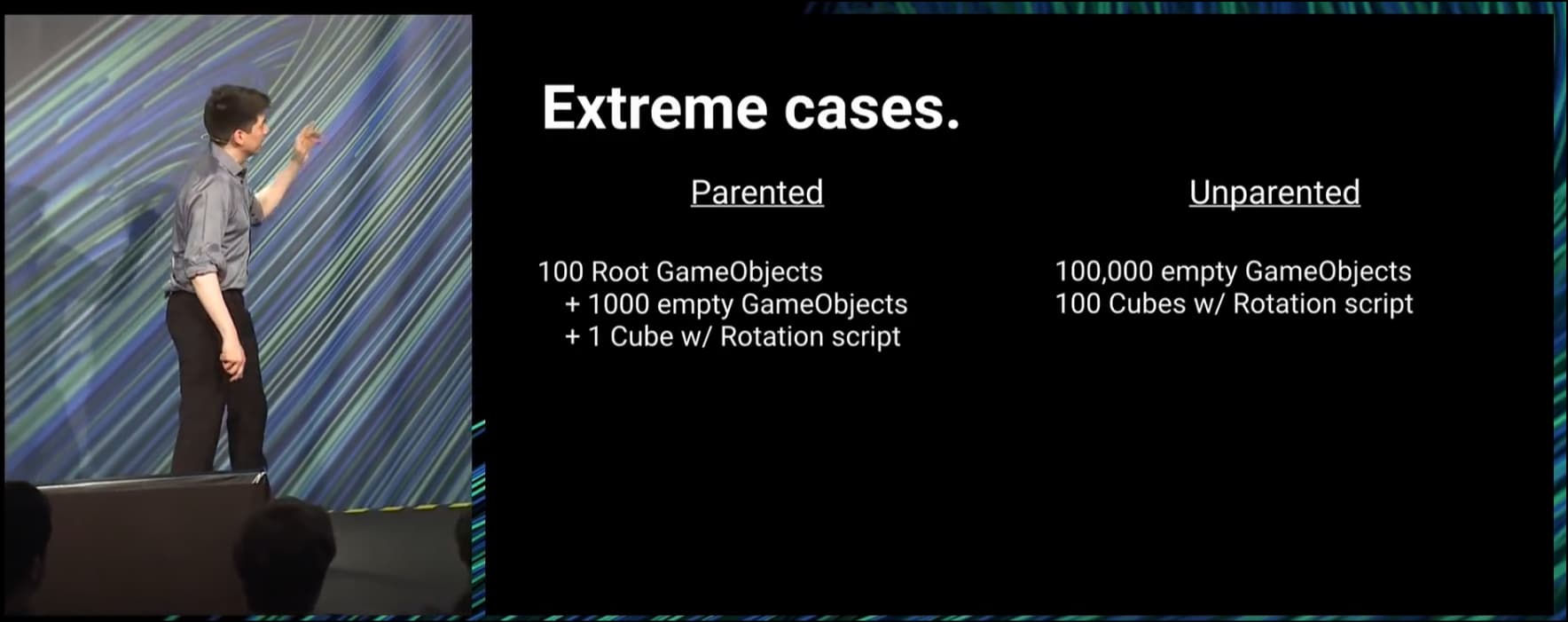
The speaker from this Ignite conference offers an interesting performance comparison. But no one asked him if he’d actually like to manage a game with 100,000 root game objects! (https://www.youtube.com/watch?v=W45-fsnPhJY&t=1214s):

Regardless, I am grateful that I have some control over the outcome here. Thank you for the helpful insights! :slight_smile:

1 Like

Yes! The box colliders share a single game node, but convex mesh colliders (when they exist) are associated to a transform. I couldn’t find a way to rotate mesh colliders at runtime without a transform. :frowning:

  • edited.

Ah. Yes, if you want to rotate or offset your mesh colliders relative to their parent, they’ll need a transform. For BoxColliders you can at least offset them directly in the BoxCollider component, though if you need to rotate them you’d face the same problem there.

1 Like

Hi, is there a simple example how to set up scripts to ‘unpack’ the folders when building the game?
Thanks in advance.

You could put something like this on your ‘folder’ GameObject:

public class UnpackOnStart : MonoBehaviour
{
    public void Start()
    {
        transform.DetachChildren();
    }
}
2 Likes