So how we went about it is like this.
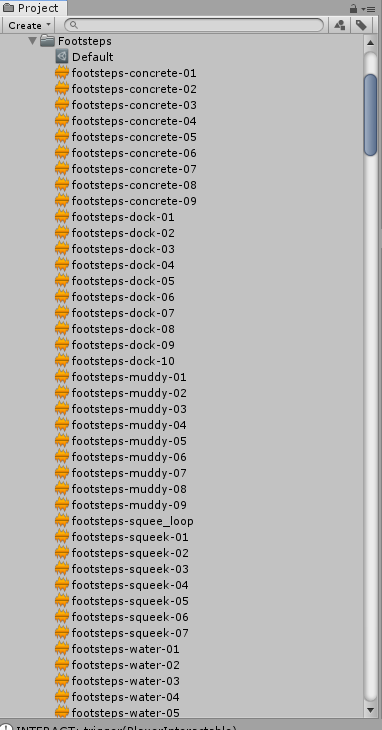
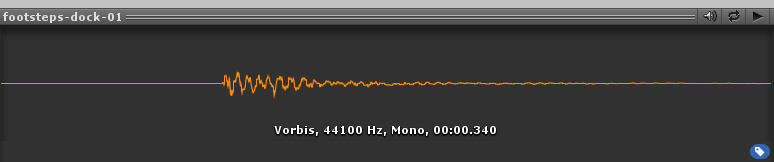
First we got a bunch of footstep recordings and we broke them apart into a single footstep per audio file. Like so:
As you can see each one is a single step:
Next we created a ScriptableObject to shove some audiosamples in to associate all the clips of a certain type together:
using UnityEngine;
using System.Collections.Generic;

using com.spacepuppy;
using com.spacepuppy.Utils;

namespace com.mansion.Entities.Audio
{

    [CreateAssetMenu(fileName = "FootstepAudioSamples", menuName = "Prototype Mansion/FootstepAudioSamples")]
    public class FootstepAudioSamples : ScriptableObject, IEnumerable<AudioClip>
    {

        #region Fields

        [SerializeField]
        [ReorderableArray]
        private AudioClip[] _clips;

        #endregion

        #region Properties

        public int Count { get { return _clips.Length; } }

        public AudioClip this[int index]
        {
            get { return _clips[index]; }
        }

        #endregion

        #region Methods

        public AudioClip PickRandom(IRandom rng = null)
        {
            return _clips.PickRandom(rng);
        }

        #endregion

        #region IEnumerable Interface

        public IEnumerator<AudioClip> GetEnumerator()
        {
            return (_clips as IEnumerable<AudioClip>).GetEnumerator();
        }

        System.Collections.IEnumerator System.Collections.IEnumerable.GetEnumerator()
        {
            return _clips.GetEnumerator();
        }

        #endregion

    }

}
So all of the “dock” footsteps together:
Then we have our FootstepAudioPlayer:
using UnityEngine;
using System.Collections.Generic;

using com.spacepuppy;
using com.spacepuppy.Utils;

using com.mansion.Entities.Actors;

namespace com.mansion.Entities.Audio
{

    public class FootstepAudioPlayer : SPComponent
    {

        #region Fields

        [SerializeField]
        private FootstepAudioSamples _defaultAudioSamples;
        [SerializeField]
        [DefaultFromSelf()]
        private AudioSource _audioSource;
        [SerializeField]
        private float _speedModifier = 1f;

        private float _speed;
        private float _t;

        private MobileEntity _entity;
        private MovementController _controller;

        #endregion

        #region CONSTRUCTOR

        protected override void Awake()
        {
            base.Awake();

            _entity = SPEntity.Pool.GetFromSource<MobileEntity>(this);
        }

        protected override void OnEnable()
        {
            base.OnEnable();

            _t = 0f;
        }

        #endregion

        #region Methods

        private void Update()
        {
            if (_entity != null && _entity.IsStalled(true)) return;
            //if (_controller == null) return;

            _t += Time.deltaTime * _entity.DesiredSpeed * _speedModifier;

            if (_t >= 1f)
            {
                _t = _t % 1f;

                var samples = FootstepAudioZone.ActiveSamples ?? _defaultAudioSamples;
                if (samples == null) return;

                var audio = samples.PickRandom();
                _audioSource.PlayOneShot(audio);
            }
        }

        #endregion

    }

}
This actually wires up the footstep clips to the audiosource and plays them at a frequence based on the players current speed.
Basically we get a reference to the “MobileEntity”, this is a script that just represents characters that can move. There is a property on it that is called “DesiredSpeed”, this is the current speed the character is attempting to walk at. It controls animation speeds, sfx speeds, etc… it may not actually be the real speed since say you walk into a wall we play a “pushing” animation or something where the players feet are moving, but the player isn’t actually moving. This property reflects the speed the player is attempting to move… hence DesiredSpeed.
Based on that, plus a speedmodifier (basically a tweakable value that corrects for the speed of the actual footstep audio track), we play a single foot step at some frequency.
You’ll not we use “PlayOneShot”:
So the nice thing about this method is that it allows your audioclip to overlap existing playing audioclips. Which is exactly what we want for our footsteps so we hear every step regardless of if it’s played when a step is already playing.
You will also notice there are “FootstepAudioZone” referenced in the script. That’s this:
using UnityEngine;
using System.Collections.Generic;

using com.spacepuppy;
using com.spacepuppy.Collections;
using com.spacepuppy.Utils;

namespace com.mansion.Entities.Audio
{

    public class FootstepAudioZone : CompoundTrigger
    {

        #region Multiton Interface

        private static HashSet<FootstepAudioZone> _zones = new HashSet<FootstepAudioZone>(ObjectInstanceIDEqualityComparer<FootstepAudioZone>.Default);
        private static HashSet<FootstepAudioZone> _activeZones = new HashSet<FootstepAudioZone>(ObjectInstanceIDEqualityComparer<FootstepAudioZone>.Default);

        public static FootstepAudioZone ActiveZone
        {
            get;
            private set;
        }

        public static FootstepAudioSamples ActiveSamples
        {
            get
            {
                if (ActiveZone != null)
                    return ActiveZone.Samples;
                else
                    return null;
            }
        }

        public static HashSet<FootstepAudioZone> Zones
        {
            get { return _zones; }
        }

        public static HashSet<FootstepAudioZone> ActiveZones
        {
            get { return _activeZones; }
        }

        #endregion

        #region Fields

        [SerializeField]
        private FootstepAudioSamples _samples;

        [SerializeField]
        private float _priority;

        [System.NonSerialized()]
        private IEntity _activeEntity;

        #endregion

        #region CONSTRUCTOR

        protected override void OnEnable()
        {
            base.OnEnable();

            _zones.Add(this);
        }

        protected override void OnDisable()
        {
            base.OnDisable();

            _zones.Remove(this);
            _activeZones.Remove(this);

            if (FootstepAudioZone.ActiveZone == this && !GameLoopEntry.ApplicationClosing)
            {
                var zone = GetHighestPriority();
                if (zone != null)
                {
                    FootstepAudioZone.ActiveZone = zone;
                }
                else
                {
                    var entity = (_activeEntity != null) ? _activeEntity : PlayerEntity.PlayerPool.Find(PlayerEntity.FindFirstPredicate);
                    if(entity != null)
                        EnableBestZone(entity);
                }
            }

            _activeEntity = null;
        }

        #endregion

        #region Properties

        public FootstepAudioSamples Samples
        {
            get { return _samples; }
        }

        #endregion

        #region Methods

        protected override void OnCompoundTriggerEnter(Collider other)
        {
            base.OnCompoundTriggerEnter(other);

            var e = SPEntity.Pool.GetFromSource<IEntity>(other);
            if (e == null) return;

            if (e.Type == IEntity.EntityType.Player || e.Type == IEntity.EntityType.UndeadPlayer)
            {
                _activeEntity = e;
                _activeZones.Add(this);

                var zone = GetHighestPriority();
                if (zone != null && FootstepAudioZone.ActiveZone != zone)
                {
                    FootstepAudioZone.ActiveZone = zone;
                }
            }
        }

        protected override void OnCompoundTriggerExit(Collider other)
        {
            base.OnCompoundTriggerExit(other);

            var e = SPEntity.Pool.GetFromSource<IEntity>(other);
            if (e == null) return;

            if (e.Type == IEntity.EntityType.Player || e.Type == IEntity.EntityType.UndeadPlayer)
            {
                if (e == _activeEntity)
                {
                    _activeEntity = null;
                    _activeZones.Remove(this);

                    if (FootstepAudioZone.ActiveZone == this)
                    {
                        FootstepAudioZone.ActiveZone = GetHighestPriority();
                    }
                }
            }
        }

        #endregion

        #region Static Interface

        public static void EnableBestZone(IEntity entity)
        {
            if (entity == null) throw new System.ArgumentNullException("entity");

            var zone = GetHighestPriority();
            if (zone != null)
            {
                FootstepAudioZone.ActiveZone = zone;
                return;
            }

            var e = FootstepAudioZone.Zones.GetEnumerator();
            zone = null;
            float dist = float.PositiveInfinity;
            while (e.MoveNext())
            {
                if (e.Current.enabled && e.Current.Samples != null)
                {
                    float d = (e.Current.transform.position - entity.transform.position).SetY(0f).sqrMagnitude;
                    if (d < dist)
                    {
                        zone = e.Current;
                        dist = d;
                    }
                }
            }

            FootstepAudioZone.ActiveZone = zone;
        }

        private static FootstepAudioZone GetHighestPriority()
        {
            if (_activeZones.Count == 0) return null;

            var e = _activeZones.GetEnumerator();
            FootstepAudioZone result = null;
            float p = float.NegativeInfinity;
            while (e.MoveNext())
            {
                if (e.Current.Samples != null && e.Current._priority > p)
                {
                    result = e.Current;
                    p = result._priority;
                }
            }
            return result;
        }

        #endregion

    }

}
So basically we can attach colliders to things in the world that “override” the default footstep audio.
So in that FootstepAudioPlayer we had the “_defaultAudioSamples”, that’s what plays if no override region is found. But if an override region is found, then those play instead.
So like in our game we have pools of blood that when you step on we play a “squishy” footstep. Or when you walk on a dock we play the wood plank “dock” footsteps. Sand gets sand, so on and so forth.
You can see this in the first minute of gameplay here in this playthrough someone posted of one of our games. You’ll notice the “dock” footsteps, and then they stop when they leave the dock and step on the sand:
You can also sort of hear the bloody steps at 3:50, though the player really only steps in the blood a little bit so you only get like 2 or 3 steps of “squish squish squish”.
My personal fave though is at the 31:00 minute mark where you play as Muriel and she has squeeky footsteps. Stupid little potato girl.