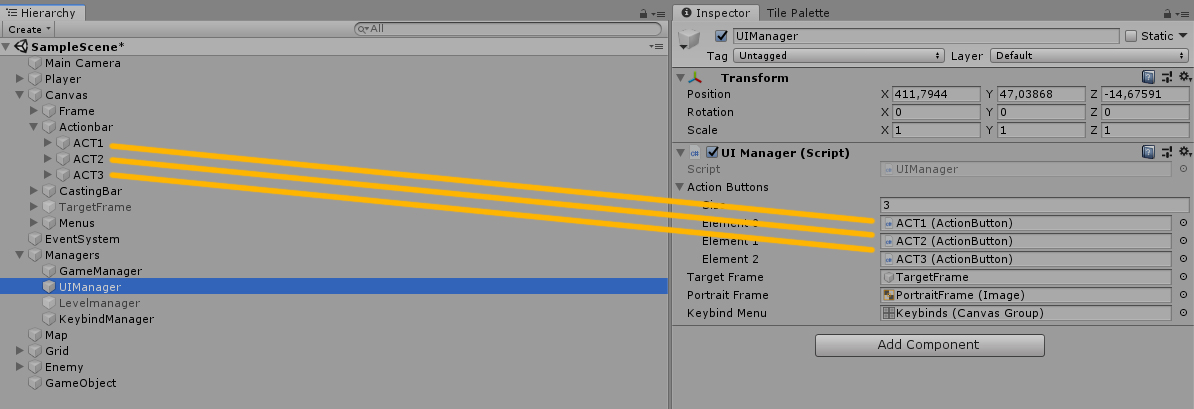
Good evening everyone, I’m a Unity beginner and I’m following a tutorial to learn how to create an RPG.
So far I have not had any problems, I have been able to execute the lessons successfully.
However, after completing step 9.2 without problems to, getting the same result as the teacher. I saved my project and rebooted Unity. When i open the project and play, a new error has been displayed on the console.
As I did the tutorial three times to make sure I had not made any mistakes, I was able to record a short video in which I complete the tutorial and restart Unity. WATCH
"
NullReferenceException: Object reference not set to an instance of an object
UIManager.SetUseable (ActionButton btn, IUseable useable) (at C:/Users/Mystic Rabbit/Desktop/GameMaker/RPG v9.1/RPG/Assets/Scripts/Managers/UIManager.cs:112)
UIManager.Start () (at C:/Users/Mystic Rabbit/Desktop/GameMaker/RPG v9.1/RPG/Assets/Scripts/Managers/UIManager.cs:54)
"
I’m leaving the youtube link with the exact step of the tutorial I’m having problem. This will make it easier to understand the situation. I am also leaving the script pointed out by the error, so that you can analyze.

Remember, I did every tutorial 9.2, until the last second, I got the same positive results as the teacher in the video, but after restarting the software, this error appeared on the console.
Since I got a positive result, I think it’s a problem with Unity. I also tried “Rebuild Solution” but I could not fix this error.
Please someone help me, as I said I’m a beginner, I’m taking my first steps and I can not do it alone 
using System;
using System.Collections;
using System.Collections.Generic;
using UnityEngine;
using UnityEngine.UI;

public class UIManager : MonoBehaviour
{
    private static UIManager instance;

    public static UIManager MyInstance
    {
        get
        {
            if (instance== null)
            {
                instance = FindObjectOfType<UIManager>();
            }

            return instance;
        }
    }

    /// <summary>
    /// A reference to all the action buttos
    /// </summary>
    [SerializeField]
    private ActionButton[] actionButtons;

    [SerializeField]
    private GameObject targetFrame;

    private Stat healthStat;

    [SerializeField]
    private Image portraitFrame;

    [SerializeField]
    private CanvasGroup keybindMenu;

    private GameObject[] keybindButtons;

    private void Awake()
    {
        keybindButtons = GameObject.FindGameObjectsWithTag("Keybind");
    }

    // Use this for initialization
    void Start()
    {

        healthStat = targetFrame.GetComponentInChildren<Stat>();

        SetUseable(actionButtons[0], SpellBook.MyInstance.GetSpell("Fireball"));
        SetUseable(actionButtons[1], SpellBook.MyInstance.GetSpell("Frostbolt"));
        SetUseable(actionButtons[2], SpellBook.MyInstance.GetSpell("Thunderbolt"));
    }

    // Update is called once per frame
    void Update()
    {
        if (Input.GetKeyDown(KeyCode.Escape))
        {
            OpenCloseMenu();
        }

    }

    public void ShowTargetFrame(NPC target)
    {
        targetFrame.SetActive(true);

        healthStat.initialized(target.MyHealth.MyCurrentValue, target.MyHealth.MyMaxValue);

        portraitFrame.sprite = target.MyPortrait;

        target.healthChanged += new HealthChanged(UpdateTargetFrame);

        target.characterRemoved += new CharacterRemoved(HideTargetFrame);
    }

    public void HideTargetFrame()
    {
        targetFrame.SetActive(false);
    }

    public void UpdateTargetFrame(float health)
    {
        healthStat.MyCurrentValue = health;
    }

    public void OpenCloseMenu()
    {
        keybindMenu.alpha = keybindMenu.alpha > 0 ? 0 : 1;
        keybindMenu.blocksRaycasts = keybindMenu.blocksRaycasts == true ? false : true;
        Time.timeScale = Time.timeScale > 0 ? 0 : 1;
    }

    public void UpdateKeyText(string key, KeyCode code)
    {
        Text tmp = Array.Find(keybindButtons, x => x.name == key).GetComponentInChildren<Text>();
        tmp.text = code.ToString();
    }

    public void CLickActionButton(string buttonName)
    {
        Array.Find(actionButtons, x => x.gameObject.name == buttonName).MyButton.onClick.Invoke();
    }

    public void SetUseable(ActionButton btn, IUseable useable)
    {
        btn.MyButton.image.sprite = useable.MyIcon;
        btn.MyButton.image.color = Color.white;
        btn.MyUseable = useable;
    }
}


 Edit: I guess you’d have instance a static member for that to work.