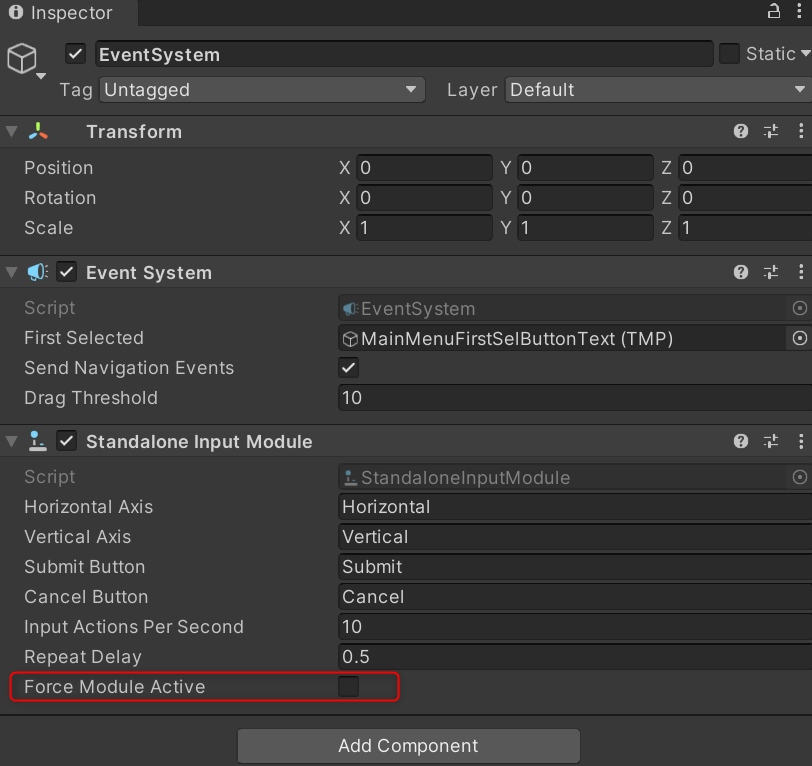
So, I’ve set up a basic main menu for my game using unity UI buttons and set the top-most button to be the ‘first selected’ in the EventSystem object.
When I run the scene in the game view, the first button is automatically selected as expected and the Xbox one controller is able to navigate the canvas correctly from the starting point. When I build the game targeting UWP (using D3D, and IL2CPP) and run it on my PC from Visual Studio, it works perfectly as well.
However when I deploy the game using the same settings to my Xbox One, the button I allocated as ‘first selected’ is no longer selected on startup, and without a starting point, my controller is unable to navigate the menu.
I’ve posted a question on unity answers about this and have had no replies, and I have found another identical question posted in September which also had no replies.
-
Unity UI doesn't seem to work with D3D IL2CPP on xbox one - Questions & Answers - Unity Discussions
-
http://answers.unity3d.com/questions/1239579/ui-buttons-on-xbox-uwp-not-selecting-first-selecte.html
I was hoping that someone could shed some light onto what’s possibly happening and what I might be able to do about this.
Thanks in advance!
EDIT : I am currently running Unity 5.4.1f1 Personal Edition, and any settings I haven’t mentioned in this post can be considered set to default values.