Unity Web Player update failed

Hello,
I understand that Unity Web Player is no longer supported, but right now it is impossible to run it even in IE.

Problem with 32-bit version (latest version from Unity website)
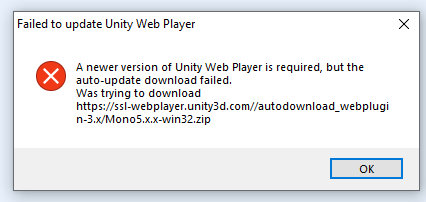
I am getting an error - a newer version of unity web player is required but the auto-update download failed. Unity web player is trying to download update from Unity website, but this url does not exists anymore. It would be great, if Unity can remove auto-update from latest 32-bit version.

There is also a problem with 64-bit in IE, it looks like that unity web player is not installed.

Like I said, I understand that Unity Web Player is not supported anymore, but it would be great, if you can at least remove auto-update from 32-bit, so some older project would be still playable. Or maybe just fix the url - https://ssl-webplayer.unity3d.com//autodownload_webplugin-3.x/Mono5.x.x-win32.zip

Thank you

4099621--358747--unity.jpg

Sorry to say, but we won’t be making any updates to the Webplayer since the support for it has run out quite a while ago.

Generally with the web player you’ll need to set up an older browser specifically for it, since for a variety of reasons it won’t work with most current browsers (and why support ended for it several years ago, and was replaced with WebGL).

After some digging I finally found, where are the issues.

  1. If you have website with https protocol, Unity is distributing file Mono5.x.x-win32.zip from ssl-webplayer.unity3d.com, instead of webplayer.unity3d.com.

I tested few ISPs with this url (https://ssl-webplayer.unity3d.com//autodownload_webplugin-3.x/Mono5.x.x-win32.zip) and some ISPs can download the file, but others return 404 error (maybe problem with CDN). It means some users can run unity web player, others can’t because of auto-update error.

But if have a website with unsecure http protocol, everything is working fine because file is distributed from webplayer.unity3d.com

  1. There is also second problem, if user is lucky and he can download the file from ssl-webplayer.unity3d.com, this file is outdated and it is not possible to run some games. I compared files downloaded from ssl-webplayer.unity3d.com and webplayer.unity3d.com - they are different.

Solution:

  • this should be easy to fix for you and you don’t need to change anything in Unity web player app, only on your servers. Fix downloading from ssl-webplayer.unity3d.com and update the file. You can use file from webplayer.unity3d.com
I know about this, we just created simple windows app which can run old Unity games. That’s the reason why I am still interested in Unity Web Player.

Нi I have this problem,pls help me :frowning:

i also have this problem pls help us