Unity3D GLSL geometry shader - minimal code for beginners

I am browsing Unity3D forum and I can see only geometry shader examples in Cg (HLSL).
So, I have written GLSL minimal version. Later I will include GLSL hull and domain shaders for tessellation.

Enable OpenGL in Unity3D → set -force-glcore parameter to editor executable, for instance: “C:\Program Files\Unity\Editor\Unity.exe” -force-glcore

Source:

//reference: http://www.geeks3d.com/20111111/simple-introduction-to-geometry-shaders-glsl-opengl-tutorial-part1/
//Minimal exercise. You should see blue color.
//Pass-through geometry shader sends the input primitives (a triangle) to the rasterizer without transformation.

Shader "Geometry Shader #01"
{
    SubShader
    {
        Pass
        {
            GLSLPROGRAM
           
            #ifdef VERTEX
                void main()
                {
                    gl_Position = gl_ModelViewProjectionMatrix*gl_Vertex;
                }
            #endif
           
            #ifdef GEOMETRY
                layout(triangles) in;
                layout(triangle_strip, max_vertices=3) out;
                void main()
                {
                    for(int i=0; i<3; i++)
                    {
                        gl_Position = gl_in[i].gl_Position;
                        EmitVertex();
                    }
                    EndPrimitive();
                }   
            #endif
                   
            #ifdef FRAGMENT
                out vec4 color;
                void main()
                {
                    color = vec4(0.0, 0.0, 1.0, 1.0);
                }
            #endif
           
            ENDGLSL
        }
    }
}

Just wanted to make sure you has seen this before going down this path…

So, there are situations when this may be useful :slight_smile:

Given that Metal does not support geometry shaders, and that geometry shaders should almost never be used because they are unbelievably slow, no, not really…

Now I am trying to make basic tessellation in GLSL. No errors, but shader looks bad.
I discovered that Unity3D GLSL shaders work properly with gl_Vertex but with tessellation I have to set minimum version 400. In this option, gl_Vertex is deprecated. Also trick with layout (location = 0) doesn’t work.

//reference: https://github.com/McNopper/OpenGL/tree/master/Example13/shader

Shader "Tessellation"
{
    SubShader
    {
        Pass
        {
            GLSLPROGRAM
            #version 400    

            #ifdef VERTEX        
                in vec4 position;   
                void main()
                {
                    gl_Position = gl_ModelViewProjectionMatrix*position;
                }
            #endif
           
            #ifdef HULL
                layout(vertices = 4) out;
                void main(void)
                {
                    gl_TessLevelOuter[0] = 4.0;
                    gl_TessLevelOuter[1] = 4.0;
                    gl_TessLevelOuter[2] = 4.0;
                    gl_TessLevelOuter[3] = 4.0;
                    gl_TessLevelInner[0] = 4.0;
                    gl_TessLevelInner[1] = 4.0;
                    gl_out[gl_InvocationID].gl_Position = gl_in[gl_InvocationID].gl_Position;
                }
            #endif
           
            #ifdef DOMAIN
                layout(quads) in;
                vec4 interpolate(in vec4 v0, in vec4 v1, in vec4 v2, in vec4 v3)
                {
                    vec4 a = mix(v0, v1, gl_TessCoord.x);
                    vec4 b = mix(v3, v2, gl_TessCoord.x);
                    return mix(a, b, gl_TessCoord.y);
                }
                void main()
                {   
                    gl_Position = interpolate(gl_in[0].gl_Position, gl_in[1].gl_Position, gl_in[2].gl_Position, gl_in[3].gl_Position);
                }
            #endif
           
            #ifdef GEOMETRY
                layout(triangles) in;
                layout(line_strip, max_vertices = 4) out;
                void main(void)
                {
                    for(int i = 0; i < gl_in.length(); ++i)
                    {
                        gl_Position = gl_in[i].gl_Position;
                        EmitVertex();
                    }
                    gl_Position = gl_in[0].gl_Position;
                    EmitVertex();   
                    EndPrimitive();
                }    
            #endif
                   
            #ifdef FRAGMENT
                out vec4 color;
                void main(void)
                {
                    color = vec4(1.0, 0.0, 0.0, 1.0);
                }
            #endif
           
            ENDGLSL
        }
    }
}

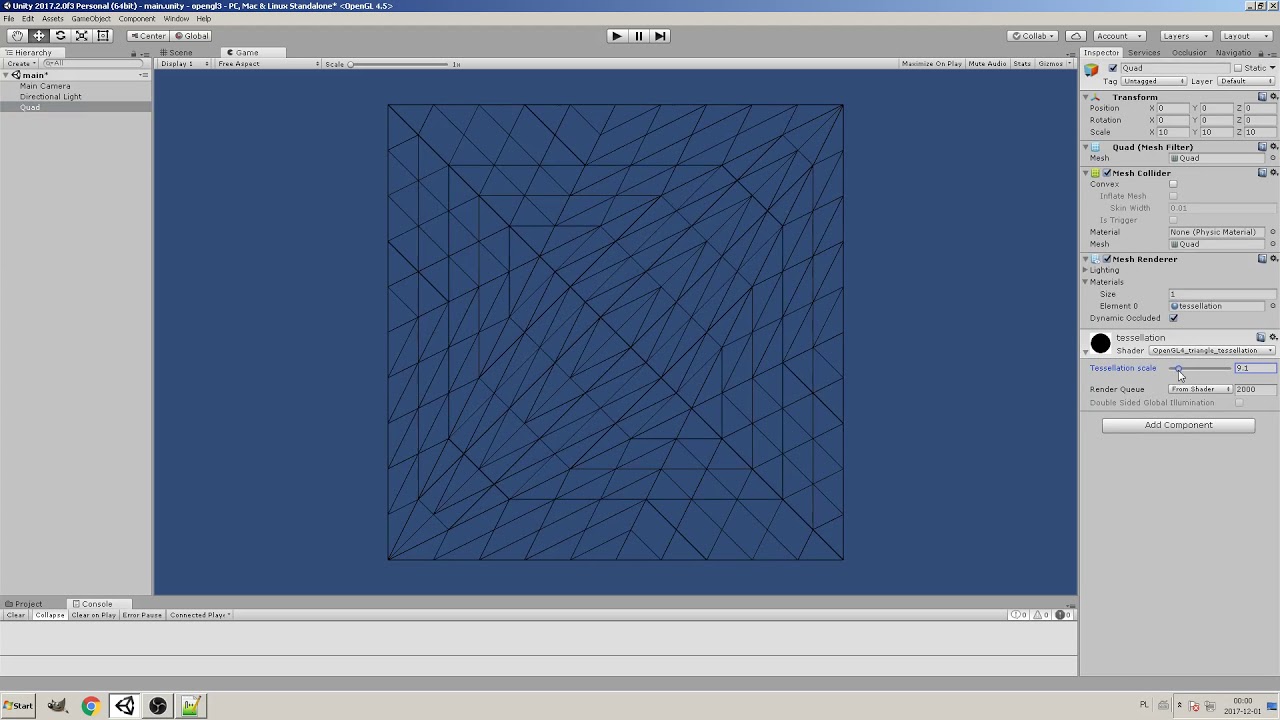
OpenGL 4.0 Tessellation and Geometry Shader example:

More info here:

/*references: http://in2gpu.com/2014/07/12/tessellation-tutorial-opengl-4-3/
http://catlikecoding.com/unity/tutorials/advanced-rendering/tessellation/
https://github.com/Unity-Technologies/HLSLcc */

Shader "OpenGL4_triangle_tessellation"
{
    Properties
    {
        _factor("Tessellation scale",Range(1.0,64.0)) = 4.0
    }
    SubShader
    {
        Pass
        {
            GLSLPROGRAM
            #version 400    
            uniform float _factor;
           
            #ifdef VERTEX
                in  vec4 in_POSITION0;
                void main()
                {
                    gl_Position =  gl_ModelViewProjectionMatrix * in_POSITION0;
                }
            #endif

            #ifdef HULL          //GLSL Tessellation Control Shader
                layout (vertices = 3) out;
                void main()
                {
                    if (gl_InvocationID == 0)
                    {
                        gl_TessLevelInner[0] = _factor;   //Inside tessellation factor
                        gl_TessLevelOuter[0] = _factor;   //Edge tessellation factor
                        gl_TessLevelOuter[1] = _factor;   //Edge tessellation factor
                        gl_TessLevelOuter[2] = _factor;   //Edge tessellation factor
                    }
                    gl_out[gl_InvocationID].gl_Position = gl_in[gl_InvocationID].gl_Position;
                }
            #endif

            #ifdef DOMAIN        //GLSL Tessellation Evaluation Shader
                layout (triangles, equal_spacing, cw) in;
                void main()
                {
                    gl_Position=(gl_TessCoord.x*gl_in[0].gl_Position+gl_TessCoord.y*gl_in[1].gl_Position+gl_TessCoord.z*gl_in[2].gl_Position);
                }
            #endif

            #ifdef GEOMETRY      //geometry shader for rendering wireframe
                layout(triangles) in;
                layout(line_strip, max_vertices = 3) out;
                void main()
                {
                    for(int i = 0; i < gl_in.length(); ++i)
                    {
                        gl_Position = gl_in[i].gl_Position;
                        EmitVertex();
                    }
                    gl_Position = gl_in[0].gl_Position;
                    EmitVertex(); 
                    EndPrimitive();
                }   
            #endif
                  
            #ifdef FRAGMENT
                out vec4 color;
                void main()
                {
                    color = vec4(0.0, 0.0, 0.0, 1.0);
                }
            #endif
          
            ENDGLSL
            }
    }
}