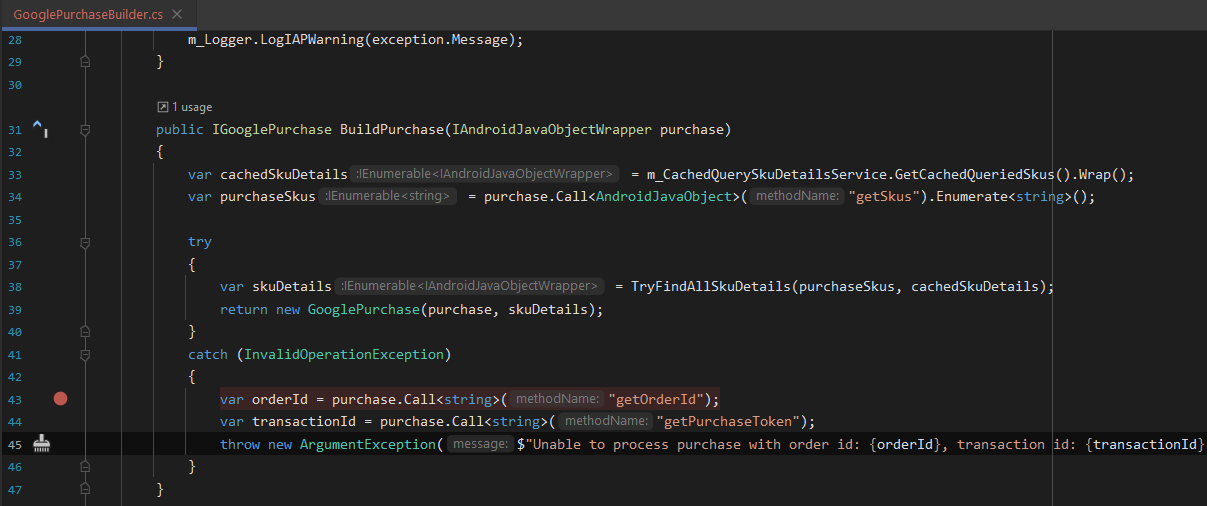
Upon digging around the code, I found that the warning message originated in GooglePurchaseBuilder.cs BuildPurchase()
I wanted to use the information from the warning logs to cross reference in Google Play Console to see if the product linked to the User Purchase that triggered this message was still valid and available to be purchased
However, it seems that Google Play Console only allows searches on User Purchases using orderId and the transactionId printed out in the console message appears to be the Google PurchaseToken instead and there seems to be no way to map back the PurchaseToken to the orderId
Hence I would like to ask if it will be possible for Unity IAP to add the orderId into the console message printed out as well to aid in my debugging of user IAP purchases
Thanks for sharing your feature suggestion, on the surface it sounds like an excellent idea, however I’m not 100% certain if we have access to the Order ID at that precise moment, I will need to check, if not we might be able to log the product id the transaction id was associated with. I will double check and file a feature request accordingly.
Some other checks and logging that might be very relevant in this type of scenario.
Check the player is online
Check the bundleID matches the one in your Google Play Store configuration
Two other workarounds, that might be of interest to you
The product id, order id and transaction id (purchase token) are all available in the PurchaseEventArgs object when the original purchase is made, should you want to record this data for later checks.
If you are using UGS Analytics on your project, you will be able to query your data in the SQL Data Explorer tool to find the details of the original transaction if you know either the transaction id or the order id. The details are within the transactionReceipt field of the transaction analytics event.
e.g.
select * from events
where event_name = 'transaction'
and event_json:transactionID::STRING = '<your transaction id>';
TIP > You should also try to add additional criteria to filter by user_id and date range if you know them, to make the query run more efficiently.
Unfortunately, we aren’t using UGS Analytics on our project and the first workaround doesn’t really cover the case where a user directly purchases subscriptions from the PlayStore, bypassing the app and all logs
But I’ve managed to solve my initial problem by modifying the UnityPurchasing Package to include the orderId alongside the purchaseToken in the error message and using them to track down the exact Google IAP Product that triggered the error
I’m pleased to hear that you found a workaround. I can also confirm that we are planning to update the error messge on the next release of the IAP Package. I can’t confirm exactly when that will be yet though.
Thanks for helping to raise awareness and find a solution.