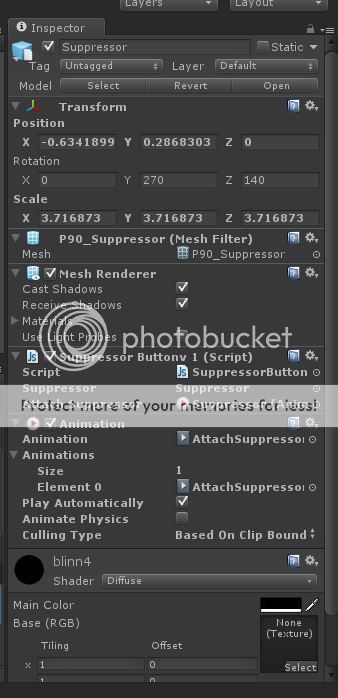
Im having problems getting a script to create a button then play the animation when it is pressed. So far this is what i have an im getting a console error Assets/MyScripts/SuppressorButton.js(17,1): BCE0044: expecting }, found ‘’. This is what i have so far the model is called Suppressor and im draging that onto the var in inspector and i added
var AttachSuppressor = Suppressor.GetComponent(Animation);
because it wasnt finding the animation on the model. Thanks D
var Suppressor : GameObject;
var AttachSuppressor = Suppressor.GetComponent(Animation);

function OnGUI()


	{
	//Button 1
	if(GUI.Button (Rect(0,0,200,100), "Suppressor"));
	}

	//Once the button is clicked, do the following code.
	{
	Suppressor.animation.Play("AttachSuppressor", PlayMode.StopAll):
	}
var Suppressor : GameObject;
var AttachSuppressor : Animation;

function Start() {
	AttachSuppressor = Suppressor.GetComponent(Animation);
}

function OnGUI() {
	//Button 1
	if(GUI.Button (Rect(0,0,200,100), "Suppressor")) {
		Suppressor.animation.Play("AttachSuppressor", PlayMode.StopAll):
	}
}
untested, but I think this is what you’re looking for 
Thanks im trying it now and getting this in console
The AnimationClip ‘AttachSuppressor’ used by the Animation component ‘Suppressor’ must be marked as Legacy.
UnityEngine.Animation:Play(String, PlayMode)
SuppressorButtonv1:OnGUI() (at Assets/MyScripts/SuppressorButtonv1.js:21)
The animation state AttachSuppressor could not be played because it couldn’t be found!
Please attach an animation clip with the name ‘AttachSuppressor’ or call this function only for existing animations.
UnityEngine.Animation:Play(String, PlayMode)
SuppressorButtonv1:OnGUI() (at Assets/MyScripts/SuppressorButtonv1.js:21)
This is how my inspector of the gameobject.
In that case it’s as easy as calling animation.Play from your script
function OnGUI() {
	//Button 1
	if(GUI.Button (Rect(0,0,200,100), "Suppressor")) {
		animation.Play("AttachSuppressor", PlayMode.StopAll):
	}
}
That’s all you need then (no GameObject references etc)
Ive just tried that but i am still getting the same error code but on line 4, it dosnt look like it is finding the animation, or i have the settings wrong on the animation some where.
This Error was pretty clear: “The AnimationClip ‘AttachSuppressor’ used by the Animation component ‘Suppressor’ must be marked as Legacy.”
On the asset you’re importing, select the “Rig” tab, and set “Animation Type” to “Legacy”, hope that helps
Thanks ive got that working great. I also want a button to play the animation on the first press and then on the second play the animation in reverse. This is what i have so far but having some problems.
var Attachment : GameObject;

 function OnGUI()
 {

    //Button 1

    if(GUI.Button (Rect(1060,0,200,100), "Explode View"))

    {
    		if (animation.time) = 0.0);
    		{
    			animation.Play();
    		}
    }
    {

            if (animation.time < 0.0);
            {
                animatio.Play();
                animation.speed = -1.0;
            }


    }
}