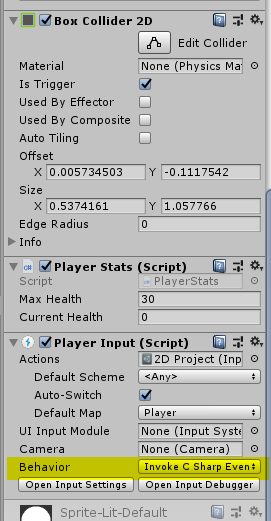
Hi,
I am using the new input system which has simplified alot of my scripts.
Im trying to make an attack in my game, where if the player holds down spacebar for 3 or more seconds, their attack will increase and do more damage (heavy attack) once they let go of space bar. If they let go of spacebar before 3 seconds, they do a weaker (light attack)
I have set up my Input Actions to have an Attack action with the Space key having a hold of 3 (i assume this means 3 seconds)
In case you are using PlayerInput: ATM you will need to use the “Invoke Unity Events” or “Invoke CSharp Events” behavior. The SendMessages/BroadcastMessages uses a simplified callback model where you don’t get all the callbacks.
As for the code:
void OnAttack(InputAction.CallbackContext context)
{
    switch (context.phase)
    {
        case InputActionPhase.Started:
            /* the space key was pressed */
            break;

        case InputActionPhase.Performed:
            /* the space key was held for 3 seconds */
            break;

        case InputActionPhase.Canceled:
            /* the space key was released; if there was no 'Performed', it was released before 3 seconds were up */
            break;
    }
}
Then I added the following code my playerController.cs script
    void OnAttack(InputAction.CallbackContext context)
    {
        switch (context.phase)
        {
            case InputActionPhase.Started:
                /* the space key was pressed */
                Debug.Log("the space key was pressed");
                break;

            case InputActionPhase.Performed:
                /* the space key was held for 3 seconds */
                Debug.Log("the space key was held for 3 seconds");
                break;

            case InputActionPhase.Canceled:
                /* the space key was released; if there was no 'Performed', it was released before 3 seconds were up */
                Debug.Log("the space key was released; if there was no 'Performed', it was released before 3 seconds were up");
                break;
        }
    }
However, unity does seem to pick up that I am pressing space.
Set it to “Invoke Unity Events”. The C# events require explicitly hooking into the event from code.
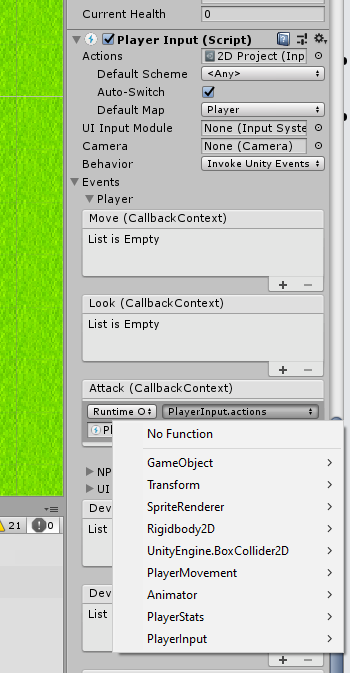
With “Invoke Unity Events”, there will be an “Events” foldout in the PlayerInput inspector. Unfold it and hook up the event for your action to the method you want called.
Unity events allow you to drag a reference to an object in there and then select a method to invoke on one of the components of the object when the event is triggered.
Drag the GameObject that has the playerController.cs script on it into the field that says “None (O…”. The dropdown that says “No Function” will become enabled. Open it, go into your playerController component and select the OnAttack method. No you’ve established that when the “Attack” event triggers, your OnAttack method will be called.
So i dragged the “Player” object that has the playerMovement.cs attached to it into the Player Input Script but I can’t find my OnAttack method in any of the dropdown boxes that it provides in the screenshot below: