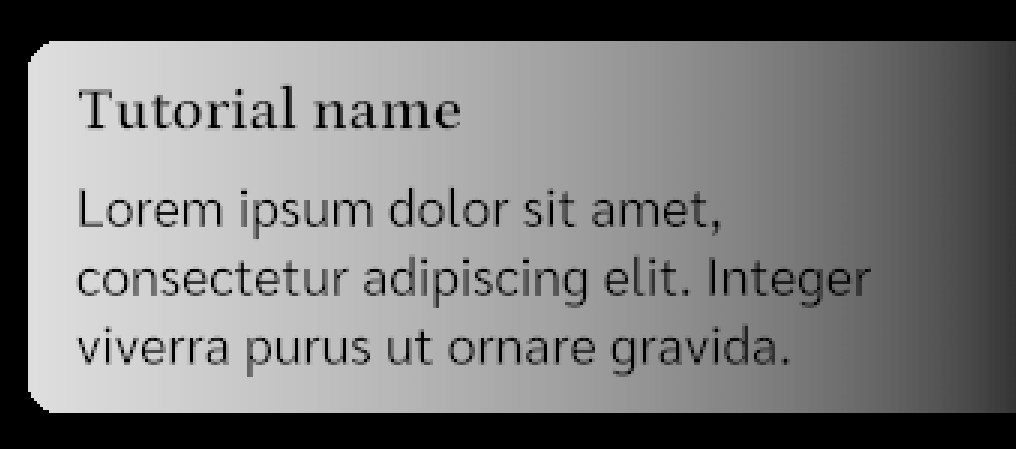
If it is useful to someone.
Here is a more advanced version, where you can specify the number of colors, direction, intensity, but it only works through code.
Definitely works in Unity 6, I did not look at earlier versions.
using System.Collections.Generic;
using UnityEngine;
using UnityEngine.UIElements;
public struct GradientStop {
public readonly Color Color;
public readonly float Location;
public GradientStop(Color color, float location) {
Color = color;
Location = location;
}
}
/// <summary>
/// Gradient fill
/// </summary>
/// <example>
/// Example of use:
/// <code>
/// var gradient = new GradientVisualElement(
/// stops: new List<GradientStop> {
/// new GradientStop(Color.white, 0.0f),
/// new GradientStop(Color.black, 1.0f)
/// },
/// startPoint: new Vector2(0.0f, 0.0f),
/// endPoint: new Vector2(1.0f, 1.0f)
/// ) {
/// style = {
/// position = Position.Absolute,
/// left = 0, top = 0,
/// bottom = 0, right = 0
/// }
/// };
/// _content.Add(gradient);
/// </code>
/// </example>
public class GradientVisualElement : VisualElement {
// MARK: Piblic
// List of gradient stops
public List<GradientStop> Stops;
// Starting point of the gradient in unit space (0-1)
public Vector2 StartPoint;
// Ending point of the gradient in unit space (0-1)
public Vector2 EndPoint;
// MARK: Private
private static readonly Vertex[] KVertices = new Vertex[4];
private static readonly ushort[] KIndices = { 0, 1, 2, 2, 3, 0 };
// MARK: Life cycle
public GradientVisualElement(List<GradientStop> stops, Vector2 startPoint, Vector2 endPoint) {
Stops = stops ?? new List<GradientStop>();
StartPoint = startPoint;
EndPoint = endPoint;
generateVisualContent += OnGenerateVisualContent;
}
// Empty constructor for cases where parameters are set later
public GradientVisualElement() {
Stops = new List<GradientStop>();
StartPoint = new Vector2(0, 0);
EndPoint = new Vector2(1, 1);
generateVisualContent += OnGenerateVisualContent;
}
// MARK: Private funcs
private void OnGenerateVisualContent(MeshGenerationContext mgc) {
var rect = contentRect;
if (rect.width < 0.01f || rect.height < 0.01f)
// Skip rendering if size is too small
return;
// Convert startPoint and endPoint from unit space to rectangle coordinates
var start = new Vector2(StartPoint.x * rect.width, StartPoint.y * rect.height);
var end = new Vector2(EndPoint.x * rect.width, EndPoint.y * rect.height);
var dir = end - start;
// Positions of the vertices of the rectangle
var positions = new [] {
// Bottom left
new Vector2(0, rect.height),
// Top left
new Vector2(0, 0),
// Top right
new Vector2(rect.width, 0),
// Bottom right
new Vector2(rect.width, rect.height)
};
// If the gradient direction is zero, we set one color
if (dir.sqrMagnitude < 0.0001f) {
var color = Stops.Count > 0 ? Stops[0].Color : Color.clear;
for (var index = 0; index < KVertices.Length; index++) {
KVertices[index].tint = color;
}
}
else {
// Calculate colors for each vertex
for (var index = 0; index < KVertices.Length; index++) {
var p = positions[index];
var toP = p - start;
var t = Vector2.Dot(toP, dir) / Vector2.Dot(dir, dir);
t = Mathf.Clamp01(t); // We limit `t` in the range [0,1]
KVertices[index].tint = GetColorAt(t);
}
}
// Set the positions of the vertices
KVertices[0].position = new Vector3(0, rect.height, Vertex.nearZ);
KVertices[1].position = new Vector3(0, 0, Vertex.nearZ);
KVertices[2].position = new Vector3(rect.width, 0, Vertex.nearZ);
KVertices[3].position = new Vector3(rect.width, rect.height, Vertex.nearZ);
var meshWriteData = mgc.Allocate(vertexCount: KVertices.Length, indexCount: KIndices.Length);
meshWriteData.SetAllVertices(KVertices);
meshWriteData.SetAllIndices(KIndices);
}
// Method for calculating color based on parameter `t`
private Color GetColorAt(float t) {
if (Stops.Count == 0) return Color.clear;
if (Stops.Count == 1) return Stops[0].Color;
// We assume that stops are sorted by location
for (var index = 0; index < Stops.Count - 1; index++) {
if (!(t >= Stops[index].Location) || !(t <= Stops[index + 1].Location))
continue;
var u = (t - Stops[index].Location) / (Stops[index + 1].Location - Stops[index].Location);
return Color.Lerp(Stops[index].Color, Stops[index + 1].Color, u);
}
// If t is less than the first or greater than the last stop
if (t < Stops[0].Location) return Stops[0].Color;
if (t > Stops[^1].Location) return Stops[^1].Color;
return Color.clear; // На всякий случай
}
}
/// <summary>
/// Container with gradient fill and support for standard VisualElement styles (borders, rounding, etc.).
/// </summary>
/// <example>
/// Example of use:
/// <code>
/// var gradient = new GradientVisualElement(
/// stops: new List<GradientStop> {
/// new GradientStop(Color.white, 0.0f),
/// new GradientStop(Color.black, 1.0f)
/// },
/// startPoint: new Vector2(0.0f, 0.0f),
/// endPoint: new Vector2(1.0f, 1.0f)
/// );
///
/// var gradientContainer = new GradientContainer(gradientElement: gradient) {
/// style = {
/// position = Position.Absolute,
/// left = 0,
/// top = 0,
/// bottom = 0,
/// right = 0,
/// borderTopLeftRadius = 16f,
/// borderTopRightRadius = 16f,
/// borderBottomLeftRadius = 16f,
/// borderBottomRightRadius = 16f,
/// }
/// };
///
/// _content.Add(gradientContainer);
/// </code>
/// </example>
public class GradientContainer : VisualElement {
private readonly GradientVisualElement _gradientElement;
public GradientContainer(GradientVisualElement gradientElement) {
_gradientElement = gradientElement;
gradientElement.style.position = Position.Absolute;
gradientElement.style.left = 0f;
gradientElement.style.top = 0f;
gradientElement.style.right = 0f;
gradientElement.style.bottom = 0f;
gradientElement.pickingMode = PickingMode.Ignore;
style.overflow = Overflow.Hidden;
Add(gradientElement);
}
public List<GradientStop> Stops {
get => _gradientElement.Stops;
set => _gradientElement.Stops = value;
}
public Vector2 StartPoint {
get => _gradientElement.StartPoint;
set => _gradientElement.StartPoint = value;
}
public Vector2 EndPoint {
get => _gradientElement.EndPoint;
set => _gradientElement.EndPoint = value;
}
}
example
// If you only need a gradient without other styles, you can use only GradientVisualElement. If you need other styles, like border, it is better to use GradientContainer
var gradient = new GradientVisualElement(
    stops: new List<GradientStop> {
        new GradientStop(Color.white, 0.0f),
        new GradientStop(Color.black, 1.0f)
    },
    startPoint: new Vector2(0.0f, 0.5f),
    endPoint: new Vector2(1.0f, 0.5f)
){
    style = {
        position = Position.Absolute,
        left = 0f, top = 0f,
        right = 0f,bottom = 0f
    }
};

// OR `_content. Add(gradient);`
_content.Insert(index: 0, element: gradient);