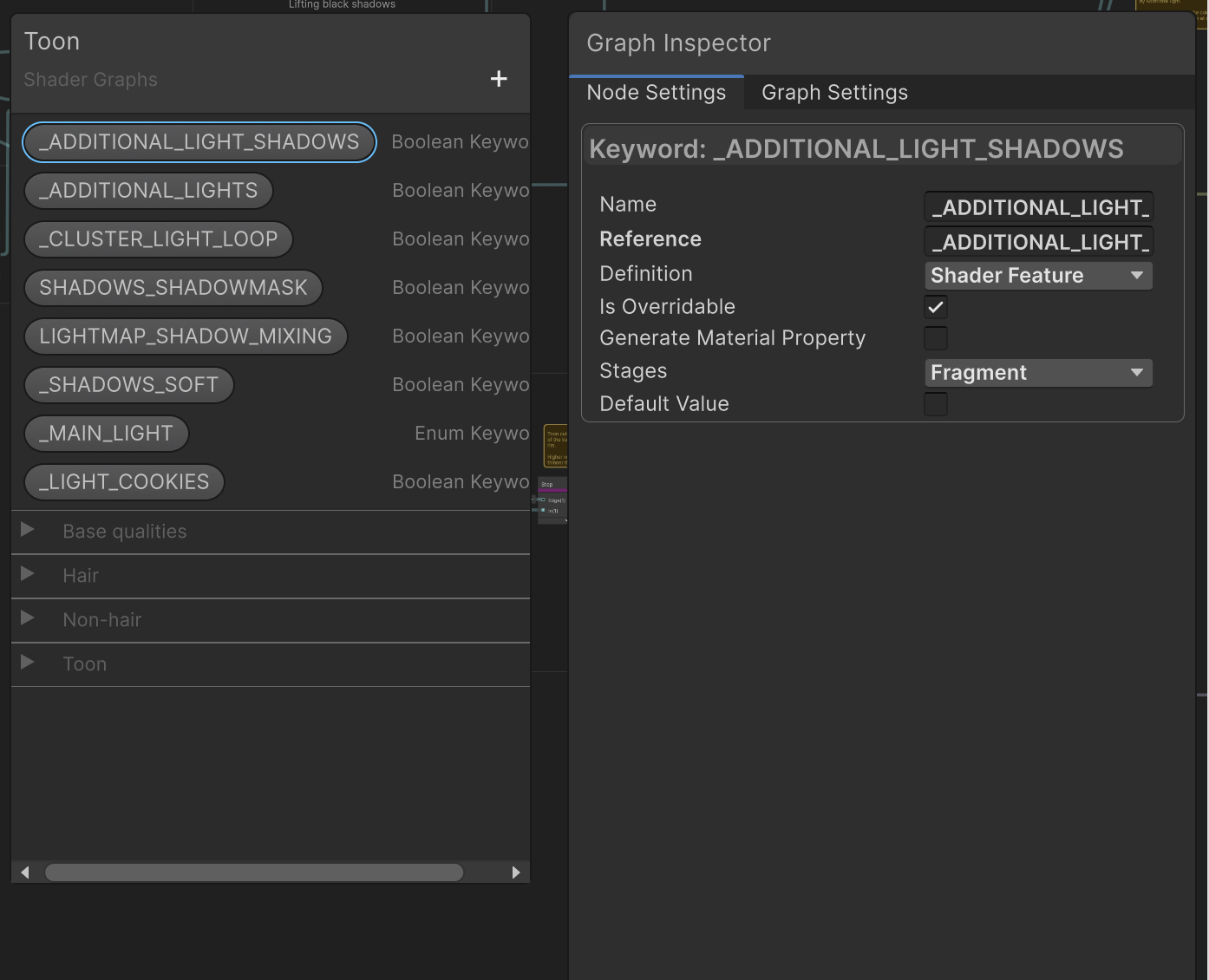
Hi, I’m working on a toon shader made in Shader Graph. The graph is Unlit, but then it defines a bunch of keywords to achieve lit graphic features (light cookies, additional lights contribution, etc.)
The keywords are used in a bunch of functions powering custom HLSL nodes.
These are the keywords I currently have:
All of them are set with the settings on the right: Shader Feature, Is Overridable set to true, Generate Material Property set to false.
So far, everything worked fine. But since Unity 6.1, I receive an error: Variant limit exceeded. Graph is generating too many variants. I can get rid of it by raising the allowed variants number in Project Settings, but I’d rather fix it once and for all.
If I bring the limit down the shader doesn’t break in the scene, but it does in the graph. If I then save the graph, the shader in the scene becomes pink too.
I thought that all these keywords, being existing ones, were treated as global, and that variants would only be generated based on which graphics settings are used in the project. But it seems that the issue here is the Shader Graph preview? I don’t know how to remove variants in the graph alone.
Thanks in advance for any help to get clarity on this.
Btw, this is what I see when I build:
Compiling shader "Shader Graphs/Toon" pass "Universal Forward" (vp)
    Full variant space:         256
    After settings filtering:   64
    After built-in stripping:   4
    After scriptable stripping: 4
    Processed in 0.67 seconds
    starting compilation...
    finished in 0.10 seconds. Local cache hits 0 (0.00s CPU time), remote cache hits 0 (0.00s CPU time), compiled 4 variants (0.34s CPU time), skipped 0 variants
Compiling shader "Shader Graphs/Toon" pass "Universal Forward" (fp)
    Full variant space:         16384
    After settings filtering:   4096
    After built-in stripping:   256
    After scriptable stripping: 256
    Processed in 0.00 seconds
    starting compilation...
    finished in 7.90 seconds. Local cache hits 0 (0.00s CPU time), remote cache hits 0 (0.00s CPU time), compiled 97 variants (76.33s CPU time), skipped 159 variants
But again, my issue is while I work in the graph.
Bump. Does anyone have thoughts on this?
I have the same problem, any luck solving it
When creating a new Unity project from one of the templates in the Hub, the default Shader Graph variant limit is set to 128. This value is too low and results in the error you’re seeing. We are working on getting the default value increased in the templates so new projects won’t have this issue. In the mean time, it is perfectly fine and acceptable to increase the value to fix the error. You need to increase the value in the Project Settings and also in the Preferences.
3 Likes
Thanks Ben. This is the most unlikely answer, but also a good solution for me 
1 Like