I’m doing some R&D with the WebGL pipeline. I’ve set up a simple scene with a video player streaming a video and rendering to a render texture. I also have a quad in the scene with a material rendering the render texture.
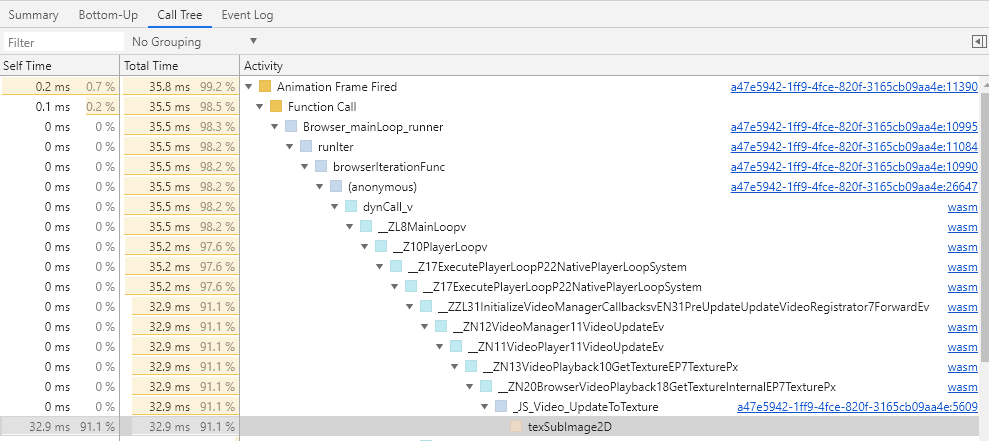
This all works, but I noticed some pretty bad performance on the texSubImage2D step in Google Chrome.
In comparison Firefox and Edge perform very smooth.
I’m conscious this may not be a “Unity” issue, but more of a browser implementation issue, unfortunately I can’t find much towards a solution on Google’s bug tracking board. One link I found that may be pertinent: https://bugs.chromium.org/p/chromium/issues/detail?id=612542
So my question is: is there a recommended method I can use in Unity that get’s past this performance hit on chrome?
Do you really need to use a render texture?
You can get the original video texture through code so you don’t need to have a render texture as “bridge” between them.
This is a example of how you can do this:
//Sets a object to use the video as a texture
targetImage.texture = videoPlayer.texture;

//Note that by doing this, you will need to manually adjust sizes to keep the video aspect ratio if needed
I imagine you’re talking about a RawImage component, I’ve just tried it, and seen no difference.
I also made sure the video player’s Render mode was set to API Only.
In fact, I’ve even removed any code to read the video player’s texture, meaning I can’t see the result of the video, but as soon as I trigger Play, I see the framerate drop and upon profiling the frames I can still see this texSubImage2D call taking around 30ms. Although upon closer inspection the 30ms seems to be increased by the Chrome’s profiling tool.
Still, if I add a fps counter, I’m not getting a great framerate:
1 video playing:
2 videos playing:
(note that this avg number is over a long period of time, and thus isn’t representative of the video playing testing period)
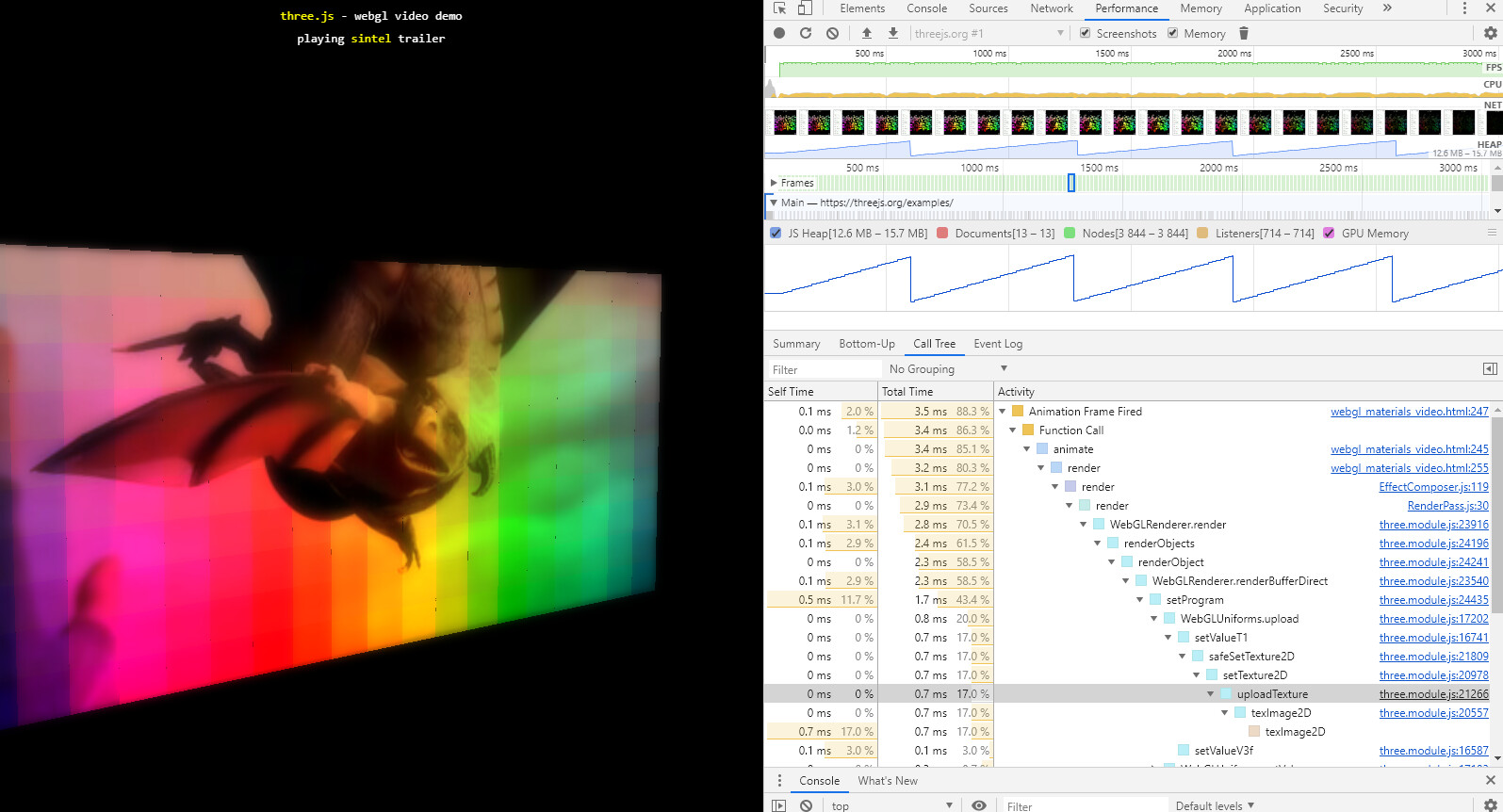
An update on this thread, I had a look at the performance of video render to image in other WebGL examples in Chrome and noticed this example performing really well, amongst others: https://threejs.org/examples/#webgl_materials_video
Which makes me think it’s not “Chrome’s implementation at fault”, but rather how Unity has implemented the video to texture step.
However I noticed that both these video other players (threeJS & PixiJS) end up with a “texImage2D” call instead of a “texSubImage2D”, and wonder if this is relevant to the performance difference?
Any chance you might be able to modify the build output to use texImage2D() instead of texSubImage2D() and compare how that behaves?
The trouble with these two functions is that different GL driver vendors and different browsers optimize them differently, resulting in different performance characteristics. Some vendors state that texSubImage2D() is the preferred path since it hints the driver that reallocation of texture resources is not desired (upload over to existing resource), others say that texImage2D() is the preferred path since it hints the driver that the old resource is no longer needed. I recall asking a few years ago from Qualcomm reps at GDC booth, who suggested back then that manually double-buffering texSubImage2D() and bufferSubData() calls would be the fast path, so there is variance there. Layering browsers on top can make this even more complex behavior wise.
If it looks like texImage2D() calls are faster on Firefox and Chrome (and preferably also in some Safari scenario), definitely we should migrate to using that instead. If texImage2D() slows down some browsers, then it becomes a bit more difficult, may need to do different paths on different browsers…
I also encountered this problem in Chrome when using texSubImage2D() to upload a texture from a HTML video element.
A potential solution is creating the texture in WebGL with createTexture() and use texImage2D(), instead of passing a reference from a Unity texture. Then on the Unity side you can use Texture2D.CreateExternalTexture to get the texture into Unity and attach it to a material or do whatever you want with it. However, I can’t find any documentation on how to get the native texture pointer in WebGL.
Does anybody have any idea how to get a native texture pointer in WebGL?
where texId is some integer ID where the texture lives. You have to make sure that it’s not already used by another texture.
Then at the Unity side you can do something like this:
Texture texture = Texture2D.CreateExternalTexture(width, height, TextureFormat.RGBA32, false, false, new System.IntPtr(texId));
Now we can use gl.texImage2D instead of gl.texSubImage2D to update the texture in WebGL which is way faster in Chrome(ium) and slightly faster in Firefox.
Does this still work? I have been trying to use JavaScript to create a texture and then point to it from Unity side for a while now. The code runs and the video is displayed, but I can still see texSubImage2D being called in chromium performance window and still observe around 10-12 fps on our target device (Raspberry Pi 4B , WebGL build, Chromium, 720p), meanwhile examples like this : https://threejs.org/examples/?q=video#webxr_vr_video run fine (so does Youtube at 1080p).