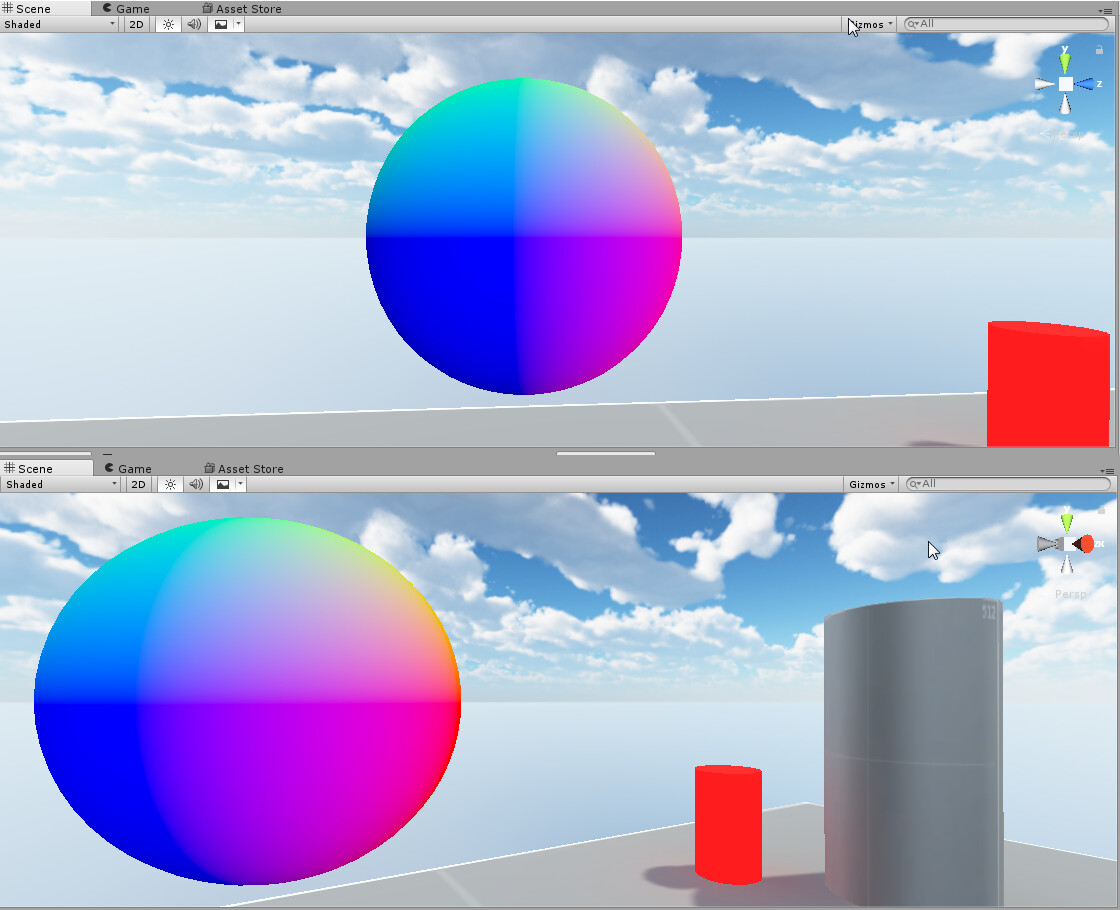
Is there a way to modify View-Space surface normals so that they don’t look different when the camera is rotated in place? Below you can see that the normals look as expected when centered on the screen but when the camera is rotated (but not translated!) the normals change.
View space means camera relative, not perspective relative. It’s “changing” with the movement of the camera because the normal directions match the camera’s orientation, ie blue is the cameras forward vector, green is the cameras up vector, etc.
Here’s some code that should get you what you want.
This almost seems right. The only problem now is that the X/Y components will flip signs when I do a 180 degree rotation of the camera around the sphere mesh around the X or Y axis respectively. Seems like this shouldn’t happen if it’s relative to the camera?
Yep, the code I posted is a bit of a hack, so it doesn’t surprise me if it falls down like that. The resulting “perspective corrected normal” is more a guess than the correct way to do this. The corrected method would require some either a few basic if statements, or two more cross() calls, or using an inverse transform projection matrix (which Unity doesn’t supply to the shader and would be relatively expensive to calculate, though possible).
It turns out it was a problem in my shader. I am writing my shader in Shader Forge and my viewDir was being calculated incorrectly. I was calculating it by taking the world position and transforming it into view space.
Since Shader Forge forced me to work in the fragment function I had to get it with i.posWorld.rgb-_WorldSpaceCameraPos instead.
UPDATE:
It looks like with flat faces I get this unwanted result where the entire surface of a face has different normals even though they should all be the same:
Because it was written with the intent to be used with a “Matcap” shader, so that data didn’t need to be calculated or transferred.
UNITY_MATRIX_IT_MV is the “correct” way to calculate the view normal from the model’s vertex normal. I say that in quotes because I do a lot of stuff for Single Pass Stereo VR, and in that case the UNITY_MATRIX_IT_MV is calculated in the shader from the transpose of the world to object transform and inverse view matrix, my code is algebraically identical and faster. Otherwise you could just do:
But that’s still just the same view normal we’re already calculating and not a “perspective corrected” one, though it technically will be a little faster if you’re not doing VR since in non-VR Unity supplies that matrix to the shaders.
Just do a dot product between the viewDir and viewNorm to get the Z component.
@bgolus Sorry, I was mistaken about UNITY_MATRIX_IT_MV I thought it could be used to get a perspective corrected normal what I actually should have said was UNITY_MATRIX_P.
I was thinking if I had the inverse of UNITY_MATRIX_P wouldn’t I be able to multiply it by the view-space normals to get perspective corrected normals? Just as an alternative to your matcap method.
What I actually need is the Z component of the perspective corrected normals, using the dot product of viewDir and viewNorm give me normals that haven’t been perspective corrected.
It would seem like using the projection matrix would be the answer here, but it’s not quite that simple. The projection matrix would be more accurately described as skewing the normal, it doesn’t rotate it, so the z component will be kind of more correct (but also still wrong), the x and y components won’t change at all, and a normalized normal will be really wrong.
@bgolus Ugh! I guess I’m really outside of my element here. Your matcap solution works for my use case it’s just that I don’t get the Z component, which I need, and the other part is I don’t really understand WHY your method works as I am inexperienced with matrix manipulation.
I kind of have a possible solution for the Z component but I haven’t figured it out entirely yet: Basically Z would be 1 when X and Y and zero, but I’m having trouble with the part where Z should be 0 if X is 1 but Y is 0. I just need to figure out some trigonometry I think?
@bgolus I hate to ask for more help, but I’m seeing a strange phenomenon where when I get too close to the mesh the normals generated by your code start to bend inwards:
I posturized the normals for visibility. You can see they’re straight at the initial distance but as you get closer you can see the bands start to bend inwards towars the center. I can’t figure out why either, I mean your normal trick used the view direction to the camera point in space so I don’t think it has anything to do with the near clipping plane and that’s where my ideas run out.
Here’s the thing, it’s not that they’re straight to begin with, they’re always curved inward like that, it’s just that it’s only noticeable when it starts to get that large on screen. However they appear straight on the smaller sphere by a quirk of the sphere geometry countering the curve caused by the view direction.
Think about what the view normals look like before the perspective correction, they bend “outward”. Well the perspective corrected normals are essentially normals viewed from inside of a sphere (the normalized view direction), and bend “inward”.
The only way to get flat normals that are always straight is to not use the perspective correction, and don’t actually use a sphere, just use a sprite with a normal map.
All this has been towards my efforts to make a screen-space refraction shader and I’m so close except for when the camera is too close to the surface the refracted UVs start to turn inside out!
I noticed that the SAME thing with Keijiro Takahashi’s Pseudo Refraction Shader here:
Although that uses Cubemap sampling instead of screen grab texture and I had written it off as a weird cubemap thing. Now I’m just stumped!