Monodevelop is not anymore in 2018.
When Unity downloads VS 2017, can I set to download it on different drive ?
Monodevelop is not anymore in 2018.
When Unity downloads VS 2017, can I set to download it on different drive ?
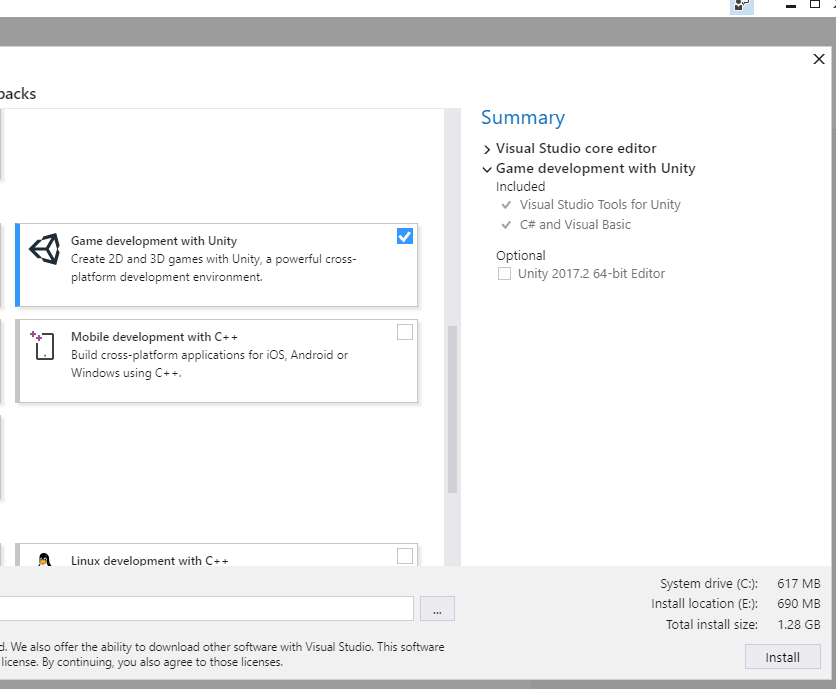
Just install Visual Studio yourself. My screenshot below is modifying an existing installation, but a brand new installation allows you to select the folder you wish to install to as well as mentions the install size is less than 2GB.
There is no advantage to letting Unity install Visual Studio for you.

Thank you. How to connect VS2017 with Unity then ?
Once Unity is running it will check for the Visual Studio Unity tools package. Once it’s detected the package it will use the package to automatically connect itself to Visual Studio. My installation process is literally installing Visual Studio followed by installing Unity. There are no additional steps necessary. It’s literally worked perfectly every single time I’ve done it.
Is it possible to write and compile scripts with Visual studio Code ?
It’s has way less HDD size than VS2017.
You can use VS Code, and Unity has some limited support for properly calling it up if you set it as the external script editor; you will also need to install the Unity debugging plugin for it if you want to do debugging. IMO the overall experience with code completion, Intellisence, etc is better on full Visual Studio, but VS Code is a great alternative (it’s what I use on my Mac at work).
Only in isolation. You can’t just install Visual Studio Code and expect any functionality beyond basic code editing until you install additional support software. At the very least you need the .NET Core SDK and the C# extension. If you wish to have debugging support you’ll need extensions for that too.
Visual Studio Code is only a mere 220MB but the .NET Core SDK is 1.45GB. Between the two of those you’ve already taken up the space occupied by Visual Studio except now you have less functionality.
Ok, thanks.
Why is VS 2017 installing in System drive too? You can see installation is split if I want to install it in different folder.
Support files. Some of the functionality it has literally can’t be moved off those drives. At least that’s the statement they provide. Once you’ve installed it you can try moving the folders and create junction links to their real locations using the following from a command prompt.
mklink /d "original folder name" "new folder name"
So if you moved the Microsoft.NET folder it’d look a bit like this.
mklink /d "C:\Program Files (x86)\Microsoft.NET" "D:\Microsoft.NET"
Truthfully you could move just about any folder you wanted this way. It’s the way I relocate my Steam games.
You can create new Steam libraries on multiple disks, and install directly there. I have games installed on several disks.
Would VS be faster if I would install it on the same drive where Unity is installed ?
I experience a lag when compiling scripts. I’m sure it wasn’t like that before.