https://issuetracker.unity3d.com/issues/build-times-are-very-long-when-building-for-webgl
Hey, have you ever figured out what was happening? I’m getting these errors too when I changed the Emscript folder
Strange thing is when i tried a whole new project and built, it was slow (maybe 30 seconds) but still acceptable.
However after adding some of my project files it went nuts. Didn’t have time to incrementally test which package or parts are causing the issue.
I’m guessing this was never fixed since I’m experiencing the same issue with version 2022.3.0f1
Update: i tried replacing the Emscripten folder from an older version of Unity and i was able to build my project but for some reason I’m not able to interact with my game through the web browser…the game loads up but when i try clicking anywhere on the screen there is no interaction whatsoever.
Man i cringe everytime i update Unity…i literally cross my fingers hoping everything works fine…which is never the case.
Hey there!!!
I managed to fix the build problem of my game!! After going nuts for almost a week I only had to uncheck the “Name Files as Hashes” checkbox and the build was complete in just 320 seconds!!!

Seems fixed from the 2022.3.2f1 release note: https://unity.com/releases/editor/whats-new/2022.3.2
Not fixed unfortunately. The release note is referring to a separate issue.
Currently 15 minutes and counting into a webgl build in 2022.3.2f1 that took < 2 minutes in 2021 LTS
Same issue here, always takes 20 minutes or so unless only one or two things are different from the previous build then it is much faster.
Build used to take <5 min on 2021.3.9f1
Now it takes over half an hour?!
And the issue is now marked as WON’T FIX too?! Unity Issue Tracker - Build times are very long when building for WebGL
How can 2022.3 be called an LTS if is more broken than last year build? There also a problem when Rider is attached to Unity, I have to stop the debugger then reattach or else it takes 1 minute of loading? It used to be instantaneous. And mscorlib.dll is being deleted by ESET.
Edit:
Setting “Shorter Build Time” and Hashed name files brings the compilation time down to 136 seconds consistently. But this is not a configuration we can work it.
Only setting Shorter Build Time compiles on 330 seconds.
Edit2:
Best i could find:
https://github.com/emscripten-core/emscripten/issues/14200
The new version passes “–allow-undefined” to wasm-ld.exe, i tried putting the 2021 wasm-ld in 2022, to see what’s different.
https://lld.llvm.org/WebAssembly.html#cmdoption-import-undefined
it seems that flag is now enabled by default but might not be desirable for every case.
Sorry for the rant, this bug comes from emscripten.
Unity is sucking more and more ass upon every upgrade. Its been 2 weeks now since i upgraded to 2022 and i just upgraded to 2022.3.2f1 and i cant build shit with WebGL. How is it that it worked fine in Unity 2021 but in 2022 its seems completely broken…does Unity not test there own app? Fix the god dam WebGL builder!!
Still present in 2022.3.2 LTS. Builds went to 21min from 4min.
Hi guys my problem was solved deleting library folder, after reimporting assets I am using 2023.1.0.b15
@anthony_b Are someone in your team currently looking into this thread? Thanks for an answer.
Some interesting notes. On my computer it takes 35-40min to build our WebGL project using 2022.3.0 LTS. On my colleagues computer it takes 5min. Both similar specced gaming laptops. Mine has an AMD processor, not sure if that has something to do with it. On earlier versions it worked to close Unity, delete the Library/Bee folder, and open Unity again to reduce build times a bit. But with the new LTS version it doesn’t work anymore.
Hey everyone, I understand the frustration when taking a new version and part of your workflow slows down on you.
In a prior post I mentioned the following:
Some of the slowness experienced is related to LLVM’s LTO setting although it provides additional optimization it comes at a time cost. We are actively working through exposing LTO as a separate option so it will be up to you to decide if the additional optimization or reduced build time is preferred.
I unfortunately do not have a timeframe for when those additional build settings will be exposed, but in the meantime if build time is more important than squeezing every possible optimization out of the project - using Shorter Build Time should work.
- Can you provide which optimization settings you’re building with?
- Can other folks in this thread chime in regards to processor (and if you have access to multiple CPUs do you notice a difference in performance)?
- From a usability stand point - how often are you typically making release builds? Daily? Weekly? Monthly?
Still having this issue in 2022.3.3. =[
-I have an Intel Core i7 7700 & 3.6ghz.
-I typically publish updates once every week or two, so that is how often I compile to WebGL.
I haven’t tried switching to “Shorter Build Times”, but I’d be willing. My main concern is, how much exactly do you sacrifice performance when switching to that setting? Is it a noticeable difference, or negligible?
I’ve already mentioned it in a previous post, but it seems evident that setting Code Optimization to “Runtime Speed” causes the build process to NOT use multithreading, whereas the “Shorter Build Time” option uses multithreading. Could you clarify why this happens?
I don’t know if my comment was seen by @JustBeanUnity but that is indeed my experience too.
Using R9 7950X - only setting that uses more than 1 core is “Shorter Build Time”.
Thanks for the answer!
Build settings:
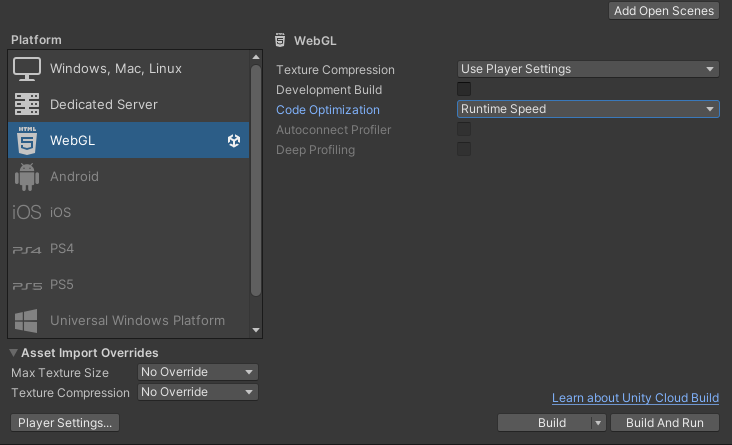
Other Settings:

Publishing settings:

On the computer that is slow (35min):
Asus Rog G14 (gaming laptop):
Processor AMD Ryzen 9 4900HS with Radeon Graphics 3.00 GHz
Installed RAM 32.0 GB (31.4 GB usable)
System type Windows 11 Pro, 64-bit operating system, x64-based processor
Pen and touch Pen support
Graphics card: NVIDIA RTX 2060 Max-Q
On the computer that is fast (2min)
Processor Intel(R) Core™ i7-10750H CPU @ 2.60GHz 2.59 GHz
Installed RAM 16,0 GB (15,8 GB usable)
System type 64-bit operating system, x64-based processor
Pen and touch No pen or touch input is available for this display
About every day so the rest of the team can test and see the progress. (but I guess a dev build could be fine too for those daily builds too)
I also tried building with dev build on my slow AMD computer using Development Build in Build settings, and then it took 3min. So it’s only the production releases on AMD (or this computer) that takes long time it seems. Have also tried deleting the Library folder or just the Bee folder without any success for prod builds.
Thanks for the info - I’m going to try to aggregate some of this info and share it internally.
I appreciate the help trying to narrow this down.
The key things to follow up on seem to be the following:
-
Only “Shorter Build Time” currently seems to use more than one core. Will see if I can get clarity around if this is expected behavior or not.
-
It is possible that AMD CPUs have significantly worse performance when producing release builds.
-
The emscripten issue linked above, basically asking “is it OK to just disable LTO when looking for a fast build” - which is a build setting we have in the works to allow folks to chose whether or not to include LTO.