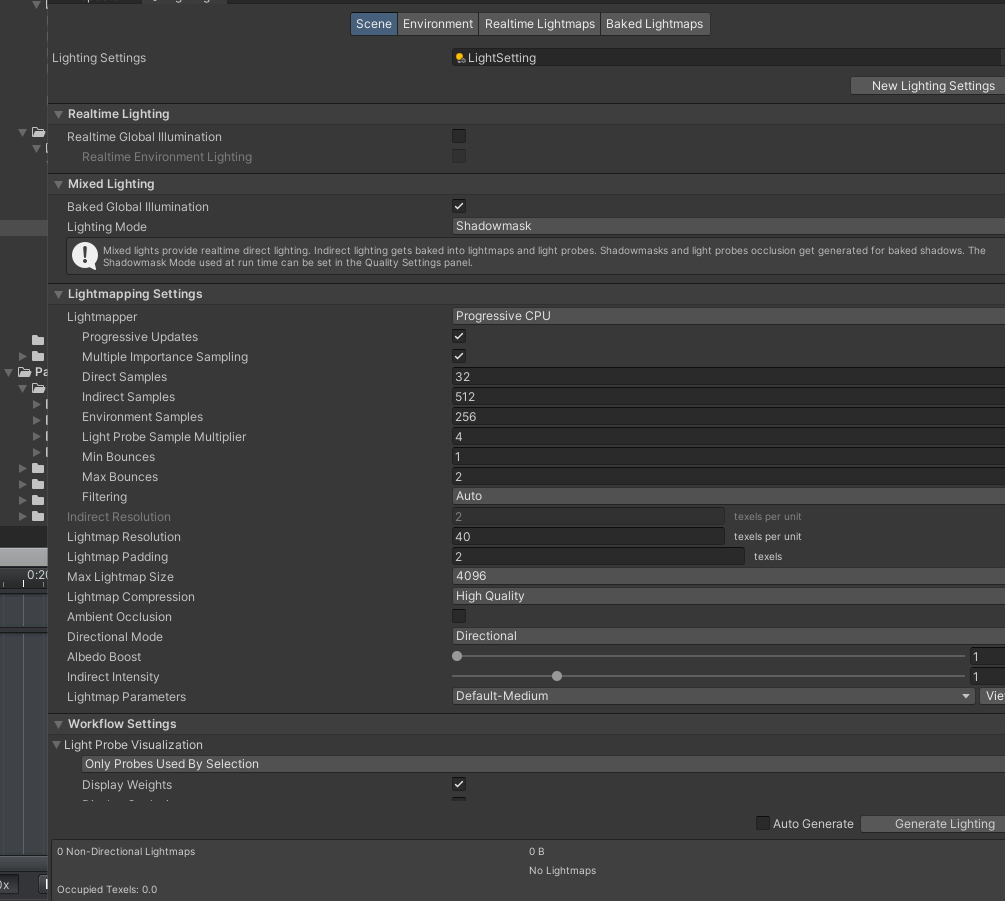
I wanna to prompt my desktop device for performance.Is 8G gpu memory enough(3070Ti) for high-level lightmap baking(such as 4096 lightmap size and so on)?
4GBs of VRAM is the min spec. You should be able to bake 4K lightmaps in 2021.2+ with Progressive Updates disabled, thanks to lightmap tiling.
2 Likes
Thanks,and whether 8GB gpu can deal with various situations,no matter how big the scene is,which option was checked that required higher performance?
I have a 3090 it can bake 4k in 2020 LTS it maxes out at 23 gig VRAM used.
One trick you can do is to lower to 1024 and lower the texel res 4 times. This way you can bake and get the same amount of lightmaps so you can test set pass and batching.
You still need a 3090 for the final bake though.
1 Like
I had tested on 2021.2.8 that 4k was supported as kristijonas_unity said:smile:
1 Like
Thanks ,and what would be improved when disable “Progressive Update”? I am looking for a new GPU for update,so I am curious about the VRM requirement for GPU light baking. Now my old desktop GPU RAM was 4G ,it could not be able to bake 4K lightmap(2048 was supported),even with “progress updates” disabled,so I am kinda worried about 8G GPU would be qualified for light baking 
I have to corret it that maybe 4K was not supportted on 4G RAM GPU, I took it wrong because my test scene is not big enough , the resolution was resized automatically to 2048, I did not notice it before. When I turn to bake light in some kinda “big” scene,4K resolution failed…
Hi @kristijonas_unity i’m currently deciding on which laptop to buy that will meet the requirements for gpu lightmapper. Whether to go with one that has 6Gb vram or the other with 4Gb but supports thunderbolt that allows me to connect to an egpu.
And also, based on what i interpret from this thread
https://forum.unity.com/threads/202…gpu-lightmapping-for-the-lts-version.1264151/
can i say that the gpu lightmapper will make use of system ram when the gpu dedicated memory is maxed out?
So does that mean i can supplement any lack of vram on the gpu by adding more system ram? Will it work the same as having a gpu with higher vram?
Edit: If that’s the case, then i should be looking for a laptop that has more ram slots for upgrade?
Now that lightmap tiling has landed in 2021.2, 4GBs of VRAM might be enough for medium-sized scenes. Unity fully supports eGPUs if you’d decide to use them. Keep in mind that new Apple Silicon macs do not work with eGPUs as of yet.
System RAM is of a bigger importance for the CPU lightmapper when compared to the GPU lightmapper. Still, having plenty of RAM has never hurt anyone.
1 Like
Thank you for the reply!
4GBs of vram might be enough for medium-sized scenes, and what about bigger scenes? What is the range of vram that we are looking at? I feel that we are lacking of a guide on this hardware requirements which makes it difficult to decide what system to get for the different scale of projects that we might be undertaking in time to come.
It really is project-dependent. It is up to users to do a proper profiling of their projects.
Same logic applies to video games as well: some are badly optimized, and run poorly even on capable GPUs, and vice-versa.
Ok. Thank you for the answers! Appreciate it 
Testing the latest alpha, GPU lightmapper seems to take up a ton of VRAM at the very start of the bake,
I thought lightmap tiling would help with VRAM, but on a simple scene, just a few objects to test lightmapping,
2k bake it eats up around 3GB of VRAM. (25 texels, 1024 direct samples, 512 indirect/env samples, 4 bounces)
I tried to do a 4K bake, a few cubes, and it crashed unity completely.
Compared to a community GPU asset, which consumes around 1 to 2 GB for the same 4k bake/res, it also uses lightmap tiling, so I’m not sure what’s going wrong with the lightmapper. Maybe an issue with the alpha version?
(I have 8GB of VRAM, but by the time I have unity open and so on, with other software running, I have around 4GB left)
Yeah I’m on 2020.3.44f1 and can’t seem to bake at 4096 on 8GB radeon rx580.
OpenCL Error. Falling back to CPU lightmapper. Error callback from context: Not enough GPU memory to fit lightmap in memory, even in tiled baking mode. Available GPU memory: 7.06 GB
You could try lowering the “Anti-Aliasing Samples” setting in the Lightmap Parameters Asset https://docs.unity3d.com/Manual/class-LightmapParameters.html
The higher that setting, the more memory will be used.
1 Like