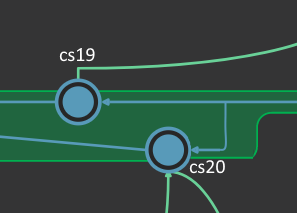
Can you help me understand how I’m supposed to read this?
We’ve seen these little side “humps” from time to time on different branches. We’re not entirely sure what we’re supposed to make of it.
I note that cs19 and cs20 are only 6 seconds apart. Is it some kind of plastic weirdness that the two changesets are somehow “simultaneous”? If so, at what point does cs20 get melded back in? right after cs19? Should it look more like this?
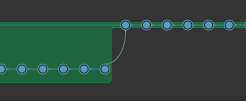
I note the arrow from cs20 to cs16 goes away if you uncheck “Display cross-branch changeset links”.

I’m not sure that really clarifies it, though.
We’ve had these kind of humps all over the place on /main. We’ve even had them start “nesting”, such that they get to four levels deep. Too big to show in one screenshot but it looks like this:


Hi Jason, this looks like a branch explorer of repository that is XLinked between different parent repos.
In this branch, there are two heads, the cs:20 was not integrated in the head of the /main branch (or maybe it was indirectly integrated later when /main/branch2 was merged to main).
The fact that both changesets happened almost at the same time is not relevant. A explanation for this could be:
- You have a Xlink_1 point to cs:16 and you create new changes via the XLink (this way, creating cs:19).
- You have a different XLink_2 pointing to cs:16, the target was not manually updated to the last changeset (cs:19) and it created a second head in the branch.
I’m not sure if it’s the case, but if you have multiple Xlinks targeting the same repo/library, it’s not straightforward to configure it to avoid the multiple heads: Plastic SCM blog: How to share an engine repository between different video games
In summary, we need to understand how the history of this repo was created (Xlink, migration from git)… to better explain this not-usual branch explorer.
I’m pretty sure this repo is not xlinked by any other repository. It’s the main repo for our app, not a library or anything.
However, this repo uses two xlinks to other repos. But I just checked, and cs11, cs16, cs17, cs19, cs20, and cs24 are all using the same xlink versions. So there was no xlink change.
Additionally, we use readonly xlinks, not writeable. I don’t know if that matters for your explanation.
Given all that, I don’t really understand how the explanation applies here.
It was just some example of how this type of repo history could be created but I don’t have access to the repo or know who the history was created.
Do you (or somebody) in your team follow a distributed repo (pushing and pulling branches from local to central server)? This could be another reason for a branch to have multiple heads.
No, no distributed repo that I know of. It’s happening with multiple users.
I will open a ticket so you can see the repo.
(Posting this here in case anyone hits this topic in the future.)
I did figure out what causes one version of these humps.
I switched my workspace to an earlier changeset before the final changeset. Then I made a change. Then I did a merge from the final changeset into my workspace. I then checked in my changes along with the pending merge. That gave me this result:

Which definitely makes more sense to me now, even though I think it’s a little counterintuitive just to look at.
But I still don’t know how to make one happen like in the example at the top of the thread. One where that cs20 is marooned with no lines being drawn from it back to the other changesets in the branch.
When I tried to check in my changes while I wasn’t on the current changeset, I got an error message that says this wasn’t allowed unless I merged in the latest. So I the result I got was the only one it seemed to allow me to do.
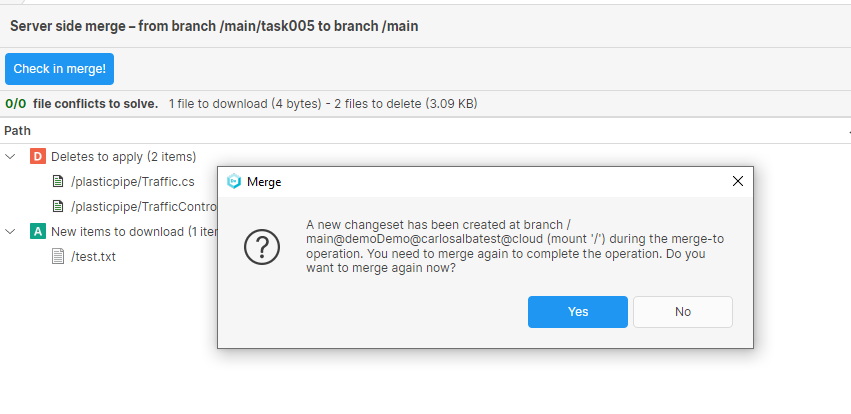
Hi @jasonpierce, I’ve been running a few tests to try to find a explanation for the scenario cs:16, cs:19, cs:20. Are you frequently using the merge-to operation, right?
If you try to merge a task to main branch via merge-to and when you are resolving the merge, somebody creates a new changeset in main, you will see the following dialog:
If you click on “Yes”, you can merge the changesets and the diagram look this way:
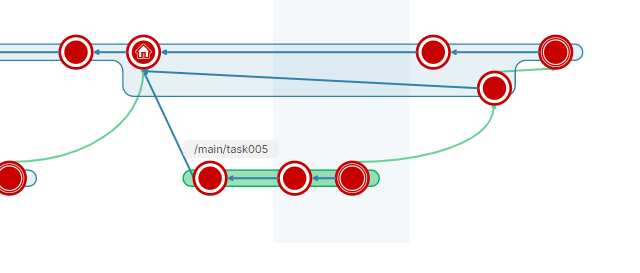
If you click on “No”, the branch will end of with two heads that are not merged.
I talked to the developer who was involved in the merge, and found out that sometimes they use server side merge. In general, it’s something discouraged at our studio but we haven’t done a good job of communicating it.
I’m pretty concerned about lost changes, though. In this case, I could trace the feature branch and see that later it was merged in again, so I’m not worried about it here. But what you said leaves open the possibility that this could happen.
I’m surprised it even allows a user to do this.
Is there a way we can deny permission for server side merges? The only related permission I see is “mergefrom”. I’ve never been able find an actual document that explains each and every permission, so I can only guess this is from NON-server side merges.
If not, can it be prevented with merge rules?
I’m afraid there is not currently permission to specifically deny server-side merges. Same for merge rules, it doesn’t differentiate between server-side and client-side merges.
Even if they use server-side merges, there shouldn’t be a problem if somebody created a new changeset in the meantime, because the server-side merge detects it asks you to merge the new changeset. But I understand your point that you want to avoid the developer to click on “No” and leave the branch with a second head that is not integrated.
Right, it’s not a problem as long as there is no user error. You know how that turns out, though. 
Would love to see a permission to turn this off. Even if it’s in a config file we can set up in plastic-global-config.
Thanks, your feedback is very welcome.