I find some font in Windows.Their suffix are ttf,ttc or fon.But they couldn’t be used.What’s the right font can be used in UI Toolkit?
Hi YinZuoyu!
I would be glad to help you. Could you be more specific regarding your use case and the font files you couldn’t use?
Currently, UI Toolkit should support all font files that are supported by Unity, namely .ttf, .otf and .ttc.
New
I think it is version trouble.The font is supported in 2020.1.3.But I used 2020.2.0a21.
Hi.
In my case in ui builder font list is always empty. I’m using unity 2020.1.4, URP and latest UIToolkit pachages.

If I do same in debugger I get the list populated

Is it a bug, or as designed?
Thanks.I get it.
The font picker, when launched from the UI Builder, has the package assets hidden by default (the little eye icon on the top right). Whereas the debugger has the package assets visible by default.
I think the reasoning behind this is that users should not use package assets in their UI.
Clicking on eye icon does nothing in my case and those are imported fonts inside asset folder, not fonts from packages.
1 Like
Thank you for bringing this up Maverick, I just tested and it doesn’t work for me either! Do you mind reporting it via Unity’s built-in Bug Reporter?
@HugoBD-Unity , done. (case 1277897)
4 Likes
Thanks for reporting this, I’m having the same problem
could we get an update on this?
1 Like
I love how QA say they cant repro this while using a way older version of UI Toolkit (1.0.0-preview.1)
2 Likes
Bug was reproduced by QA. You can follow progress here:
In preview14 I can indeed select my fonts, with the following caveats:
- I need to make my Font Character Dynamic and my Font Asset Atlas Population Mode Dynamic (the latter done automatically when creating TMP Font Asset from a dynamic font) for my text to appear in UI Builder or at runtime (using UI Document).
- I can select a Static font in the UI Builder, but the text will be invisible, and apparently shrinked to size 0 as the container also shrinks.
- When creating a UI Toolit > Text Settings (UITK Text Settings aka Panel Text Settings), the Default Font Asset > Default Font Asset can only be filled with a (non-TMP) Font Asset. Static fonts don’t allow creating a non-TMP Font Asset, so I had to resort to Dynamic Font again.
As a result, I’m using a dynamic font everywhere, which is OK but for pixel art fonts they appear blurry on the edges… Setting Atlas Render Mode to RASTER_HINTED doesn’t help.
Hi @huulong !
Could you be more specific on how you created your FontAsset? FontAssets created from the MenuItem Create/Text/FontAsset should be AtlasPopulationMode.Dynamic by default.
You shouldn’t have an issue using a static FontAsset in the UIBuilder. Make sure the atlas is prepopulated with the relevant characters. To do so, use the FontAsset Creator Window. It is located in Window/Text/Font Asset Creator. I also recommend having a look at this documentation, it explains in more depth how to do so. Just keep in mind that it was made for TextMesh Pro, not for TextCore. TextMesh Pro: Font Asset Creation - Unity Learn
As for Pixel Art fonts, could you explain what you are trying to achieve and share your current setup (Font, FontAsset you are using…)?
You might also want to look at this thread, it looks similar to your issue: Font Asset Issues
When creating a font this way from an original Font asset imported as Dynamic, the resulting Unity Font asset is set to Dynamic indeed. But I needed to change the import mode first.
I made sure to create the Atlas with the characters I needed (not sure if it was ASCII or Unicode). As a matter of fact, I can use the font on TMP text. Because I only needed certain font sizes, I made it static at first. I can also use dynamic font with TMP. But I have no choice for the UI Toolkit.
That said, I generated the Atlas a while ago, and it wasn’t for the UI Toolkit. So I can try to generate them again and testing live within my UITK template. The tutorial and thread seems like what I did and what I’ve read in the documentation, but I’ll try again following the steps more closely.
I’m using the BitPotion Ext font family. When I get back on my project I can give you more details on the import settings, and upload a screenshot of the crisp vs blurry font rendering.
Ah, sorry, actually only when creating the Custom UITK Text Settings (Panel Text Settings) I was constrained to selecting the dynamic non-TMP font asset for the default font field (see first screenshot).
So I tried to create a new non-TMP Font Asset from BitPotionExt.ttf, but clicking on Generate Font Atlas gave an error:
Font Asset Creator - Error Code [Invalid_File] has occurred trying to load the [BitPotionExt] font file. This typically results from the use of an incompatible or corrupted font file.
UnityEngine.GUIUtility: ProcessEvent (int,intptr,bool&) (at /home/bokken/buildslave/unity/build/Modules/IMGUI/GUIUtility.cs:189)
If instead I try the shortcut for quick creation of right-click Create > Text > Font Asset, I get:
Unable to load font face for [BitPotionExt]. Make sure “Include Font Data” is enabled in the Font Import Settings.
UnityEditor.TextCore.FontAsset_CreationMenu:CreateFontAsset () (at Library/PackageCache/com.unity.textcore@1.0.0-preview.2/Scripts/Editor/FontAssetCreationMenu.cs:170)
Setting the font asset import setting Character from Unicode to Dynamic (with Include Font Data) makes Font Asset generation work with both techniques. And actually, the Include Font Data setting is only present for Dynamic fonts. So the font file is not corrupted (I tried, it does the same with other fonts), the generator itself, with the shortcut command, is asking me to make a dynamic font.
(You can get the font for free at BitPotion by Joeb Rogers if you want to test by the way, if you need to test rasterization; but any pixel art font will do)
And on top of that, none of this seems to matter because in the UI Builder, it is not possible to clear the Text font field to use the default provided by Panel Text Settings. Trying to set it to None or pressing Delete does nothing and shows this log:
UI Builder: Font cannot be set to none.
UnityEngine.Debug:Log (object)
Unity.UI.Builder.BuilderInspectorStyleFields:OnFieldValueChangeFont (UnityEngine.UIElements.ChangeEvent1<UnityEngine.Object>,string) (at /home/bokken/buildslave/unity/build/External/MirroredPackageSources/com.unity.ui.builder/Editor/Builder/Inspector/BuilderInspectorStyleFields.cs:1773) Unity.UI.Builder.BuilderInspectorStyleFields/<>c__DisplayClass28_0:<BindStyleField>b__11 (UnityEngine.UIElements.ChangeEvent1<UnityEngine.Object>) (at /home/bokken/buildslave/unity/build/External/MirroredPackageSources/com.unity.ui.builder/Editor/Builder/Inspector/BuilderInspectorStyleFields.cs:192)
UnityEngine.GUIUtility: ProcessEvent (int,intptr,bool&) (at /home/bokken/buildslave/unity/build/Modules/IMGUI/GUIUtility.cs:189)
So, I’m constrained to picking the text on each Label element or using a style. Which is fine for me. However, the Label > Text > Font field only takes pure font assets like .ttf. So no Font Asset generation at all here. I can only pick my Unicode or my Dynamic-imported font file.
Picking the Dynamic font works but is blurry. Picking the Unicode or any other static set font spams two errors:
Unable to load font face for [SourceSansPro-Black_STATIC]. Make sure “Include Font Data” is enabled in the Font Import Settings.
UnityEngine.UIElements.UIElementsRuntimeUtilityNative:UpdateRuntimePanels () (at /home/bokken/buildslave/unity/build/Modules/UIElementsNative/UIElementsUtility.bindings.cs:26)
NullReferenceException: Object reference not set to an instance of an object
UnityEngine.TextCore.Text.TextSettings.GetCachedFontAssetInternal (UnityEngine.Font font) (at Library/PackageCache/com.unity.textcore@1.0.0-preview.2/Scripts/Runtime/TextSettings.cs:268)
UnityEngine.UIElements.Text.PanelTextSettings.GetCachedFontAsset (UnityEngine.Font font) (at Library/PackageCache/com.unity.ui@1.0.0-preview.14/Text/PanelTextSettings.cs:42)
UnityEngine.UIElements.Text.TextUtilities.GetFontAsset (UnityEngine.UIElements.MeshGenerationContextUtils+TextParams textParam) (at Library/PackageCache/com.unity.ui@1.0.0-preview.14/Text/TextUtilities.cs:32)
…
UnityEngine.Yoga.Native.YGNodeMeasureInvoke (UnityEngine.Yoga.YogaNode node, System.Single width, UnityEngine.Yoga.YogaMeasureMode widthMode, System.Single height, UnityEngine.Yoga.YogaMeasureMode heightMode, System.IntPtr returnValueAddress) (at /home/bokken/buildslave/unity/build/External/Yoga/csharp/Facebook.Yoga/YogaNative.bindings.cs:146)
UnityEngine.UIElements.UIElementsRuntimeUtilityNative:UpdateRuntimePanels() (at /home/bokken/buildslave/unity/build/Modules/UIElementsNative/UIElementsUtility.bindings.cs:26)
(see second screenshot)
and the text is invisible in the UI preview.
That’s it. Is there any way I can use a rasterized font in UI Toolkit menu?
I can export a Dynamic font in RASTER_HINT mode as TextCore Font Asset, but since I cannot select it in the Label Text Font field, it doesn’t help.
Note that I’m giving up on making my menu with UITK for now because of another issue, namely failing keyboard/gamepad navigation (at least on Linux). I have reported this separately.
P.S.: we need a checkbox to disable emoji generation, all callstack containing :Process end up creating a smiley!
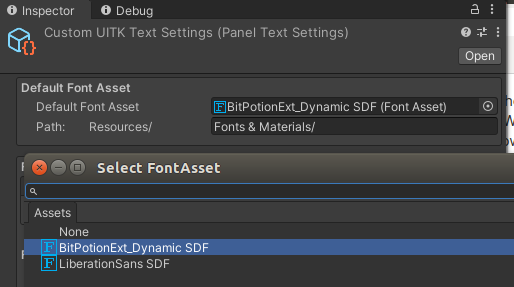

Hi @huulong !
This is indeed confusing, but TMP_FontAsset created from TextMeshPro cannot be used in UIToolkit. For the moment, UIToolkit only supports assets created from TextCore. We are planning to migrate the TMP assets to TextCore, but this is more complicated than expected, and it will not happen shortly… When you create your assets, make sure to use the Text/ menu item rather than the TextMeshPro/ menu item.
Unable to load font face for [BitPotionExt]. Make sure “Include Font Data” is enabled in the Font Import Settings.
This is expected, for the Font to be consumable by TextCore, the unity font settings should be the default one. (see screenshot). You should then be able to create a static FontAsset from this unity Font using the Window/Text/Font Asset Creator.
UI Builder: Font cannot be set to none.
This is a known issue that we should soon fix.
That’s it. Is there any way I can use a rasterized font in UI Toolkit menu?
I can export a Dynamic font in RASTER_HINT mode as TextCore Font Asset, but since I cannot select it in the Label Text Font field, it doesn’t help.
From your screenshot, it seems you are not using the UIBuilder package. Using the package in versions earlier than 21.2 will allow you to use FontAssets.
it is not possible to clear the Text font field to use the default provided by Panel Text Settings.
PanelTextSettings and PanelSettings are currently not available in the UIBuilder. This is unfortunate, but it is on the roadmap.
Thanks for the feedback! I

I also used unity 2020 before.1.4, and I can say that there were no problems with this. Given that unity has quite a lot of open-source components, it was not difficult for me to change some of the libraries in order to make it easier for me to work. I added some fonts from UpFonts and just changed the path to them in the code. For me personally, it helps to perceive information a little easier since fonts are the primary transmitter of information in this area. The post above describes everything quite well, so it probably makes no sense to repeat what he said.