[WIP] Unity Pattern - An easy but powerful collection of generative design tools

Wow thats really funny. Since THIS HERE is my newest Feature for Unity Pattern.(Created just couple of minutes ago) =D

Never heard of the Cinema4D tool before. But im using the array tool of 3ds MAX a lot and felt we need something like that in Unity! =) I even want to add a feature to voxelize selected 3d Assets Currently its only working with cubes, but i will work on that next!

Do a search for “C4D Mograph” videos on Google for some inspiration. They got some very nifty tools. You seem to be on the right path :wink:

1 Like
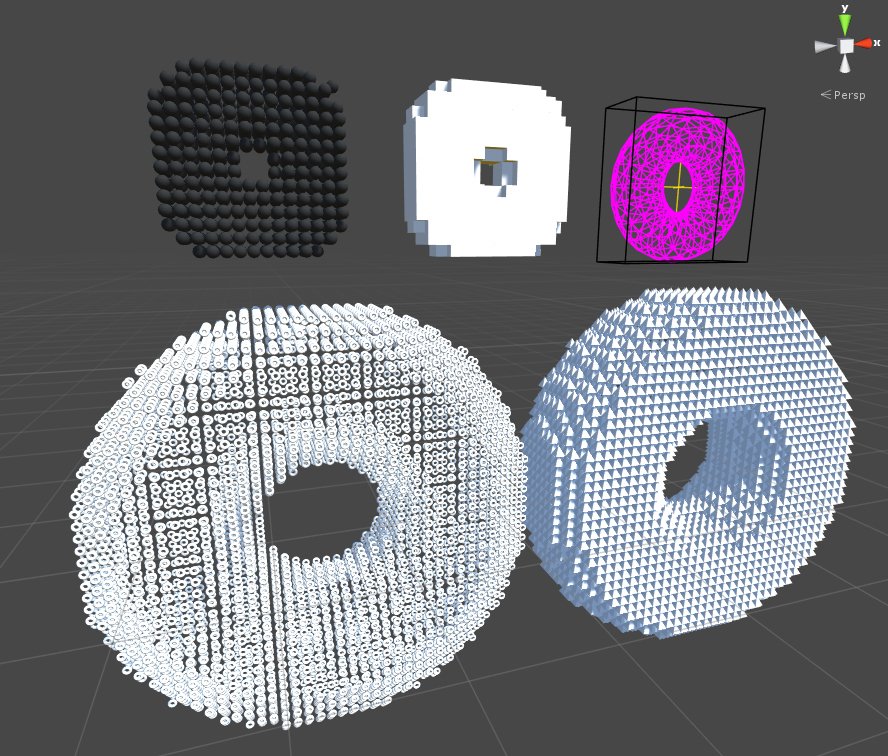
  • New feature: It is now possible to voxelize a sphere with every Asset you choose in Unity Pattern. ( This also works with every concave MeshCollider)


But keep in mind that huge meshes may take some time!

Also the first version of the tool will be released next week. :slight_smile:

Cheers!

1 Like

Some additional Patterns created with the new Voxelizer. =D

1 Like

New features: Voxelizer works now with any 3d Asset!

  • Voxelize a Torus with Toruses =D
  • Or Voxelize it with any other 3d Asset.
1 Like

The video is finally finished! And the tool is currently previewed! :slight_smile:

Cheers!

New Features:

  • Texture modifiers
  • Realtime refreshing

Cheers. :slight_smile:

Can you use this for runtime procedural animation? Thd closest analogy i can think of is the boss battles in Rez

Hello lazygunn!

Currently this feature is WIP and only possible in the inspector. But actually it would work if you would call the Regenerate() from an Update and change the value over time. :slight_smile:

Its interesting to see people would like to see this as an in game asset animator, since it was only planned as a fancy support tool. I will definitely work on more on that now!

Cheers!
Lewnatic

1 Like

If you could make it possible to create animation like that at runtime youd have a customer here

1 Like

Im working on that!

Cheers.

Added bunch of new features to version 0.8

  • Added tooltips for all input fields

  • Added some security features to prevent generating to much gameObjects

  • Added position, scale and rotation modifiers for the Move Agent

  • Added texture rasterization for the Move Agent

  • Added alpha clamping for the Move Agent

  • Added invert texture option for the Move Agent

  • Added tiling for the Move Agent

  • Over all better performance.

Cheers! =)
Lewnatic

1 Like

  • Optimized rasterizer of Move Agent to work better with photos.

Cheers!
lewnatic

1 Like

It also rasterizes colored images(as grascale) but. Still not sure if i should let it generate a material for every pixel color. =P I think it would be better to restrict it to 256 colors.

1 Like

Hi, really like your direction, what is your ETA for the Unity Store firsy release?
All the best!

@Lewnatic That’s coming together nicely! Another good inspiration source might be Maya’s newly integrated “Mash” features. See here: Maya | 2025 Features | Autodesk
I’d love such functionality in Unity.

Hello and thank you for your post!

Unity Pattern is currently previewed in the asset store. So hopefully it will be available soon. =) BTW there will be free version of Unity Pattern which also includes the texture rasterizer.

The Pro version includes the voxelize and mesh projection tools.

Hey thanks dude!

yeah this Maya feature would be totally cool to have. At the moment Unity Pattern enables scattering and mesh projection and procedural GameObject Transform, which can be applied on the position, scale and rotation via animation curves. A Mesh merger to write/modify meshfilters is something that im currently working on. After that i will work on a boolean feature as well. And in a long term i want this stuff to work as real time animations as well. =)

2 Likes

Used the last couple of months to learn how to use compute shaders. And im glad to announce that the next version of uPattern Pro will feature an in-game camera to geometry plotter.


4 Likes

Uploaded a video of the shader in motion. :slight_smile:

1 Like

Now this time a short example for the Camera to Geometry feature. =)

2 Likes