Hi,
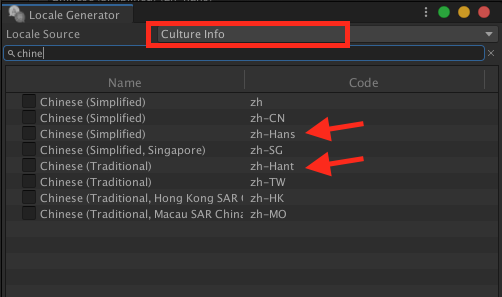
I’m localizing my game in Chinese, traditional and simplified. In Unity (localization package 0.10-preview), I generated the following locales: zh-Hant and zh-Hans.
When trying to test it on a test device, I found a problem where Chinese what not found in the locales, even though I switched my phone’s language. My phone is not a “Chinese” phone so I can only change the language and not the CultureInfo.
Tracing the problem, I found out that my phone returns “Invariant Culture info” which makes SystemLocaleSelector.cs branch out to using the system language to find the locale.
Problem is, in SystemLanguageConverter.cs:
case SystemLanguage.ChineseSimplified:  return "zh-hans";
                case SystemLanguage.ChineseTraditional: return "zh-hant";
we get language codes with lowercase ‘h’ whereas the codes in the available locales are using ‘H’. Although the created LocaleIdentifier is technically OK as Chinese, the matching fails in LocaleProvider.cs (line 55):
public Locale GetLocale(LocaleIdentifier id)
        {
            foreach (var locale in Locales)
            {
                if (locale.Identifier.Equals(id))
                    return locale;
            }
            return null;
        }
If I hardcode a cultureInfo to (zh-HK), I can see that the code fails to find a direct match but because the culture info was properly created, the localization feature properly checks for the parent culture and properly finds ‘zh-Hant’. (with capital ‘H’)
Not sure if the proper solution is to change to a capital ‘H’ in SystemLanguageConverter. Any thoughts?
Thanks!