Addressables: how to truly unload assets to free memory

Hi all!

I have a large world and a system that spawns game objects (from now on: “decorations”) and terrains around the player according to the position of the player.

Previously all existing terrains prefabs were assigned to a scriptable, while decoration prefabs were assigned to a different scriptable. Both scriptables were loaded with Resources.Load soon after the launch of the game. This caused all the prefabs and their linked assets to be loaded into the memory at once, leading to high ram usage.

Now all these prefabs have become addressables and have been added to 2 different addressable groups, while the scriptables contain a list of AssetReference instead of a list of GameObject. When the system must spawn a decoration or a terrain, it loads the asset reference into memory with Addressables.LoadAssetAsync, then spawns the GameObject with GameObject.Instantiate. If an AsyncOperationHandle for the same asset already exists, the system uses the loaded asset (if ready) or enqueues the spawn until it’s ready, so there can’t be more than 1 handle for the same asset.

If all the game objects generated from the same asset have been destroyed, the system releases the handle with Addressables.Release.

The system works well - initial memory usage is much, much lower. Sadly, it grows slowly over time when the player moves around, as if the assets no longer needed and unloaded where actually never removed from the memory.

What is causing that? Is it not enough to destroy all the gameobjects and call Addressables.Release on the handle? Or is it the fact that all the decorations / terrains belong to the same group, thus the same asset bundle, and an asset bundle can be partially loaded but not partially unloaded?

If the reason is the latter, what’s the right approach? Split the 2 bundles into multiple bundles based on the region of the world in which the assets are needed?

Thank you!

Bump. Tried adding labels according to the area of the world where assets are used and then “bake together by label”, which generates multiple bundles, but no luck.

Yes, to the best of my knowledge, asset bundles are unloaded as soon as all its contents have zero references, no sooner than that. You might want to make smaller bundles or even pack each object separately.

1 Like

I saw somewhere else a dev said exactly what you asked. Assets are loaded in a partial way as needed, however once you release them, they are only released from memory once the entire set of assets from the bundle are released and have a ref count of 0.

Loading asset 1 that is included in the bundle on the system of the addressable asset bundle increases the reference count for bundle and asset 1. Loading asset 2 in addition increases the reference count for the bundle to 2.

Even if you unload asset 1 here, asset 1 is not immediately unloaded because asset 2 still has a reference count of 1. This means that asset 1, asset 2, and bundle metadata is still loaded on memory.

So if you want to completely unload asset 1 from memory

  1. Make the reference count of all assets included in the bundle zero. → It means Release all assets in bundle

  2. You must use an exception. The method is

Use the engine interface Resources.UnloadUnusedAsets.

There are also precautions for this method, so use it properly.

Alternatively, when you switch scenes, Resources.UnloadUnusedAsets is automatically called and unloaded, but the scene transition will not be right for your project

1 Like

I also just saw this in the documentation. It’s been a while since I’ve looked at Addressables but I think they must have updated the documentation with this info, because now it seems clear cut how it works whereas before it wasn’t (or maybe we all just missed it).

In any case, thanks for posting the info in this thread! It should be useful for others.

Edit: Also in the documentation, it confirms that loading an asset from a bundle only loads the asset (and dependencies obviously) and not the entire bundle, which is great.

1 Like

Recently, I looked into bundle caching in the Addressables system.

Check this reference : https://discussions.unity.com/t/857639

It seems that when calling the DownloadDependenciesAsync function to download all assets or bundles with the specified Label, or when loading an asset through LoadAssetAsync (if the bundle containing the asset is not downloaded, it will download it first), all of those bundles are cached in memory.
Caching the bundles in memory is likely faster than reading them from the file disk when loading assets, which is why this approach is taken.

I apologize for the incorrect content in the underlined section. Please refer to the post below.

The Addressables system can be quite complex and not always clear.

It would be great if Unity provided more clear explanations or documentation on this topic.

Hmm, my understanding is that caching with Addressables just meant the assets were downloaded to the users device and stored there. This way you do not have to redownload the addressables from a remote server, which makes it faster to loam them into the game world.

I have not seen anything saying they are stored in system memory. Where did you read that?

1 Like

I’m sorry for the confusion I caused. :sweat_smile:

I should have done more research and written before post reply.

Today, I investigated the documentation on Asset Bundles. First of all, since Addressables internally use Asset Bundles, I needed to understand the caching process of Asset Bundles.

Asset Bundles cache when the app runs for the first time or when updates are downloaded. The part that confused me was whether this caching is done in memory or on the local disk.

The criteria for determining this are:

  • Whether “Asset Bundle Compression” is set to LZ4.
  • Whether the “Use Asset Bundle Cache” option is enabled.

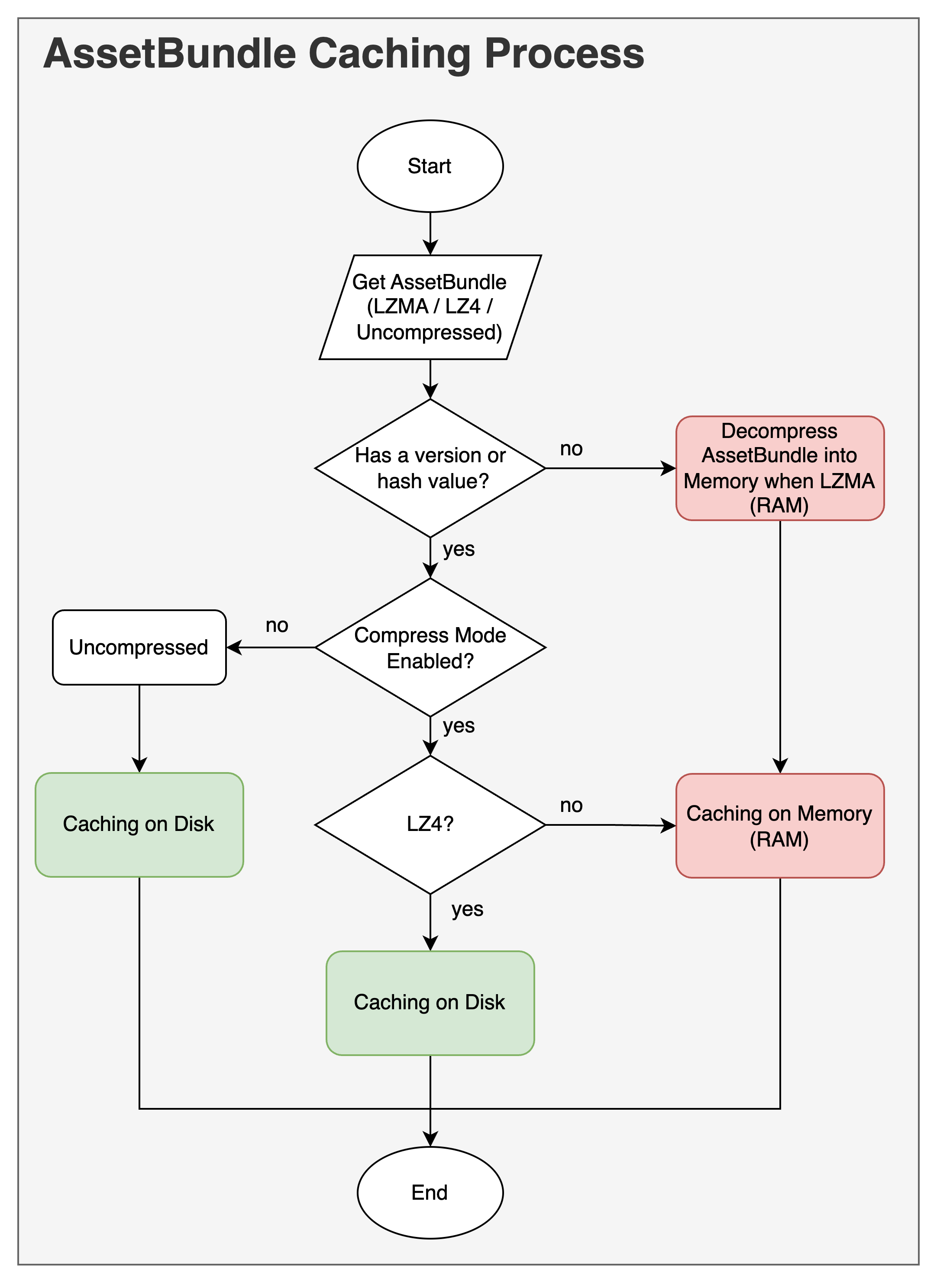
According to the Unity Asset Bundle caching documentation, if the compression algorithm is set to Uncompressed, the Asset Bundles are cached in memory. Also, if the version or hash value is not available, they are cached in memory. (There is mention that the LZMA compression format also loads into memory, but this part needs verification.)

I’ve drawn a flowchart detailing the Asset Bundle Caching Process.

Therefore, to reduce memory usage, it’s necessary to use the LZ4 algorithm by default. When LZ4 is used, all Asset Bundles are cached to the local disk after downloading. This is because LZ4 compresses Asset Bundles individually into “chunks,” allowing selective retrieval and loading of only the required “chunks” for requested objects without decompressing the entire Asset Bundle. Particularly, it’s more efficient to disable the “AssetBundle CRC” feature when using LZ4.

So, ultimately, the Addressable loading process, as I understand it, is as follows:

Load Addressable → If LZ4, cache Asset Bundles to local disk → Load Asset Bundle metadata into memory → Load assets into memory → Increase reference count for each Bundle and Asset by 1.

Please let me know if there are any mistakes!
I hope this post will be helpful to those curious about Addressable loading processes and Asset Bundle caching, like myself.

Have a great day!

1 Like

I think you might’ve read the docs on this point wrong. Uncompressed and LZ4 don’t need to load the bundle into memory. Only LZMA needs to load the entire bundle into memory. The reason for this is that Uncompressed and LZ4 can uniquely identify files in the bundle when reading it.

  • Uncompressed, the internal asset bundle functions can read the header file and know what’s inside the bundle.

  • LZ4 applies compression on a per-file basis in the bundle. So it knows where the header is, and can extract it from the bundle without loading the entire bundle. This is similar to how compression works in Windows’ file explorer: you can check whats inside the archive without unpacking the archive as a whole.

  • LZMA applies compression on the whole bundle file. This allows to get better compression, but it can’t identify unique files within the bundle, unless it can decompress it as a whole. That’s why it’s the only type of compression that needs to load the whole bundle into memory.

2 Likes

Wow, I was completely misunderstanding it.

In summary, Uncompressed and LZ4 are cached on the local disk, while LZMA is loaded into memory. Right?

I really appreciate it. You are my savior!

Yes, apart that caching on disk can also happen for LZMA. The caching and loading into memory are kind of separate things. Caching will happen when a bundle is downloaded to disk, regardless of its compression method. And loading it in memory depends on the compression method.

This is my surface-level knowledge on this topic though. I haven’t yet worked with downloading remote bundles or with LZMA compression much. I’ve only worked on desktop titles through Steam which takes care of the download stuff for us.

1 Like