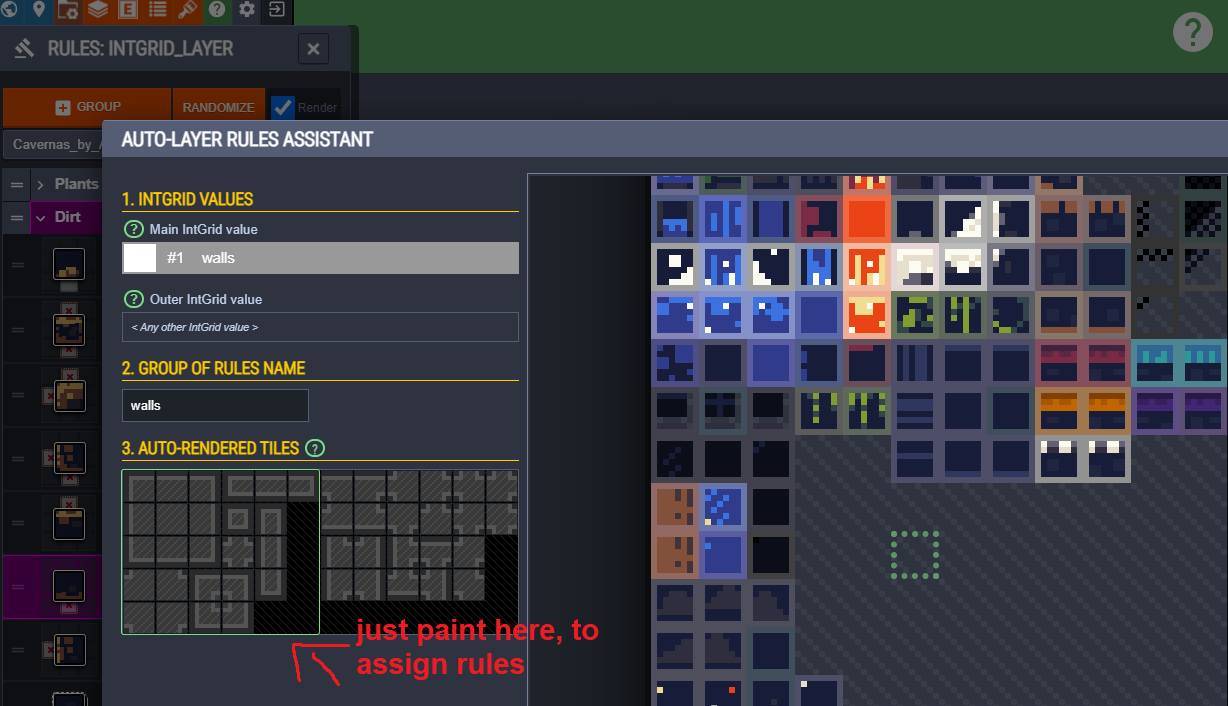
If it’s useful to you @rustum , we use RuleTiles extensively in our current production (10 person ish team, 3 year production), and we found the way you edit them so inadequate that we wrote a complete UI replacement.
Our rule tiles almost 500 different sprites, many with unique rules, some with shared rules. There’s also a few variants of each rule tile (one for sloped tilesets, one for blocky).
Understanding and having an overview of the rules would have been impossible if it was just a long list of rules as in the built-in RuleTile UI. We tried to do that with much simpler rulesets than we have now, and our brains broke. Making the rule override tiles was the most tedious exercise in drag-and-dropping I have been through in my life. That could be solved by automation, but the core UI issue couldn’t.
The core insight that made things a million times better was to make a UI where you see the whole texture you’re turning into a rule tile, instead of just a list of sprites. We click a sprite in that texture to select it, and then get a UI for what rule that sprite should have.
This is the inverse of the built-in workflow, as we select sprites and assign rules instead of selecting rules and assigning sprites:

This required us to implement a restrictions that might not be desirable for everyone: each rule tile has a single texture. No having a rule tile spread over several textures. The artists did this on their own anyway, so it wasn’t really a problem for us, but maybe if you’re putting these together from stuff off the asset store it might be a problem?
Anyway, this was a huge win as we were able to understand our rules in the context of the image, and we ended up with a really good workflow for designing the rules.
We also set up the whole way of sharing rules completely differently, as we found RuleOverrideTiles very cumbersome and essentially something that came out a poor initial design. We have instead split the set of rules and the set of sprites into two different types, so the rules can be reused. Here’s a simplified code overview:
// Very, very simplified version of how the built-in RuleTiles and RuleOverrideTiles work:
class RuleTile : TileBase {
    List<TilingRule> tilingRules;
}

class TilingRule {
    List<int> neighbors; // rules
    List<Sprite> sprites; // sprites
}

class RuleOverrideTile {
    RuleTile ruleTile;
    Dictionary<Sprite, Sprite> replacements;
}

// Very, very simplified version of how our replacement works:
class RuleSet {
    List<Rule> rules;
}

Rule {
    List<int> neighbors; // rules
    List<int> spriteIDs;
}

class RuleTile : TileBase {
    RuleSet ruleSet;
    Dictionary<int, Sprite> spriteForID;
}
This makes it very, very easy to create several rule tiles that have the same rules, but different textures. The ID is simply generated from the x/y position of the sprite in the texture, and then we’re off to the races. We have a button that the artist can press to set the correct settings on the texture, create a new RuleTile, and assign the RuleSet and spriteForID dictionary.
There’s also a slight memory win. In the built-in case, you always need the sprites for the original RuleTile loaded in order for the RuleOverrideTile to be able to resolve it’s rules. Since we’re sharing the rule asset instead of overriding sprites, we don’t need that at all.