The issue is caused by transform inheritance, here is my workaround:
Create a second spine bone to act as a proxy.
Make this proxy bone to be a sibling of the hips instead of child.
Constraint this bone to copy transforms of original spine bone in your animation.
Then in Unity, after applying upper body mask in a second Animation Layer, make the original spine bone follow rotations of the spine proxy bone (with a script for example).
Exactly what I did, but just in Unity, I duplicated animator and bones and I use code to sinc both animators (they are exactly the same, but the proxy one has no avatar mask on upper body layer).
I also adjust the input with vector3.Dot() to assure the player can still play the correct move animation even if they are spinning.
I do love your anims, dont you have a discord channel (the invitation links are broken to me)?
Also, do you have any free pack for basic locomotion that includes strafe where the player is looking forward in all strafes? like this:
Yes, there are 8 directional running movement animations in this free asset: Human Melee Animations FREE. And I just added left/right strafes also to the same asset. Using the run animations along with the Strafe02_Left/Right instead the Run01_Left/Right ones, I think you should be able to achieve the same movement motion of the V Rising character.
These animations already have the spine proxy bone/joint with the animation data of the original spine, so you just need to apply the upper-body Avatar Mask on a new Animation Layer, and making the hips child spine bone (not the proxy) follow the spine proxy bone. I do this with this simple script, but you can make your own, it just copies the proxy bone rotation and applies it to the original spine bone. Check the example scene included in the asset, all character prefabs and Animator Controllers are already configured with the Spine Proxy and are ready to be used with upper-body masks.
If your animations do not have the spine proxy bone you will need a way to gather the original spine bone world (not local related to the hips) animation curves, store them and then apply them back to the original spine bone after the upper-body mask (in LateUpdate). This is why I recommend (if you have access to the animations source) to create this proxy bone in Blender or Maya rather than in Unity, and export the animations already with the spine bone rotations in the proxy bone (for example using a constraint).
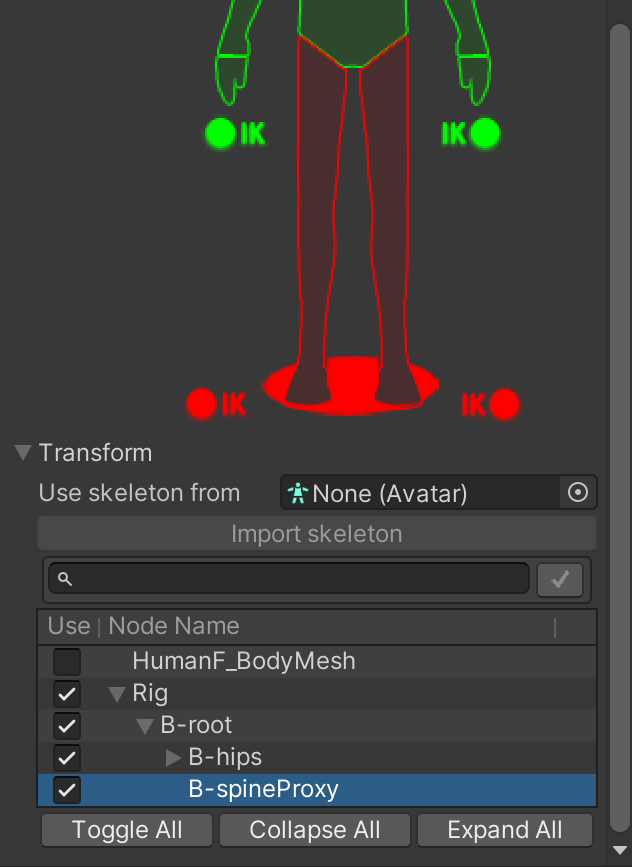
Also, make sure the masks you use cover the spine proxy bone in the Transform section:
Remember both the animation and the character playing the animation need the spine proxy bones structure (can be empty Transforms) in their rig.
Also, I’m not entirely sure what the Vector3.Dot function does in the V Rising 80 Level article — maybe it’s needed for some specific blend trees and might be unnecessary in some cases.
I really dont need the extra proxy bone, my system is working perfectly with 2 animator and the fact, I prefer not using another software to do that.
The link is working properly and Im in!
But the pack you linked is missing the proper forward left and right and backwards left and right with body completely pointing forward (also the foot should always point forwards aswell),
this is required to make the character move correctly after adjusting the input, so the player can face any direction and yet move to right player input direction.
You are right about what you say about the pack, I even noticed that the strafe animations don’t have the same speed as the run and walk. I will fix this as soon as possible uploading a quick update. Here is what I managed to do with the fixed speed of run strafes:
As you pointed out, it could be better with the missing animations for strafe forward-left, strafe forward-right, strafe backward-left, and strafe backward-right — all with the body and feet consistently facing forward. Adding those will take a bit more time, but I’m aiming to have them ready by the end of the week. Once they’re ready, I hope they help you or at least guide you toward the next step in achieving what you want.
And thank you for your feedback, helped me identify this strafe speed issue and pushed me to add these new strafe diagonal direction animations.
I’ve added the additional strafe animations to both the full and free version, you should see them after updating and importing via the Package Manager.
This is what I managed to do only with the animations and the Avatar Masks in the free version:
This is possible thanks to the Spine Proxy but would be great if you manage to get similar results without it.
I already did it, int the video above I have 2 layers: base layer running movement and a second layer runnning attack animation with avatar mask for upper body.
I even could that spinning atack keeping the right animation for move direction on legs using .dot()
Ah I see it now, so the upper body animation in your video looks the same when the character is not moving? And the the .dot() thing is to control lower body, to ensure feet follow the animation torso direction while keeping the input direction of the player.
Yeah, the attack animation is a root motion one from mixamo:
But now that you mentioned that you have those strafes anims on your free pack, I will check it out, because if it fits well I will buy the complete one, so I can make both showcase for other solo devs and my MVP based on your anims