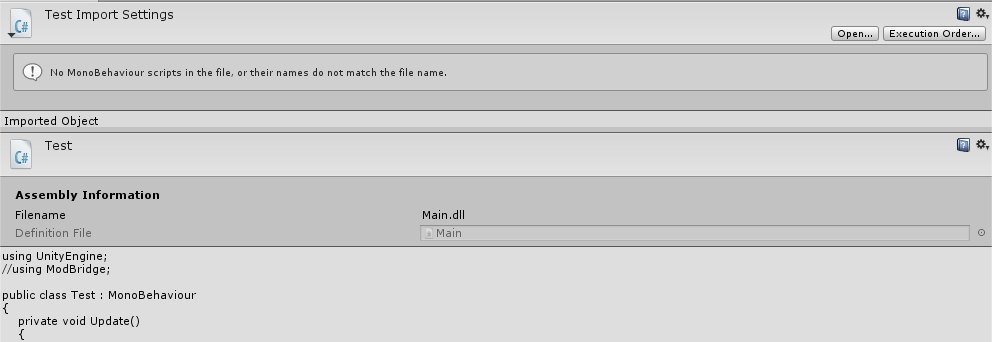
I am trying to use Assembly definition files, I create one and suddenly classes outside of that definition file are no longer able to see namespaces and classes inside of it.
I hope this is not the intended behavior, as this this makes it quite useless IMO. So, I hope its a bug.
Cannot seem to resolve it, any help would be appreciated.
If your scripts are in multiple definition files then you need to add the other definition files as references through the editor. Unity - Manual: Assembly definitions
Both. The 2nd screenshot I posted was simply creating an asmdef in the “ThirdParty” folder. No other asmdef files were in the project.
The first screenshot was with a “Main” asmdef file located in the root assets folder. If i ONLY create this file, it works. But then when I add another one elsewhere, suddenly unity doesnt see my scripts as monobehaviours anymore.
I have played with it for 4+ hours, playing with references, moving folders around, etc. Cannot get it to function as expected.
Having similar problem too with an assembly definition file in a ThirdParty folder and Editor folders. Works fine in the editor, but throws all sorts of errors when attempting to build to iOS.
I get 212 Errors similar to this: Assets/ThirdParty/EasyTouchBundle/EasyTouch/_Documentation/Cinemachine/Base/Editor/Editors/CinemachineBasicMultiChannelPerlinEditor.cs(3,7): error CS0246: The type or namespace name `UnityEditor’ could not be found. Are you missing an assembly reference?
Not sure if I should be removing the Standard Assets folder, or adding a Main assembly definition file, or removing all the editor folders from the Third Party folder? I tried excluding for iOS, but that wasn’t the answer.
My project is pretty huge, its an in progress game and I also have a few Third Party assets that are really large MB wise that I haven’t cleaned up. Whats the process for sharing stuff like that?
I might be able to replicate the issue in a blank project. Regardless, if the issue is not occurring in a new project, it doesnt matter because it exists in a more complete project.
EDIT: I will delete sounds, textures and meshes to make it smaller. How do I need to send it in?
When using asmebly definitions you need to also define what is an Editor assembly. Editor folders are not treated as special folders. So add another assembly def file into the Editor folder and set it to be Editor only. Then tell it to reference the other assembly so it can see the contents. https://docs.unity3d.com/Manual/ScriptCompilationAssemblyDefinitionFiles.html
If you can create a really simple one with a few scripts that would be idea. I suspect its just in the way you have set up the asembly files. You can submit a bug report if you think its a bug or just upload it here if its small enough and I can take a look.
Could we have a checkbox under “Any Platform” that reads “Editor only”? So that when you click “Editor only” it will deselect “Any Platform” as well as all other platforms except “Editor”.
Because right now the workflow for an Editor asmdef is:
Create Assembly Definition in Editor folder
(wait for recompile)
Uncheck “Any Platform”
Click “Deselect all” at the very bottom
Click “Editor” at the top (2nd item)
Apply
(wait for recompile)
Just feels unecessarly convoluted, especially since you have that convenience when assigning platforms to DLL files dropped into the project.
Happened to me quite a few times that I missed the “Editor” checkbox too and selected another platform instead. In a project where compiling then takes 10 seconds or so it’s particularly annoying.
Or why not use the existing Inspector for DLLs. Wouldn’t that work?
So I was thinking about setting this up in my project, but it seems like it might not be as magical as I initially thought. Am I right about this process?:
Create asmdef in the base directory (catch all).
Add asmdef files to every Editor directory.
Add asmdef files in subfolders as you see fit, but if classes within that subfolder reference another folder, you need to link those.
This means we need to edit asset directories, right? Rather than a catch all in the base directory working for important assets? It also means it’s not trivial to have an asmdef in my game’s directory, as I need to update it with every asset’s directory wherever they’re referenced.
Assembly definitions work better/easier if you can start out with 2 asmdef, one under /Scripts and one under /Editor, rather than having to check every Scripts subfolder for an Editor folder and having to reference that.
Once I have this, I start decoupling individual features. The idea is that eventually the asmdef in /Scripts and /Editor will be declared “DO NOT USE” and no .cs file should belong to them. To ensure that, I eventually switch off all platforms except for one we will never ever use (Tizen … WTF is that anyway? g). That way all new features will have to have an asmdef.
In the end you have about the same work with both structures, but there’s one big reason to avoid Editor subfolders:
Programmer creates new “feature” folder with scripts in it
Programmer creates asmdef for that feature
all is fine up to here
Programmer adds some “Editor” scripts to this feature-folder
Programmer does not add asmdef for Editor
all seems fine but … from now on builds will fail
The reason is that asmdef by default include “Any Platform”, which includes editor. So the above workflow will tend to create asmdefs that include Editor scripts which of course can’t be in a build.
Therefore separating Scripts and Editor in two folder paths makes it clearer that one needs to create an asmdef for both. And even if you forget to add an asmdef, the “catch-all” asmdef at the Script or Editor root folder will get these script files and thus builds continue to work. It’s only at the time where you need to reference a new feature in some other asmdef that you’ll find that this feature you’re trying to reference has no asmdef yet, so you’ll add one.
Thanks for the explanation! Though by ‘Assets’ I mean scripts downloaded from the Asset Store. They always have their own folder/file structures, so you now need to add asmdef files to them, or restructure them like you’ve suggested. But that seems like a nightmare for upgrading?
Contact the developer and encourage him/her to provide asmdef with the next release (I suppose these files will be ignored if the user uses an older version of Unity).
During the transitional period we have to do this ourselves. However I rarely need more than 10 minutes to prepare an Asset Store plugin for general release among our developers, including cleaning up file structure and suppressing warnings (sometimes even errors). Plus upgrading plugins is something we only do when we are convinced that it helps our work. Over the year we upgrade each plugin on average once or twice.
Having the same issue with my 3rdparties when trying to create a thirdparty.dll, mostly my regular main scripts (that will be added to Assembly-Csharp.dll don’t get to know what’s inside the thridparty dll.
My third party folder is not under the unity Script folder. Could it be something ?