We’ve recently upgraded our project to 2019.3 and the new asset database v2. One thing we’ve noticed was the project now takes considerably more space on our drives.
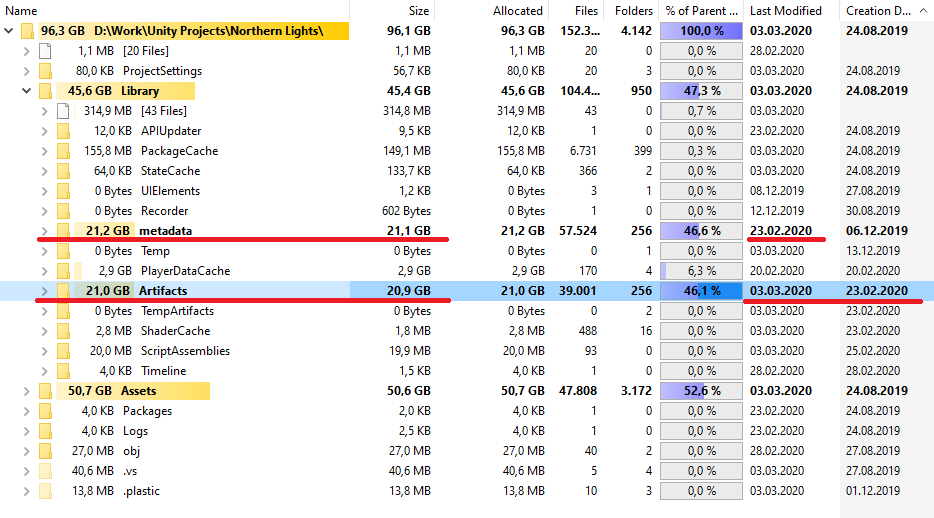
Doing some investigation I’ve noticed a new “Artifacts” folder is used (for storing metadata?) but the old metadata folder is still there taking space as well, while last time it was modified was before we upgraded to 2019.3.
Question is, is it safe to delete the old metadata folder when using the new asset database v2 or is it still used in some way? Asking because I don’t want to trigger a reimport as it would take a lot of time but also 20gb is a lot of wasted space especially on a 500GB SSD with many projects.
Well in the end I deleted the old metadata folder and Unity seems to not be affected by it, so if anybody else stumbles across this problem when upgrading to 2019.3, deleting the metadata seems to be safe and will save you some storage space.
If anyone from Unity is reading this, wouldnt it be better if the metadata folder gets cleaned automatically when upgrading to asset database v2 to avoid confusion?
!!! Don’t use AssetDataBase v2!!!There are currently bugs when moving scrips to another folder causing missing scripts. For a small test project not an issue. But for larger project a complete disaster. If you move a scripts folder with perhaps 200 attached scrips to another location, I’m sure you would not do any backup in this case previously. It’s impossible to reconstruct what scrips are attached to any gameobject anymore! If you like to work with any Unity version 2019.3.xxx rebuild to Asset Database Version 1.0. [Asset Database V2] GameObjects and Prefabs lose references to Assets when Assets are moved to a different folder] Unity Issue Tracker - [Asset Database V2] GameObjects and Prefabs lose references to Assets when Assets are moved to a different folder
Well we’ve been working with v2 with no obvious issues on our project for the past month so I can’t say much about this issue. We even did a project cleanup and folder restructuring recently where a lot of stuff got moved around in the project and nothing catastrophic happened.
If you’re only using ADBV2 its perfectly fine to delete the metadata folder, as that is the folder where ADBV1 stores its import results. Unless you plan to switch between V1 and V2 (which I don’t recommend ) then you can keep the metadata folder.
 But write a short note if this does not work any longer for you, please.
 ) then you can keep the metadata folder.