Is this intentional or bug?
1 Like
I believe Awake is called when the GameObject itself is activated and not necessarily just the script in question.
Ok, it just seemed odd to me how Awake is being called even though the script was never turned on. But if that is by-design then all is well. I would like to know for sure though, I’d hate to change all of my scripts to assume that it behaves this way when it was actually a bug. Then I will have to change everything back again.
How to use Awake(): Unity - Scripting API: MonoBehaviour.Awake()
It is intentional.
1 Like
How does that answer my question exactly? I don’t see enabled mentioned on that page.
It should, I thought it was, sorry.
Anyway, it’s logical that Awake() is called even if the script is not enabled. It wouldn’t work properly if it didn’t.
If the script needed to be enabled, Awake() would merely be a simple Start() and become completely useless. The first sentences of the description explain why:
1 Like
Intentional. Check the MonoBehaviour page. It mentions that one of a list of methods must appear in the script for it to have the checkbox allowing you to enable/disable it. Awake() is not in the list.
https://docs.unity3d.com/ScriptReference/MonoBehaviour.html
Additionally check the Order of Executions page regarding scene loading. It mentions that Awake() is only delayed if the GameObject the script is attached to is disabled. It makes no mention of delaying the method if the script is disabled.
https://docs.unity3d.com/Manual/ExecutionOrder.html#FirstSceneLoad
I verified this on my end with the following scripts. AwakeTestA was an object that was part of the scene at startup, and AwakeTestB was on a prefab that was linked up to AwakeTestA via the Inspector.
using UnityEngine;

public class AwakeTestA : MonoBehaviour
{
    public AwakeTestB prefab;

    private void Awake()
    {
        Debug.Log("AwakeTestA : Awake!");

        GameObject.Instantiate(prefab);
    }

    private void Start()
    {
        Debug.Log("AwakeTestA : Start!");
    }
}
using UnityEngine;

public class AwakeTestB : MonoBehaviour
{
    private void Awake()
    {
        Debug.Log("AwakeTestB : Awake!");
    }

    private void Start()
    {
        Debug.Log("AwakeTestB : Start!");
    }
}
1 Like
Expanding a little bit on @Ryiah 's excellent example above, I made a handy little test package you can run to play with the different bits in the editor. See attached unitypackage.
Here’s what the output looks like:
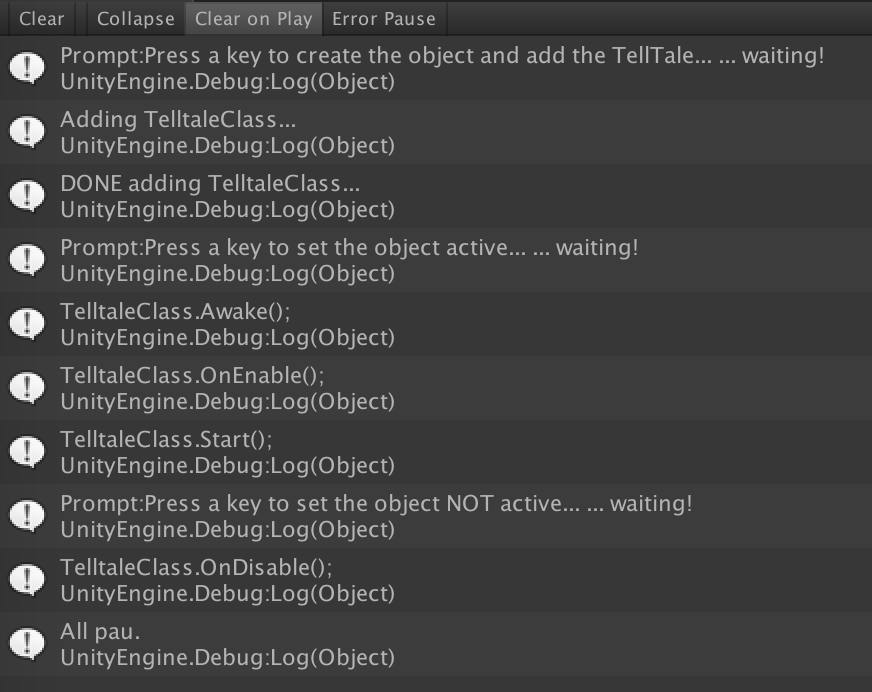
1 Like
I think this is accurate. Corrections welcome.
Unity’s object loader:
- create the object
- serialize known state of object itself (this includes the active/inactive flag)
- serialize all known state into all components (this includes the enable/disable flags)
- if game object is supposed to be active, activate the object per below
Unity’s activation behavior:
- if object has never been awoken before, call every Awake and mark the object as having been awoken once
- for every enabled component, start it per below
Unity’s component starter behavior:
- if enabled, call Start()
If a component is added later,
- construct the component, enabled or not
- if the object has been activated before, call new component’s Awake() (separate from the object activation process above)
- if the component is enabled, start it per above
The beginning is more-or-less right, but OnEnable and Start are a little off. OnEnable is called when the script is enabled. This can also occur during the creation process if the GameObject it is attached to is active and the script is enabled by default. Start on the other hand is a bit of an odd beast. Any script that is being enabled for the first time registers itself with a global start queue. At the beginning of each frame, Unity will process and then remove all pending Starts() in this queue. This has the sometime unrealized effect that Start will be called after OnEnable and at the beginning of the next frame. This means if you instantiate an object during Update(), the Start() function of any attached script will not be called this same frame and will instead be processed at the beginning of the next frame before Update() is processed.
1 Like
Yeah I forgot to include “call OnEnable” and appreciate your addition of the queue which has quirky ordering.
1 Like
It claims this in the docs now (Unity - Scripting API: MonoBehaviour.Awake()):
Awake is called even if the script is a disabled component of an active GameObject.