(Using Unity 5.3.6)
The problem is I cannot get a 0% smoothness when using the Standard Shader in metallic mode, even when the alpha channel of the metallic map contains pure “black” (0 value).
When switching to Specular mode, I then can then achieve pure blackness.
The portion of metal is covered in smoke (0 smoothness). But maybe the shader is setting the smoothness to a minimum value? Or is this something to do with fresnel?
METALLIC MODE

SPECULAR MODE
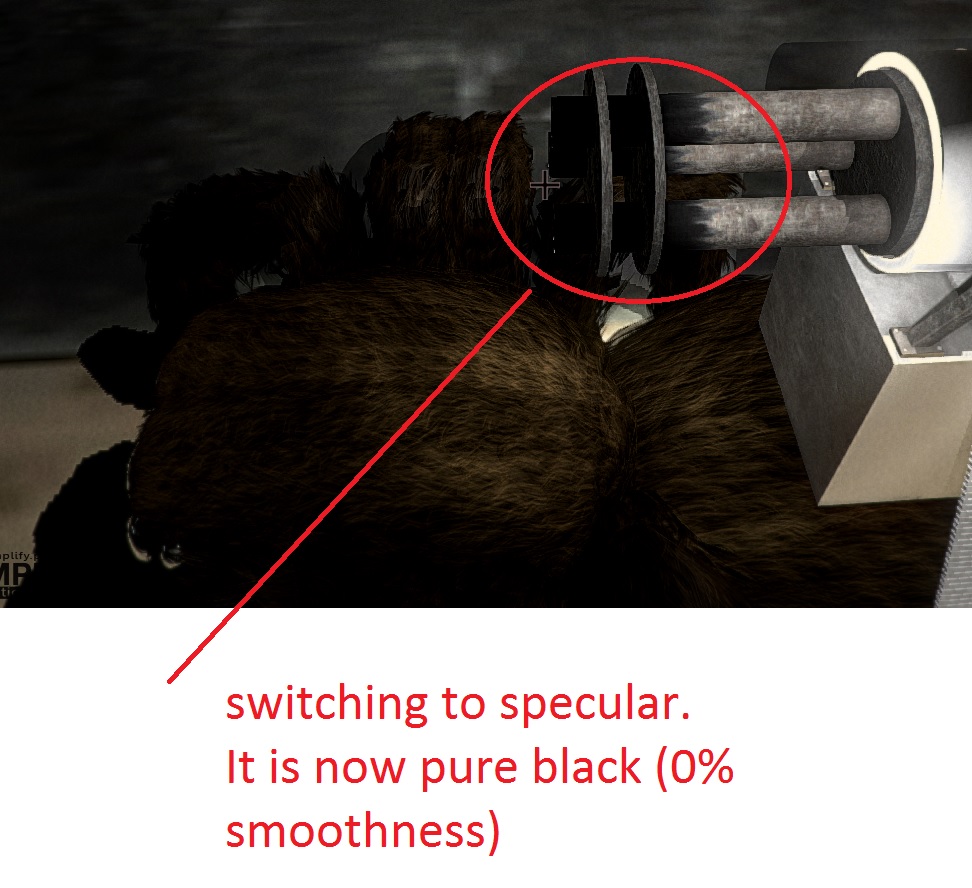
This has had me avoiding the metallic mode and opting for specular mode for this reason alone.
Am I overlooking something or is this how the metallic mode is supposed to work?
Edit: looking into this thread: 5.3 Standard PBS is Wrong Cannot Eliminate/Remove Specular - Unity Engine - Unity Discussions
It was said:
“In reality everything has specular, F0 is about 4% for non-metals. So that’s between 4% and 100% of light going into specular reflection, depending on fresnel effect.”
This is not true. “Vantablack” absorbs 99.965% of visible light.
source: Vantablack - Wikipedia
Edit 2:
According to that thread Unity adds an artificial value of 4% to the smoothness value in metallic mode. That’s high considering vantablack only reflects 0.035% of light.