Hello !
I am trying to build my game for iOS.
No problem so far for Android.
But then I switched platforms to iOS and my game won’t compile.
I’m using Unity 2022.1.14f1, iOS Build Support is installed.
Unity is running on a Windows 10 computer.
I have a mac also that I will use just to compile with XCode (this mac doesn’t have Unity).
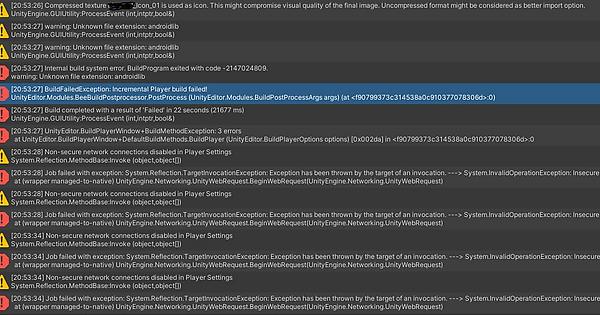
I get a few warnings and 3 errors :
warning: Unknown file extension: androidlib
UnityEngine.GUIUtility:processEvent (int,intptr,bool&)
Internal build system error. BuildProgram exited with code -2147024809.
warning: Unknown file extension: androidlib
warning: Unknown file extension: androidlib
System.ArgumentException: You're trying to copy to C:/Unity/MAGICAT_BUILDS/iOS/Libraries/Plugins/Android/GooglePlayGamesManifest.androidlib more than once. Previously from C:/Unity/CastAndBlockRPG/Assets/Plugins/Android/GooglePlayGamesManifest.androidlib/AndroidManifest.xml and now from C:/Unity/CastAndBlockRPG/Assets/Plugins/Android/GooglePlayGamesManifest.androidlib/project.properties
   at Bee.Core.CopyTool.Setup(NPath target, NPath from)
   at iOSPlayerBuildProgram.SetupTargetForInludedFile(IncludedFile file)
   at iOSPlayerBuildProgram.AddProjectPlugin(NPath path, NPath absPath, String compileFlags, Boolean shouldAddToEmbeddedBinaries)
   at iOSPlayerBuildProgram.SetupCopyPlugin(NPath pluginPath, NPath pluginDest, Plugin plugin)+MoveNext()
   at iOSPlayerBuildProgram.SetupCopyPlugin(NPath pluginPath, NPath pluginDest, Plugin plugin)+MoveNext()
   at System.Collections.Generic.List`1.InsertRange(Int32 index, IEnumerable`1 collection)
   at System.Collections.Generic.List`1.AddRange(IEnumerable`1 collection)
   at PlayerBuildProgramLibrary.PlayerBuildProgramBase.SetupCopyPlugins()
   at PlayerBuildProgramLibrary.PlayerBuildProgramBase.SetupPlayerBuild()
   at iOSPlayerBuildProgram.SetupPlayerBuild()
   at PlayerBuildProgramLibrary.PlayerBuildProgramBase.RunBuildProgram()
   at PlayerBuildProgramTypeWrapper.Run(String[] args)
   at Program.Main(String[] args)
UnityEngine.GUIUtility:processEvent (int,intptr,bool&)
BuildFailedException: Incremental Player build failed!
UnityEditor.Modules.BeeBuildPostprocessor.PostProcess (UnityEditor.Modules.BuildPostProcessArgs args) (at <f90799373c314538a0c910377078306d>:0)
UnityEditor.iOS.iOSBuildPostprocessor.PostProcess (UnityEditor.Modules.BuildPostProcessArgs args) (at C:/buildslave/unity/build/PlatformDependent/iPhonePlayer/Extensions/Common/iOSBuildPostprocessor.cs:508)
Rethrow as BuildFailedException: Exception of type 'UnityEditor.Build.BuildFailedException' was thrown.
UnityEditor.iOS.iOSBuildPostprocessor.PostProcess (UnityEditor.Modules.BuildPostProcessArgs args) (at C:/buildslave/unity/build/PlatformDependent/iPhonePlayer/Extensions/Common/iOSBuildPostprocessor.cs:515)
UnityEditor.Modules.DefaultBuildPostprocessor.PostProcess (UnityEditor.Modules.BuildPostProcessArgs args, UnityEditor.BuildProperties& outProperties) (at <f90799373c314538a0c910377078306d>:0)
UnityEditor.PostprocessBuildPlayer.Postprocess (UnityEditor.BuildTargetGroup targetGroup, UnityEditor.BuildTarget target, System.Int32 subtarget, System.String installPath, System.String companyName, System.String productName, System.Int32 width, System.Int32 height, UnityEditor.BuildOptions options, UnityEditor.RuntimeClassRegistry usedClassRegistry, UnityEditor.Build.Reporting.BuildReport report) (at <f90799373c314538a0c910377078306d>:0)
UnityEngine.GUIUtility:ProcessEvent(Int32, IntPtr, Boolean&)
Build completed with a result of 'Failed' in 22 seconds (21677 ms)
UnityEngine.GUIUtility:ProcessEvent (int,intptr,bool&)
Any help would be much appreciated !
Let me know if I can provide any additional information.
Thanks !