Cast ray from vector3 point to mouse position

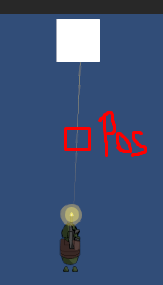
How do i cast ray from point to mouse position. I have bullet tracer that cast mesh from gunpoint to mousePos, if it hits collider it stops at hit.point. Somehow my ray goes thru mouse position in mouse direction.

    public void Shoot(Vector3 gunEndPointPosition, Vector3 shootPosition) {
        RaycastHit2D hit = Physics2D.Raycast(gunEndPointPosition, (shootPosition - gunEndPointPosition).normalized);
        if (hit.collider != null)
        {
            shootPosition = hit.point;
        }
        CreateWeaponTracer(GunEnd.transform.position, shootPosition);
    }

I’ve tried this code, but then my bullet tracer goes thru wall

    public void Shoot(Vector3 gunEndPointPosition, Vector3 shootPosition) {
        Vector2 worldPoint = UtilsClass.GetMouseWorldPosition();
        RaycastHit hit;
        if (Physics.Raycast(gunEndPointPosition, shootPosition, out hit, layermask))
        {
            if (hit.collider != null)
            {
                Debug.Log("Hit");
                if (shootPosition == hit.point)
                {
                    shootPosition = hit.point;
                }
            }
        }
        CreateWeaponTracer(GunEnd.transform.position, shootPosition);
    }

In your first attempt you correctly gave the raycast method a direction but you didn’t specify the distance and so it casts a ray with an infinite distance and hits the box. In your second attempt you incorrectly gave the raycast method a world position instead of a direction. You also used the 3D version of Raycast which won’t work in 2D. You’ll probably find Linecast more suitable for what you’re trying to do. You can give it the world positions instead of having to calculate the direction and distance.

Can you tell me the code how to specify distance for raycast2d, unitydocs website not working for me

Solution

    public void Shoot(Vector3 gunEndPointPosition, Vector3 shootPosition)
    {
        Vector2 worldPoint = UtilsClass.GetMouseWorldPosition();
        var dist = Vector3.Distance(gunEndPointPosition, shootPosition);
        RaycastHit2D hit = Physics2D.Raycast(gunEndPointPosition, (shootPosition - gunEndPointPosition).normalized, dist);
        //RaycastHit2D hit = Physics2D.Raycast(gunEndPointPosition, Camera.main.ScreenToWorldPoint(Input.mousePosition));
        hit.distance = dist;
            if (hit.collider != null)
            {
                //Debug.Log("Hit");
                //var spread = new Vector3(0.03f, 0.03f, 0f);
                shootPosition = hit.point;
                //shootPosition += new Vector3(Random.Range(-spread.x, spread.x), Random.Range(-spread.y, spread.y));
            }
        CreateWeaponTracer(GunEnd.transform.position, shootPosition);
        //CreateShootFlash(gunEndPointPosition);
        //ShakeCamera(.5f, .05f);
    }

Thanks for help, it works now!

The simpler linecast version:

    public void Shoot(Vector3 gunEndPointPosition, Vector3 shootPosition)
    {
        RaycastHit2D hit = Physics2D.Linecast(gunEndPointPosition, shootPosition);
        if (hit)
            shootPosition = hit.point;

        CreateWeaponTracer(gunEndPointPosition, shootPosition);
    }

You should also note, 2D physics uses Vector2 not Vector3. Unity has to convert it to a Vector2 before passing to calls that require Vector2. You’re better off using rhe correct type rather than having it implicitly converted for you because using Vector3 can lead to subtle and hard to track bugs in your code such as when calculating distance when Z isn’t zero.

1 Like