I am using a TMPro Dropdown.
When an option is selected, there is a check mark beside that option. I would also like to turn the text green. This is what I want to look like:

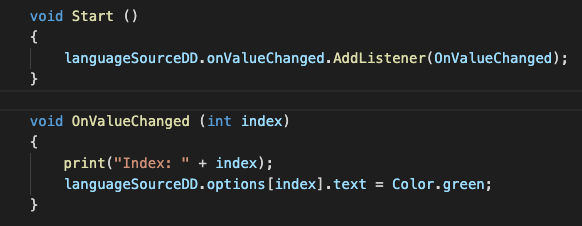
This is what I tried:

How can I do that?
I am using a TMPro Dropdown.
When an option is selected, there is a check mark beside that option. I would also like to turn the text green. This is what I want to look like:
This is what I tried:
How can I do that?
Dunno what library you use, but is there a .color property on that thing that has the .text property? The Unity UI.Text object has this…
Edit: just realized you are using the TMPro Unity Dropdown; my bad, I hadn’t tinkered with that yet. At least for the STOCK Unity Dropdown, the options do not have a color in them. BUT! Lucky for you the source for that package is available from Unity at:
https://bitbucket.org/Unity-Technologies/ui/src/2019.1/UnityEngine.UI/UI/Core/Dropdown.cs
I imagine the same goes for the TMPro version, but I didn’t dig that way.
In the original dropdown, you could clone that and make your own, say DropdownWithColor.cs and then you could modify the internal OptionData class, which holds information about each individual thing, to also include .color property, and make the extra plumbing the get the color transferred to the list of UI.Text objects that are transiently spun up when you open the list. It looks like the function that does this might be RefreshShownValue() but I didn’t dig much farther.
Note also there is a co-class called DropdownEditor that drives the custom editor for the DropDown; you may want or need to clone that as well to be an editor of DropdownWithColor… not sure.