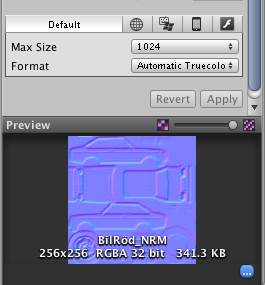
I was trying to change the texture format of a normal map. I did so in both the project inspectorpanel and the texture importer. But everytime i press Apply the the text on the preview window tell me that the fileformat is RGBA 32-bit. Does not unity 3.5 support this format or what?
Normal Maps at max are 32bit… You can change the texture settings in the override of the standalone… I usually using ARGB 32 which gives me the maximum detail… you are in the default tab, which tells unity what size to import the next texture asset… auto Truecolor. Unity supports 32bit textures…
i think the texture you are using is of more then 32bit so asked your designer to change the texture in 32bit,so that you can change the things.
because unity supports maximum of 32bit textures.
I honestly have no idea what you’re on about nikki.j, TS just either needs to get rid of his alphalayer for ‘truecolor’(24-bit) or stick with the current ‘truecolor+alpha’/rgba 32-bit.
The only image format i’d know with a higher density would be hdr, which unity converts just fine.
Thank you for all of your replies.
The reason im asking is because im trying to learn how to use mobile shader using Render to Texel, but the tool wont bake me any texture cause it tell me that the only alowed texture format is Automatic Truecolour, and the one im using is RGBA which is a not supported format.
Speaking of normals, does anyone know how, or any tool to convert a regular normal map into a Object-space normal? i heard thoose arent using as much perfomance to render.