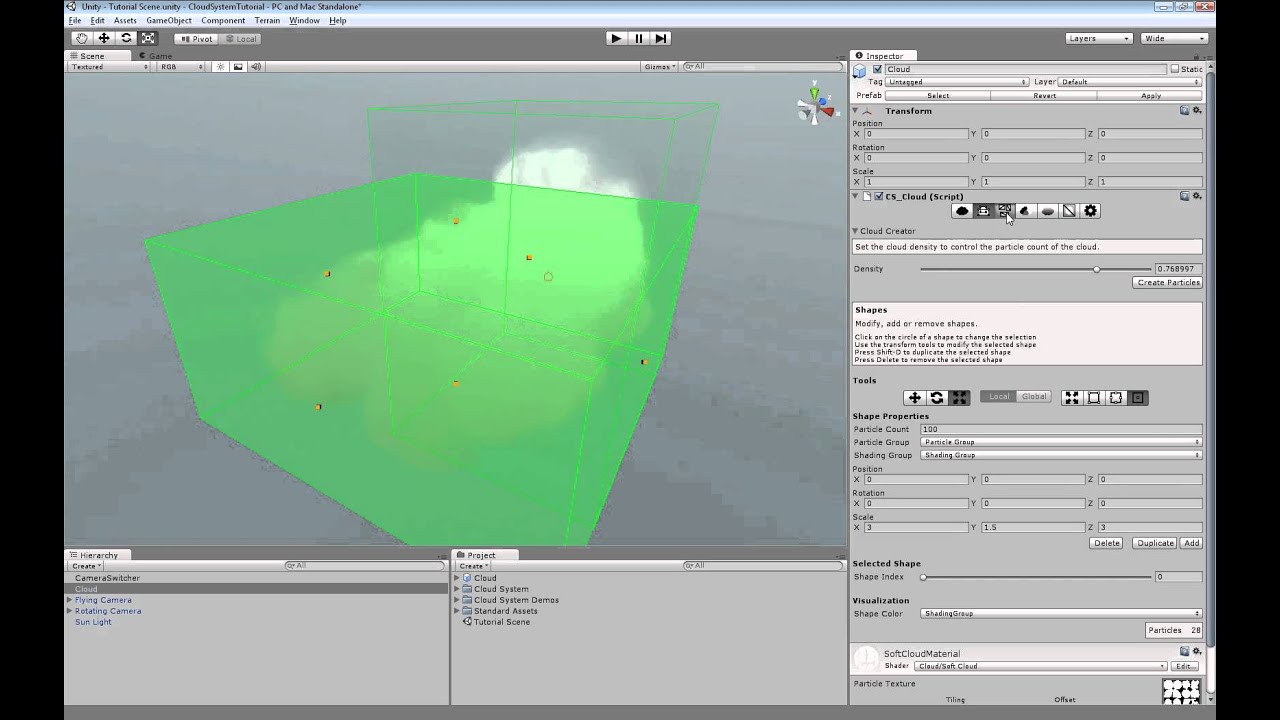
The Cloud System is available in the Unity Asset Store. It is an artist friendly and time saving tool to create billboard based volumetric clouds in Unity.
You find more information and web players on our webpage. If you have any question, suggestion, feedback, criticism or bug report about the Cloud System, feel free to post them here. We are happy to reply to every post!
As I already wrote, I am going to post videos and webplayers. I know that $150 is expensive, so you can be sure to get a well documented and tested product. And in the next few days there will be enough material for you to get a impression about the Cloud System.
Sorry, I just didn’t expect that the Cloud System would be accepted within a few hours :).
mrbdrm, the cloud code itself is not very complex. But it was extremly time consuming to create the editor scripts and make a usable workflow. That’s what makes the price.
fghajhe, I am not sure what you mean with collision. At the end every cloud is just a particle system. Something can fly through a cloud just like it would through a particle system.
As I already wrote, I am preparing web players and videos, sorry about the delay.
3dDude, which demo do you mean? I will make a video, in which all the particle counts are going to be mentioned. But if you tell me which one you mean, I will tell you the exact count.
The particle count always depends on what you would like to do with the cloud. Even if the Cloud System has a few cloud prefabs, its advantage is, that you get cloud modeling tools to create whatever shape you want, with the particles you want and also the shading you want.
Updated the first post. Now there is a short demonstration video! We are working on a tutorial, about how to use the Cloud System in Unity. Stay tuned!
Cloud looks nice, but $150 for something anyone can do easily in Unity, seems pretty expensive.
What exceptional advantages does this offer to warrant such price? Does it work exceptionally well in iOS/Android? Does it solve the problem of particle plane artifacts when geometry fly through it?
kerters, I am not sure if you mean physical collision or how graphical collisions look. The Cloud System does not have any physical simulation. For geometry collision, the picture that I am da Bawss has posted shows exatcly the result you can expect. If you have Unity Pro and are using Deferred Rendering, you may use a soft particle shader. Like this you may get the result from the right picture. Otherwise you get the one from the left picture. Even if the Cloud System comes with a soft particle shader, I can not offer support for it, as I don’t own Unity Pro.
I am da Bawss, the exceptional advantage is the editor script. You may have a look at the reference (the link is the first post). I am working on a video, that shows, how you can create the clouds. That’s where the $150 are. I understand you. So far it is not possible to see, why it is so expensive!
M_Stolley, yes, the Cloud System has very few drawcalls. At most 1 per cloud.
It has not been tested on mobiles so far. From a technical point of view, I see no reason, why it should not work. Everything that happens in the code at runtime, is not very special. But I can’t give you any guarantee about that.
It is impossible for me to make any prediction about the performance on mobiles. What I can say in general is, that the fastest renderer that comes with the Cloud System is the one, that is using Unity’s particle system. You may easily test the performance for that one on any platform. Use a transparent shader for a particle system - you have to use SortedBillboard - and emit the amount of particles that you may use for the cloud. That nearly matches the performance you are going to get with the Cloud System.
There are two more custom renderers. The slowest one gives by far the best result, as the color is not calculated per particle - as it happens with Unity’s particle system -, but for each vertex (have a look at the last scene in the video to see the difference). This renderer can also be used on low end machines, if neither the camera, nor the cloud is rotated (and no effects are applied). For that case you may also test the performance. Just place a mesh in the scene with a transparent shader. Each particle in the cloud consists of two triangles and four vertices. Just take care that the mesh has enough faces, such that you get an impression of the performance.
Long answer for a simple question :). It is not that simple to make reliable predictions. Just ask if you have further questions or need some clarification!
I watched the Tutorial more in depth but find the product pricey
at the price that is set now i wouldn’t buy on impulse just cause of the wow factor.
I would buy if i absolutely required it and had no other recourse after experimenting with other solutions or finding something else on the asset store. Still i do like the fluffy clouds and the layer effects and the vetex coloring is nice.