True Clouds is a plugin for rendering volumetric artist-driven clouds, targeted on mobile devices.
Asset Store | Documentation | Android Demo | PC Demo | Official Thread


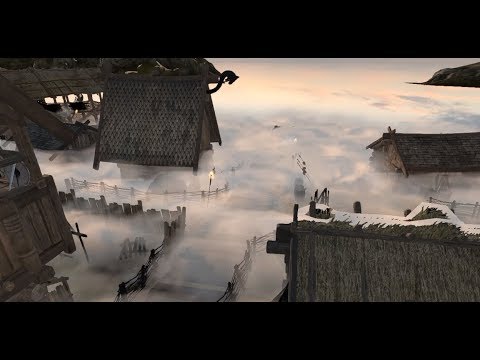
True Clouds is a plugin for rendering volumetric artist-driven clouds, targeted on mobile devices.
Asset Store | Documentation | Android Demo | PC Demo | Official Thread
Looks neat, but only you can say how much you should charge since only you know the quality/extent of your asset.
Thank you very much. I thought that it won’t be so easy)
Hello @marserMD
Interesting shader. I have no experience with your prior explosion package, but at least one person found it to be less than optimized based on his comment on the asset page. Which leads to believe the lag shown above isn’t from the capture. If you show the scene statistics while capturing - your point about lag from capture can be confirmed.
Since you’ve learned a lot since initially releasing the explosion pack, are you going to update the explosion pack to be better optimized?
I’ve used a free capture tool called active presenter and I’ve found if I increase the capture frames to 60 fps it seems to perform better.
Hi, @theANMATOR2b
I am terribly sorry for such a huge delay. I have worked hard on the shader to make it work on mobiles in full-3d, which was hard since mobile graphics commonly support only ARGB32, some of them don’t support depthTextures and so on. But I made it through. And ofcourse I worked on it’s quality.
I am not going to update TrueExplosions, but I might want to create a new explosion tool later. With better effects AND better optimisation.
Here is a video to show that my plugin works really fast on pc. On monday I will publish photos of android profiler. I don’t have the right cable at home to connect my phone) without framecapture and with max settings it takes 0.7 ms to render clouds on my laptop(old core i3 and nvidia gt530 m)
Hey, guys. I’ve sent the package for approval!
Plugin’s quality has majorly increased in past month. Here are a few pictures that I got easily out of my plugin:
Two years later there still is no volumetric clouds asset optimized for mobiles on the Asset Store!
That’s why I decided to finish my job. Previously my package was declined (most probably because of poor UX), but now I’m much more experienced and ready to bring it on:)
Update:
P.S. ETA on the asset store: 1 month + approve time.
Today I’ve fixed issues with deferred shading.
One step closer to publishing:)
Next on the schedule: adding an option to test depth less accurate, but faster to improve performance on low-end devices.
Figured out a way to drastically optimize depth testing without noticeable look change. I’m getting close to 6 ms for clouds rendering on my nexus 5x!
Fixed bugs related to noise reprojection.
Next on the schedule: better noise for density and better profiling for mobile devices. Unfortunately, the only way to correctly measure the impact of clouds rendering is to measure the difference between enabled and disabled rendering fps.

this is so cool! do you need beta testing? I will try it out on ipad mini 3, iphone 7 plus, apple tv 4 and apple tv 4k.
Yes, I do, good sir:)
I’m a bit lazy in setting up apple build environment, so if you would assist me in a few simple steps: build, check that everything is OK, send me performance statistics(will be shown on-screen), then you will receive a free copy of TrueClouds even before release and a promo code for free copy after it is released.
You might need to do this several times though because some bugs might occur:) But I won’t abuse your help, if something goes terribly wrong, I won’t use you as a build server:)
So if you are interested, just add me on skype (same nickname as here).
The sweetest cherry of any image effect is the support for edit-time preview.
Done
Nice work!
What does every GPU intensive asset need? An easy-to-understand built-in profiler so you could easily understand what impact on performance the asset makes. And why would it be hard?
Clock rate might change over time, especially on mobile platforms
Framerate is capped at 60 fps, so it is unclear what part of “56 fps” took clouds and what part was taken by, for example, skybox.
Some GPU tasks may or may not be executed asynchronously on different platforms.
But what matters to every one of us is the difference that the script makes.
So here is what I came up with:
Wait for some time to pass since app start-up.
Perform test.
Make 2 * N batches, each T frames long.
In N randomly selected of those, enable clouds rendering and measure performance.
In other N batches, disable clouds rendering and measure performance.
To address the 60 fps cap, add workload of 16 ms for each frame during testing.
After the performance info is collected, print out median and 90 percentile of deltas between batches with clouds enabled and batches with clouds disabled.
For my Nexus 6x it takes about 6.4-6.7 ms to render the clouds with all features enabled.
Now I can easily judge performance impact that certain features make.
And I will publish a demo app this week so you can decide for yourself whether you’d like to use my asset:)
What is crucial to an asset that makes heavy use of noise textures?
I believe that a convenient way to generate appropriate noise textures is a must-have because it is the simplest way to change the appearance.
So these are some pretty images I got out of my generator:)
http://momentsingraphics.de/?p=127
Som interesting article about noise
Thanks! Looks interesting. I might apply some of the ideas.
Late night teaser.
Created this scene in about a minute just by using a mountain from the Asset Store, a bunch of spheres and “True Clouds” plugin of course.
Development update:
I’ve fixed all known bugs, improved the interface as far as possible, cleaned up the project.
Most importantly I’ve fixed triplanar projection issues, which led to a huge quality boost.
ETA for submitting package – this weekend.


