Hi,
Every time I do some color sensitive work in Unity I end up wondering which part of Unity handles colors which way, and it’s always different. The color pickers for example are very inconsistent. And then the asset processing, shader graphs, vfx graphs, etc. always seem to randomly pick if they want to do gamma/linear conversions automatically or not. Basically every time you do color work, you have to be really careful about your assumptions.
Here’s an example about color pickers. The first property uses HDR color picker (through ColorUsage attribute) and the second a ‘basic’ (no HDR) color picker. Both are set to 0.5 RGB values. But as you can see, they’re show as different colors in the editor. (Basic is 128 and HDR is 188 if looked through this screenshot). Now this maybe might be as you intend it, I don’t know? Feels very wrong though.

Here’s another example. The gradient editor is HDR (through GradientUsage attribute). There’s a 0.5 gray value at the center. The gradient itself shows it at 128, the Color below it shows it as 188, the HDR color picker shows it as 188.
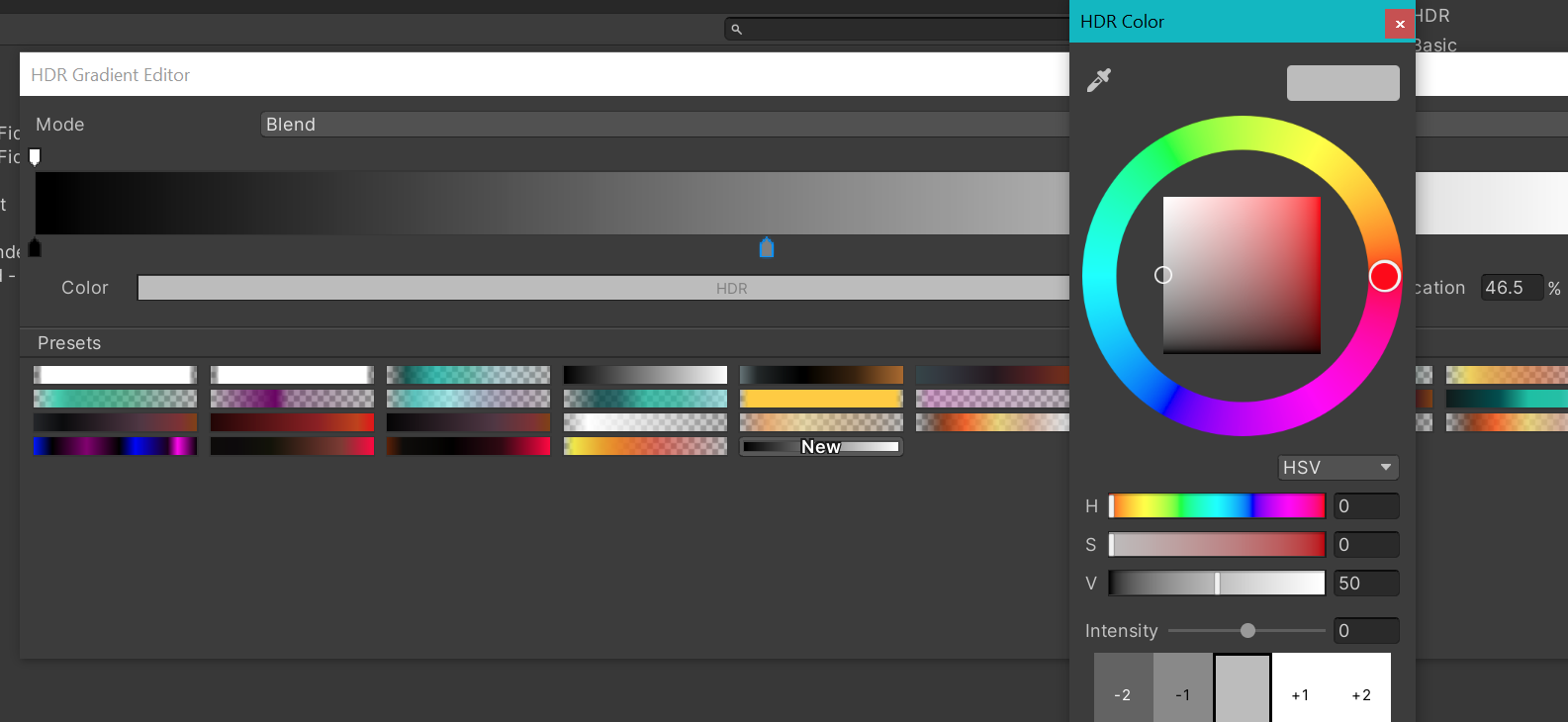
I’ve had issues like this with Sprites and TextMeshPro and so on and I’ve reported some of these as bugs a long time ago, but they’ve always been dismissed as “it’s the way it is”. So my question is, are there any plans anywhere to bring some consistency to color management or at least explain what the overal philosophy behind all this is. I would really appreciate some overal guidance here so I would not always be guessing.