[CommandBuffer] RenderTextures lag behind rendering

(Unity 2021 LTS)

Hello,

In my game, I have some objects that need to render outlines under specific conditions, and need to be able to animate those outlines within their shaders for special effects. It does work, but when rotating the camera, it is obvious the outline is lagging and is not in sync with object rendering :

I’m using a Command Buffer during the “beginCameraRendering” step, rendering the needed objects in two Render Textures, one with the Normals in the rgb channels, and one for the Depth. The result is then Blit with an Outline shader similar to a post-process. The final texture is used within the objects shaders :

void InitializeOnce()
    {
        m_BaseCommands = new CommandBuffer { name = "AzurineBaseCommand" };

        DepthRT = new RenderTexture(TextureSize.x, TextureSize.y, 16, RenderTextureFormat.Depth)
        {
            hideFlags = HideFlags.DontSave,
            filterMode = FilterMode.Point,
            name = "DepthRT"
        };

        NormalRT = new RenderTexture(TextureSize.x, TextureSize.y, 0, GraphicsFormat.R16G16B16A16_SFloat)
        {
            hideFlags = HideFlags.DontSave,
            filterMode = FilterMode.Point,
            name = "NormalRT"
        };

        OutlineRTH = RTHandles.Alloc(TextureSize.x, TextureSize.y, colorFormat: GraphicsFormat.R16_SFloat, dimension: TextureDimension.Tex2D, name: "OutlineRTH");

        Shader.SetGlobalTexture("_outlineRT", OutlineRTH.rt, RenderTextureSubElement.Color);

        OutlineMaterial.SetTexture("_DepthTex", DepthRT);

        RenderPipelineManager.beginCameraRendering += BeginCameraRendering;
        m_initialized = true;
    }
void BeginCameraRendering(ScriptableRenderContext context, Camera camera)
    {
        m_BaseCommands.SetRenderTarget(NormalRT, RenderBufferLoadAction.DontCare, RenderBufferStoreAction.DontCare, DepthRT, RenderBufferLoadAction.DontCare, RenderBufferStoreAction.DontCare);
        m_BaseCommands.ClearRenderTarget(true, true, Color.black);

        foreach (AzurineRegisterOutline azs in Setters)
        {
            if (!azs.Azurine) // Include renderer only if powered
                continue;

            m_BaseCommands.DrawRenderer(azs.Rend, NormalMaterial);
        }

        m_BaseCommands.Blit(NormalRT, OutlineRTH, OutlineMaterial);

        context.ExecuteCommandBuffer(m_BaseCommands);
        context.Submit();

        m_BaseCommands.Clear();
    }

The final texture is handled in the shaders like this:

The frame debugger shows that the command buffer happens before the camera rendering, so it should be OK:
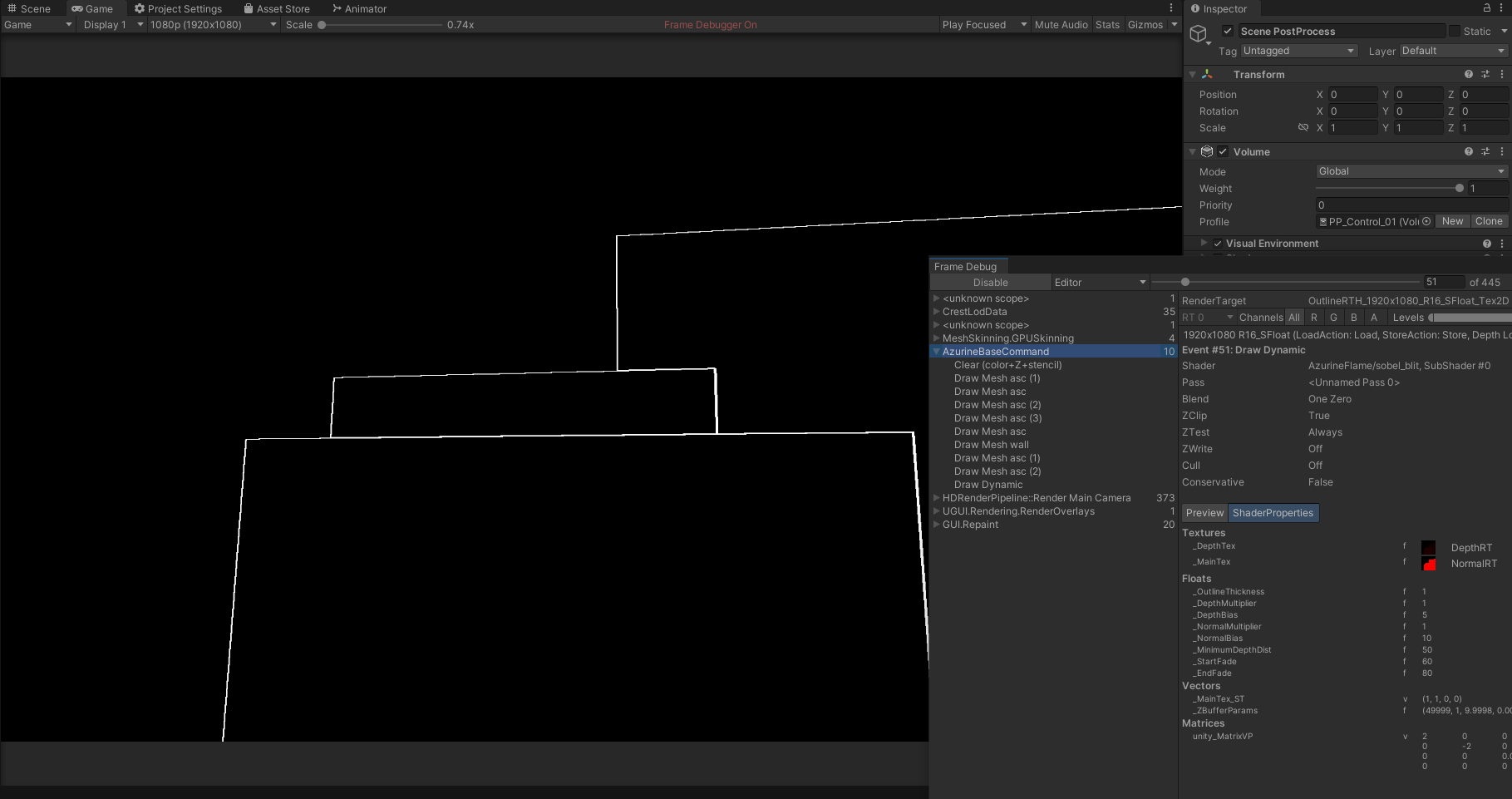
Does someone knows why the effect is lagging? Is there a better way to achieve the effect?

Thanks!

I tried to just display the final RenderTexture on top of the screen using a post process, I still have the issue.

This means it’s not linked to Shader Graph at least, but more probably on the write / read timing for custom buffers. The RenderTexture used by either ShaderGraphs or PostProcesses seems to be one frame late, even though it is recalculated at the beginning of the frame.

This is a serious issue for any custom effect I’m afraid.

It appears the issue is not linked to the RenderTexture itself but rather the camera movement. If I move the object, I have no issue at all and everything is rendered correctly, which makes me think everything is rendering in the correct order and is well synced.

I tried to deactivate the motion vectors in HDRP settings, and remove all sort of anti-aliasing, with no success.

I checked if the camera projection matrix is the same during BeginCameraRendering and EndCameraRendering, and it is the same indeed.

There is “something” when the camera moves that makes the objects render at the wrong place when using a CommandBuffer.

Since it doesn’t seem to come from motion vectors or the projection matrix, I have no clue :frowning:

Update : I switched for a Custom Pass, at the BeforeRendering injection point, with the same shaders and same RTHandle.

Everything works fine and there is no delay. I quite dislike using CustomPass because layers are shared with the Physics system and it’s a pain to rework collision masks when adding rendering layers, but it will do the works.

The issue may be linked to the fact that BeforeRendering CustomPasses happen inside the “HDRenderPipeline::Render Main Camera” step, while the BeginCameraRendering CommandBuffers happen before it. Maybe some camera data is lacking here.

Is it a bug or expected behavior ?

[quote=“ssurget, post:4, topic: 880704, username:ssurget”]
The issue may be linked to the fact that BeforeRendering CustomPasses happen inside the “HDRenderPipeline::Render Main Camera” step, while the BeginCameraRendering CommandBuffers happen before it. Maybe some camera data is lacking here.
*[/quote]
*

Indeed, between the BeginCameraRendering and the BeforeRendering custom pass, there is the camera setup for HDRP to prepare the rendering of the current frame. So before this step, all the variables in shaders are using the values of the previous frame.

Right now, I’d say that this is expected since the BeginCameraRendering even is supposed to be called before any camera-specific code is executed.

Ok, that makes sense. Thanks for the reply.

Do you know if in the future we will have different layers systems for general uses, Physics and/or CustomPasses, as we have for Light layers?

For now, nothing is planned regarding the addition of new types of layers. Note that it’s possible to use the rendering layers of the renderers to filter the objects rendered inside the custom pass, but for that, you need to write a C# custom pass and do the Draw manually.
There are some custom pass examples here that can show you how to do that: GitHub - alelievr/HDRP-Custom-Passes: A bunch of custom passes made for HDRP

Oh right! That’s good for me.
Thank you :slight_smile: