Hi!
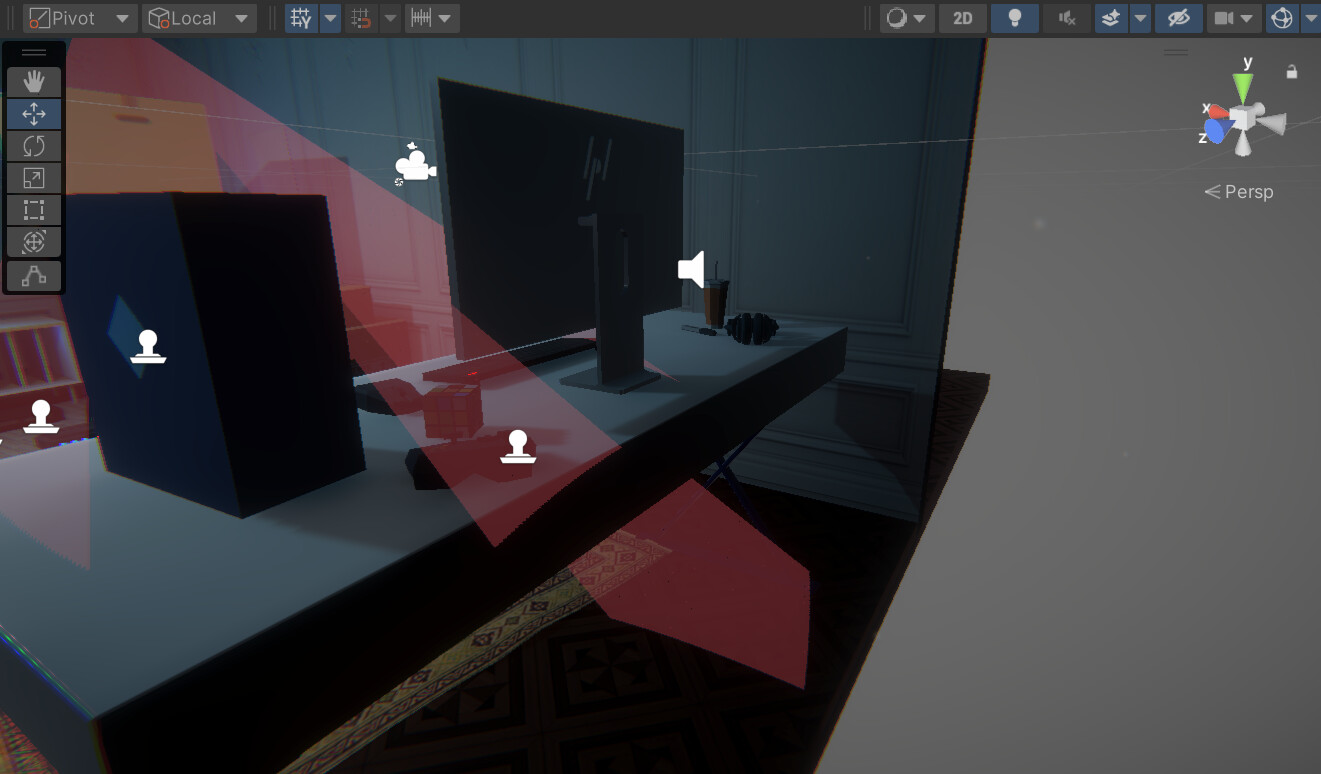
I created a camera in my game and have a transparent 3D cone mesh to show the player what the camera sees (see image). But the problem is that the cone goes through objects. Is there a way to either cut the cone mesh after it hits an object, or hide it the unwanted parts with a shader?
Ideally it will be computed at runtime (as the camera and also the objects in the scene will move), and be compatible with URP.
At the moment I have no idea how to achieve the desired effect 
Thanks in advance!
There are two ways you could do this from the top of my head. First one is tracing a single ray per fragment towards the camera and seeing if it intersects with geometry, if it does, discard the fragment, as simple as that. I am not entirely sure how to do that on Unity cause I’m not familiar with the unity ray tracing pipeline but there must be a way of doing this. It shouldn’t be really expensive since youre tracing a single ray, specially if you ray-intersection culling algorithms are good (which they should be in unity).
Another way if you don’t wanna trace rays is to do a depth map based technique. You’d render the scene into a depth attachment from the artifical camera (you can render into a render texture in unity to achieve that). In your fragment shader, output the distance between the fragment and the camera.
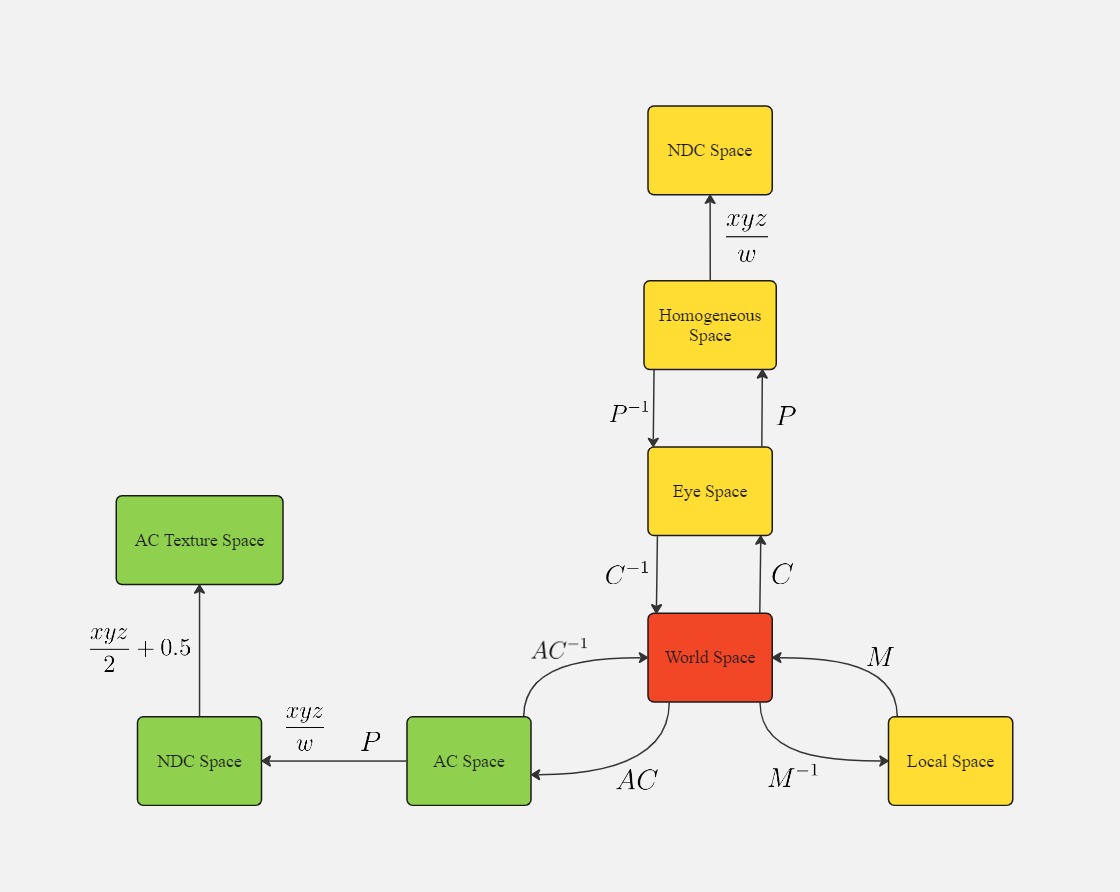
We may think of a brand new space abstraction to help us out, artifical camera space (AC space for short) that essentially is the Eye space from the artificial camera.
In the Cone shader, we would then sample this render texture, compare the sampled value (which is the distance from the closest material from the artificial camera) with the fragment distance from the actual render camera and discard/keep the pixel as needed. The tricky part is to get the coordinates to sample from that texture: You need to transform your vertices into an “AC Texture Space” and use those as UV coordinates.
Green does a better job of explaining (in a different context but the technique is pretty much the same) this technique than me in GPU Gems, in chapter 16.3.
Here’s a bit of how the transformations work in this case:
C stands for View matrix
Both techniques can be problematic, they might not look good because this is a hollow cone, honestly you’d have to see if it looks good. If this doesn’t look good I’d look into SDF interpolation, or generating custom mesh on the go with the CPU, maybe tesselation shaders if youre not targeting tile based renderers, or some volumetric logic.
I’m sure there might be implementations better than mine, so take my ideas with a grain of salt.
Thanks a lot for the detailed response!
So I took inspiration from your first idea and shoot linecasts from the artificial camera at an angle and then create a cone mesh, cutting the faces where the linecast intersects an object. Of course creating a mesh every frame is terrible for performance (I went from 160 fps to 100-120 with just 2 artificial cameras) but it allows me to visualize easily what the result might look like with the other techniques you mentioned.
Indeed it looks a bit weird especially when the cone intersects complex objects.
Here is my code for those interested even though I don’t recommend anyone using it (or at least not every frame) :
using System.Collections;
using System.Collections.Generic;
using UnityEngine;
using System;

public class ConeOfSight : MonoBehaviour
{

    public MeshFilter meshFilter;
    public float alpha = 0.30f; // tangent of the angle of the cone (or just the angle with the small angle approximation)
    public float dist = 5; // length of the cone

    public int subdivision; // number of subdivisions of the cone


    private Vector3 origin = new Vector3(0,0,0);


    private float theta(int i)
    {
        return i*2*MathF.PI/subdivision;
    }

    public GameObject cube;


    private void Update() {
        Mesh mesh = new Mesh();
        origin = origin;

        Vector3[] vertices = new Vector3[2*subdivision+1];
        int[] triangles = new int[3*subdivision];

        vertices[0] = new Vector3(0,0,0);


        for (int i = 0; i<subdivision; i++)
        {

            Vector3 target = new Vector3(-dist*alpha*MathF.Cos(theta(i)),-dist*alpha*MathF.Sin(theta(i)), dist);


            if (Physics.Linecast(transform.TransformPoint(origin),transform.TransformPoint(target), out RaycastHit hitInfo))
            {
                float new_dist = transform.InverseTransformPoint(hitInfo.point).z;
                vertices[2*i+1] = transform.InverseTransformPoint(hitInfo.point);
                vertices[2*i+2] = new Vector3(-new_dist*alpha*MathF.Cos(theta(i+1)),-new_dist*alpha*MathF.Sin(theta(i+1)),new_dist);
            }
            else
            {
                vertices[2*i+1] = target;
                vertices[2*i+2] = new Vector3(-dist*alpha*MathF.Cos(theta(i+1)),-dist*alpha*MathF.Sin(theta(i+1)), dist);
            }

            triangles[3*i] = 0;
            triangles[3*i+1] = 2*i+1;
            triangles[3*i+2] = 2*i+2;
        }

        mesh.vertices = vertices;
        mesh.triangles = triangles;
        meshFilter.mesh=mesh;

    }
}
It looks like if I want the cone to not be hollow I will have to code something similar to god rays, which I’m not sure I want to do at the moment (or find a way to “close” the cone)…
Anyway, thanks again for your ideas!
Yeah, this is a cool cpu based approach. Try messing with backface culling on your cone shader, might look better. Or messing with the shader visuals in general.
One approach to optimizing that is to recalculate the mesh only when needed, lets say, when the camera moves, or the objects around it move, etc.
GPU based approaches would eat that task for breakfast so I suggest you take a look into it, specially into ray tracing shaders in this case because i really think this will solve the issue with ease. Also I believe since the subdivision in a gpu based approach is a fragment, you wont need to worry about complex meshes