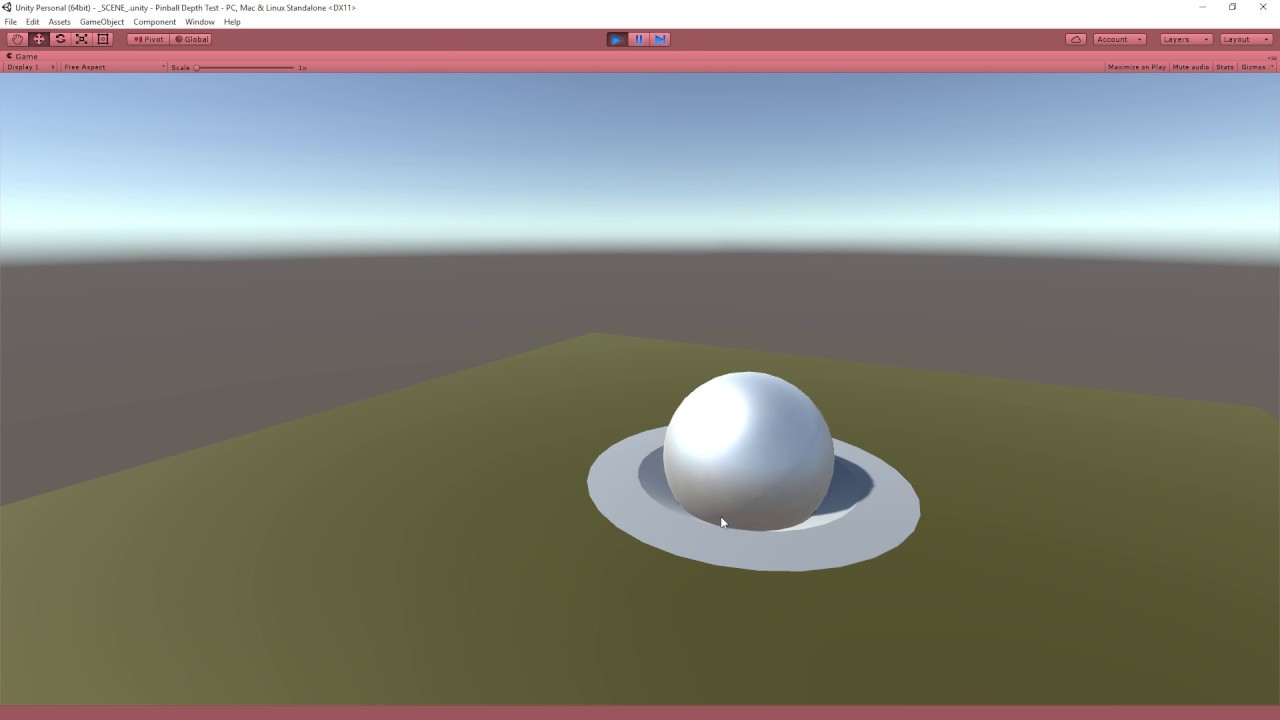
I’m trying to recreate the depth effect shown in the video
and essentially cut fake holes into geometry without modifying the mesh. I’m trying to do this in URP without luck, has this been achieved before? Is this something that isn’t possible with Shader Graph yet?
Anything to steer me in the right direction would be extremely helpful!
Hey @Elizabeth_LeGros - I’m a bit new to Shader Graph (and shaders in general). The idea is that anything where the depth mask is should basically just render transparent. In my attached screenshot - the hope is the center of the torus is transparent. Any idea how to achieve this effect or available resources to do so? Thank you!
I mean you can set the alpha of the center to 0 or modify the mesh to just have no center but I am a bit confused what you are trying to accomplish here; could you explain what the desired effect is? If you want to create a similar effect to quill’s then making the center transparent wont achieve that
The desired effect is I want to be able to have geometries pass through the center of the torus (or any shape that the depth mask creates). Think Hole in the Wall. The idea being that the actual mesh has to be created with the holes, but rather prefabs for different shapes can be placed at runtime on a surface. Hope that’s helpful, appreciate your help!
Cool idea that is very much not possible in shadergraph. There might be other ways to achieve this effect but would likely take both c# code and some clever shadergraphs with maybe some hlsl thrown on top.
It may be easier to achieve this effect by having the attached mesh have a shadergraph marked as transparent, and modify the alpha based on distance to a point in worldspace, and then use c# to attach the position of your torus to the material worldspace point
Oh that’s an interesting idea! I guess depending on the shape of the transparent parts it would require different shaders. ie one for a circle, one for a rectangle etc. I think I would also need different material instances, basically one per each transparent section I wanted on the surface. Will give it a shot this weekend, thanks a bunch for the tips
@Elizabeth_LeGros . I used the same method described in the video above to make holes in walls. It worked very well with the built-in render pipeline. But now, I a using URP, the depth mask is hiding the skybox even if the skybox is drawn before the depth mask in the render queue. Skybox queue is 1000(background) and the depth mask is at 1999(geometry-1.)
I simply used this shader (which I believe is the one you linked to) and set the ‘Priority’ of the object to be masked as 20.
Shader "Custom/DepthMask"
{
    SubShader{
        // Render the mask after regular geometry, but before masked geometry and
        // transparent things.
        Tags {"Queue" = "Geometry+10" }

        // Don't draw in the RGBA channels; just the depth buffer
        ColorMask 0
        ZWrite On

        // Do nothing specific in the pass:
        Pass {}
    }
}
This doesn’t seem to work anymore or I am just doing something wrong while misunderstanding how shaders and render queues work. I am using Unity 2020.3.29 SRP (built in not URP or HDRP) and the shader hides more than it should in the scene and gives a shimmering ghosting effect in the game view.
It seems its doing Z testing checking the distance of the camera to the texture or the pixel depth and rendering objects in a queue with geo at different levels. The terrain seems to be around 2101 the tree stump shader in my example is about 2001 and the grass at 2201 The fence comes back at 2450 but the tree foliage is invisible until 2451. I may be able to mess with queues but its still not working in the scene view? Any one know a better way to do this or should I just make an altered mesh that has a hole cut in it?
This writes to the Z buffer at Render Queue 1999. Regular geometry is drawn at Render Queue 2000, at which point they’ll avoid drawing pixels where your DepthMask shader has “drawn”.
Then for the geometry you want to render behind the hole you’ve cut out, it needs to have a Render Queue lower than 1999. Unfortunately, a lot of methods to achieve this are unavailable in URP. You can’t change it in the Shader Graph (at least from my attempts). You can view a material’s Render Queue in the inspector by clicking the 3 dots in the top right and entering Debug mode… However, you cannot change the number when you use URP.
Luckily, we can still use scripts to dynamically change the render queue at runtime!
I found this script in the comment section of a YouTube video:
using UnityEngine;

public class SetRenderQueue : MonoBehaviour
{
    [SerializeField]
    protected int[] m_queues = new int[] { 2000 };

    protected void Awake()
    {
        SetVals();
    }

    private void OnValidate()
    {
        SetVals();
    }

    private void SetVals()
    {
        Material[] materials = GetComponent<Renderer>().sharedMaterials;
        for (int i = 0; i < materials.Length && i < m_queues.Length; ++i)
        {
            materials[i].renderQueue = m_queues[i];
        }
    }
}
it does a great job as it also shows the results in the scene preview.
(the floor is flat, solid geometry. A cylinder with the DepthMask shader cuts a hole, and the model for the hole’s inside uses a regular lit shader, and uses the SetRenderQueue script with a value of 1998)
To summarize:
Use the DepthMask shader to cut a hole in regular geometry
Put the SetRenderQueue script on objects that you want to render behind the DepthMask.
Set the value of the script in the inspector to 1998 or lower.
Known issues:
It does not render properly on mobile devices. I found this post saying that it can be fixed by setting the camera’s property Clear Flags to “Don’t Clear”… However for some reason this camera setting isn’t available for URP, so if anyone has any ideas how to fix the rendering on mobile, feel free to share them!