Hi, I’m having the same problem too, double-clicking a line in the Console output no longer takes me to the relevant line of code. Nor does that action (or any other similar “Edit Script” action)do anything but open the relevant file. It no longer opens the Solution file or any Project files.
@davidnibi
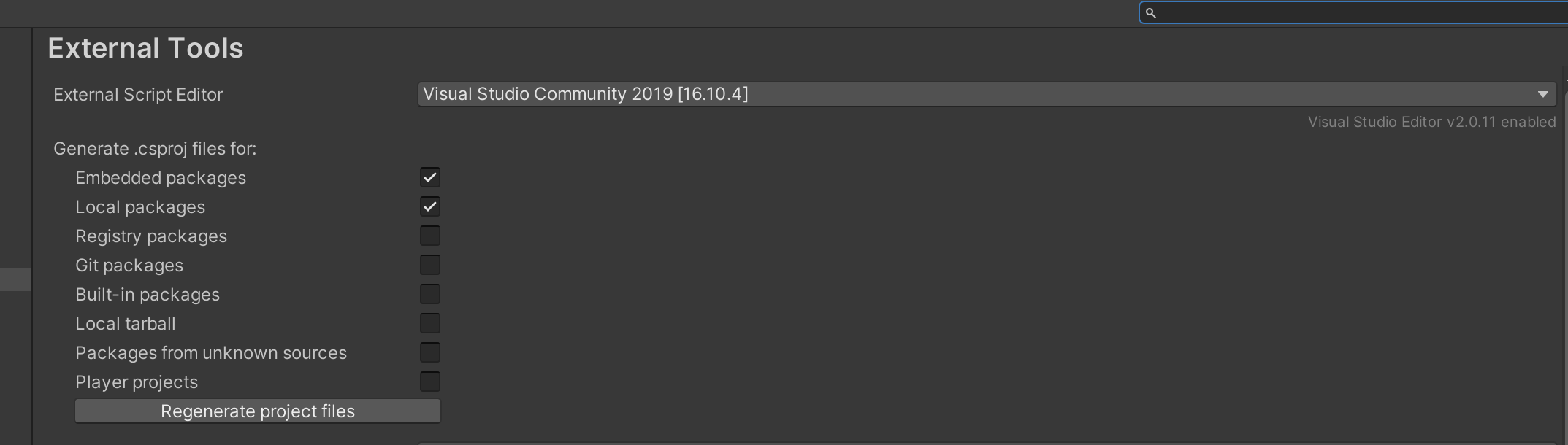
I didn’t quite understand what you meant by “reselect”-ing an .exe file, at first. Until I re-read what you said and went to Unity’s “Preferences/External Tools” menu and selected (in my case) Visual Studio 2019 (Community) and now it works for me as well. Just FYI for anyone that’s having the same issue.
Hey all, I had the same problem. I tried all that was mentioned above and it didn’t work. What did work though was clicking on the console settings (three dots in the corner of the console window) and making sure the Stack Trace Logging\Error\ is not set to “Full,” rather it should be “Editor Only.”
I just came across this issue myself and my fix was:
In Unity:
Click Edit → Preferences → Click external tools
Then at the top where it says External Script Editor, Choose the proper Visual Studio you want to use.
Mine was set on “Open by file Extension”
As soon as I set it to: “Visual Studio 2019”
It worked perfect.
For me what fixed it:
in console: first click the three dots in the right > stack trace logging > all > full
Then click play (now it won’t work)
then in console again: click the three dots in the right > stack trace logging > all > script only
Click play
Now clicking in the console should open the script and jump to the correct line.
Hey, had this issue after a random crash, turn out my game’s project somehow switched to “release mode”. Switching back to debug mode solved the issue. (unity2021.1)