Downsides to delegates/events

Hi everyone,

I’ve been a fan of using delegates and events for communicating different parts of the project without the need for parts to know about each other. This is pretty good for decoupling code and to have much more modularity. For a long time, I thought there was no downside to it.

The way I’ve been doing it so far for the most part is by having a scriptable object acting as a middle-man between 2 or more parts that have to communicate. This scriptable object acts as an “event handler” that gets called/triggered by the part that wants to transmit data and sends an event that other parts can listen to. This is good for an infinite amount of things, such as updating scores, UI, animations, and so on.

However, I’ve noticed that sometimes it doesn’t come in handy. For instance, if the part that triggers the event wants to perform a series of actions in sequence/order, then delegates or events (at least in the way I used them) don’t seem to be adequate. For example, imagine I want to do the following in order within a method: (1) perform action 1 > (2) perform action 2 > (3) trigger a specific event (that another part is subscribed and performs action 3) > (4) action 4. In this case, action 4 would be performed before action 3 no matter what, since the sequential order within the method has priority over the event that is been listened to in, most likely, another script. In fact, I’m not sure in which exact moment the action 3 will happen within the frame logic, which, in certain cases, could screw things up when order is crucial.

I just wanted to know whether you have faced these kinds of scenarios, what your stance is on this, and what practices you guys normally do for these cases.

Have a great day and thanks for reading!

An event is just a function call really at the end of the day. So action 3 would occur before action 4… unless action 3 was an asynchronous action (say it plays an animation over several frames… the command to start playing the animation would happen before 4, but the animation wouldn’t complete before 4). I’m assuming your “actions” are asynchronous otherwise this wouldn’t be inferring an alternate case.

With that said if I’m in a scenario where actions 1-4 are intended to happen in a direct sequence of 1,2,3,4 and in no other order. Than these actions are inherently tightly coupled regardless of being in another object in the scene.

Lets say the sequence is (and I’m describing an asynchronous sequence wher:

  1. Character A walks towards target position.

  2. Character A presses button

  3. Elevator rises up

  4. Character A steps onto elevator

These are intrinsically linked and the logic of Character A interacting with the elevator has to wait for the elevator. The idea of “decoupling” where the behave asynchronously of each other is not appropriate. Instead the logic of Character A interacting with it should know it has to wait.

The decoupling would come in that the elevator doesn’t need to know who interacted with it or for what reason. It just needs to know it moves and it needs to signal that it has completed.

The character on the other hand needs to know what it is interacting with, and that what it is interacting with needs to complete, and so therefore needs to know to wait for it to complete.

As for how this is done, I can think of several ways to do it. And honestly… events are low on the list of my personal example. Coroutines or async tasks are what come to mind, along with maybe an IInteractable interface.

interface IInteractable
{
    async Task Interact(Entity actor);
}

Of course this COULD be done with events/callback delegates. But it’s actually more annoying. Especially using this ScriptableObjects you refer to.

What I meant by this:
"
(1) perform action 1 > (2) perform action 2 > (3) trigger a specific event (that another part is subscribed and performs action 3) > (4) action 4
"

Is that (3) the trigger of the event happens instantly in the sense that it would happen after action 2 and before action 4, in an orderly manner. For instance, if step (3) was triggering the event in the scriptable object:

_eventHandlerSO.RaiseScoreUpdate(score);

and you have the following in your scriptable object (one of the many ways):

public UnityAction<int> OnScoreUpdate;
public void RaiseAudioCueEvent(int score)
{
    OnScoreUpdate?.Invoke(score);
    Debug.Log("Event sent");
}

Then indeed we would see the log "Event sent" and therefore the event being triggered exactly after action 2 and before action 4.

However, the exact moment when the interested party listens to this event and performs action 3 on their end is unknown to me. But what is sure is that action 3 will indeed happen after action 4, therefore we cannot rely on delegates or events if the intention is to have action 3 performed (in whatever script that listens to the event) before action 4.

My general rule of thumb is that anything responding to an event should be able to do so in any arbitrary order within that event. If that doesn’t reliably achieve the desired results then I need to re-think how I’m doing the overall task.

Some common solutions in those cases are:

  1. The actions should not all be responding to the same event. Often, I realise that one of my actions should raise its own event, and one of the other actions should happen in response to that new event. This prevents breaking the above rule.

  2. I might split my original event into multiple, which can then be raised in order.

  3. If I need specific control of the whole order of actions, it may be that a plain ol’ function is what I need rather than events. And in that case, to manage your decoupling and such there are other strategies you can use, as already suggested by lordofduct.

Events are super useful, but they’re not a one-size-fits-all solution to every situation.

1 Like

This is exactly the point of events. If the originating object needs to know how or when a responding object will take action then an event is not an appropriate solution. It sounds to me as if responsibilities aren’t being allocated clearly, or aren’t being allocated to the appropriate object.

Specifically, it seems as if you’re making your originating object responsible for controlling something that a responding object needs to be doing. (Edit: it could also be that you’re splitting something up more than it needs to be, or something like that.)

Why is this “sure”? It’s possible and even common for listeners to respond to events immediately. As lord already said earlier, an event is just a function call.

Delegates are fine when the order of the listeners doesn’t matter. In general they’re good when any number of other and generally unrelated/unconnected objects need to know when something happens.

If order is a factor then I would specifically build a system for that. Whether I want to do this via the inspector, or simply via code, will influence how I end up building it as well.

1 Like

This is exactly what I wanted to know: what you guys do when order matters while having interconnected scripts performing actions in sequence (maintaining modularity). Or common practices for such scenarios.

This is just my assumption based on what I saw using Unity events and delegates. If I report every action (for instance using logs), I’ll see how the sequence goes. In the example, you’ll see that the whole method gets executed first (actions 1, 2, and 4), and then you’ll see the actions from the other scripts reacting to the event reported.

I completely agree with this. What I found after using them a lot is that they are very useful, but they don’t fit every scenario, such as the one I mentioned when order matters.

Could someone elaborate on @lordofduct 's strategy using interfaces? For instance, in the example I provided using an event to report a score, how could I use an interface for instant communication?

An Interface is a way to say “this class has these functions”. For example, IExplodable might contain the function “Explode()”, and then you might have the classes Grenade, Car and Barrel all implement IExplodable even though they don’t have any common base classes. You can then have a variable of type IExplodable which can contain a reference to anything which implements that Interface, and call that function as you normally would.

Ok, but there is nothing inherent to events or delegates which causes any delay. It’s all up to the implementation of the responding objects and/or maybe the event system. If you’re seeing a delay in your logs then some code somewhere is causing that.

Well to answer this question and your one about interfaces, rather than having a system where you subscribe to delegates, outline the required information in a callback via an interface, and subscribe objects via said interface.

Really it’s just about writing the functionality you need to solve your use case. Up to you how versatile or simple it needs to be.

An ultra basic implementation might just be the following where you can specify the order of events:

public interface IEventHandle
{
    int Order { get; }
 
    void Invoke();
}

public class EventHandleContainer
{
    private readonly List<IEventHandle> _eventHandlers = new();
 
    public void RegisterHandle(IEventHandle handle)
    {
        _eventHandlers.Add(handle);
    }
 
    public bool UnregisterHandle(IEventHandle handle)
    {
        return _eventHandlers.Remove(handle);
    }
 
    public void RaiseEvents()
    {
        _eventHandlers.Sort(HandleComparison);
        int count = _eventHandlers.Count;
        for (int i = 0; i < count; i++)
        {
            var handle = _eventHandlers[i];
            handle.Invoke();
        }
    }
 
    private int HandleComparison(IEventHandle a, IEventHandle b)
    {
        return a.Order.CompareTo(b.Order);
    }
}

Then you just use instances of EventHandleContainer where needed. You could easily make versions of this with generic parameters.

Generally the more flexible the more complicated it gets. I have in my current project an event system that I more-or-less based upon the UI Toolkit event system. It’s definitely versatile but boy do I hate going through the code when I have to.

1 Like

I mean everything happens within the same frame, of course.

With the way delegates/events work in Unity, you can trigger the event at the beginning of the initial method, and then perform hundreds of operations within this method (the initial one), then you can do a hundred calls to other methods (within the same script and from other scripts), and let’s imagine that each of these methods has a hundred operations inside. Then we would observe that all of these operations happen first and in order, and only then we will have other parties reacting to the event that was triggered.

Just to illustrate:

  • Initial method:
    — (1) Triggers the event
    — (2) Performs 100 operations
    — (3) Performs 100 calls to other methods (within the same script or from other scripts)

Then, the sequence of operations is as follows:

(1) Event being triggered

(2) 100 operations being executed in order

(3) Call to method 1 executed
— (3.1) Operation 1 from method 1 being executed.
— (3.2) Operation 2 from method 1 being executed.
— . . .
— (3.100) Operation 100 from method 1 being executed.

(4) Call to method 2 executed

. . .

(103) Call to method 100 executed
— (103.1) Operation 1 from method 100 being executed
— . . .
— (103.100) Operation 100 from method 100 being executed

(104) The party listens to the event reacts to the event triggered in (1) and performs its actions.


Only after the above steps are completed will the listeners of the triggered event respond and execute their respective actions.

Unity’s execution order within a frame is detailed in the documentation, although I don’t remember whether they mention where delegates or Unity events are processed. I assume they fall under the ‘Game Logic’ phase, which happens after ‘Physics’ and ‘Input events’ but before rendering. Within ‘Game Logic’, the exact timing of when listeners respond to events depends on a schedule with which I’m not so familiar.

Thanks! So, just to make sure, if I want to update the score but the timing for it is crucial to other operations for whatever reason, I could implement an interface called, say, IScoreUpdate, with a function inside the interface (let’s say UpdateScore(score)). Then, within the original method, for action 3, I call the UpdateScore(score), to which the ‘ScoreManager’ script would implement the interface and method, and would perform their actions right there, before the original method performs action 4. Is that it? If so, I think it could be a good way to avoid having a reference to the ‘ScoreManager’ script and avoid having hardcoded references.

My strategy was specific to the asynchronous scenario I gave as an example. It may or may not fit the needs of your own as I’m unclear what your own scenario actually is.

You made this statement early on:

I point out that no, that is not true. If you call a delegate the code within the delegate will be ran immediately before moving on to action 4. That is unless the code in the delegate did something asynchronously (like start a coroutine, play an animation, perform an async Task operation) in which the code that starts these asynchrnous operations would occur immediately, and the completion would take time.

I then described a scenario that was asynchronous… waiting for an elevator. And how I wouldn’t use events at all for it but rather an interface describing an interaction system (because I’m describing a character interacting with a thing) that had an async Task as its return so that you could await that for a signal of the completion of the elevator animating to where it needed to be.

I would have to see the code you’re describing to tell you why you see that. But I assure you it’s not the event/delegate causing that out of order event, but rather whatever logic you have in the callback receivers of the event/delegate. That or you wrap your event/delegate in some weird logic… you did say you stick them inside ScriptableObjects, you may have some weird timing logic in there that delays the call of them.

1 Like

I can imagine!!! :hushed::hushed::hushed:

This doesn’t happen in my case, at least using Unity events. I haven’t checked it specifically with other types of events or delegates though.

I don’t think it’s to do with scriptable objects, because when you call functions inside scriptable objects, they happen immediately and in an orderly manner. This makes me think that, when we’re invoking the event within the scriptable object, it happens in the correct order, as I can confirm with the log “Event sent” right after invoking the event.

Regarding the operations on the other end, I’m not using coroutines, asynchronous operations, or anything that could cause a delay. All I’m doing is reporting a Debug.Log. So, the below would happen only by reporting logs and doing nothing else:

  1. I said I’d have to see the code to explain why, but that I assure you C# events/delegates are just function calls and behave like function calls. If your code is acting asynchronously, there is something else causing that which is NOT the event/delegate.

  2. now you’re talking about Unity events… like UnityEvent?
    Unity - Scripting API: UnityEvent

Yeah, that’s a completely different topic. But their logic still stands, the receivers of the event are ran before moving on to the next line of code.

Or are you talking about UnityAction, a thing you sort of referenced earlier:

UnityAction is just a delegate and therefore behaves exactly like delegates and has no asynchronous behaviour intrinsic to it.

For example if you have this code (demonstrating both event/delegates AND UnityEvent):

    public class zTest01 : SPComponent
    {

        public UnityEvent UEvent = new UnityEvent();
        public event UnityAction OnEvent;

        private void Update()
        {
            if (!Input.GetKeyDown(KeyCode.Space)) return;

            Debug.Log("Triggering");
            UEvent.Invoke();
            OnEvent?.Invoke();
            Debug.Log("Triggered");
        }

    }

    public class zTest02 : MonoBehaviour
    {

        public zTest01 Target;

        private void Start()
        {
            Target.UEvent.AddListener(_target_Handler1);
            Target.OnEvent += _target_Handler2;
        }

        void _target_Handler1()
        {
            Debug.Log("DID A THING 1!");
        }

        void _target_Handler2()
        {
            Debug.Log("DID A THING 2!");
        }

    }

2 different objects.

Run this and press space bar… and you’ll get this output:
9609440--1363103--upload_2024-1-28_20-30-46.png

Which is exactly the expected behaviour of both.

If you have somethhing where “DID A THING…” comes AFTER “Triggered”… then you have extra code causing a delay. It has nothing to do with events/delegates or UnityEvent.

2 Likes

Show us the code that’s called by the events. I use them regularly and they do not behave as you describe.

This isn’t relevant as they are not injected into the game loop. Delegates are just a list of functions to call, and this happens at the time you call the delegate. Unity Events are the same thing with a bunch of stuff for compatibility with serialization and the Inspector.

The rest of that paragraph is fine, but none of these approaches have any particular impact on when logic is executed. When you call a function, the function is executed. It doesn’t matter if you call it via a type-specific reference or an interface reference or a delegate or an event or reflection, it runs when it is called.

What is most likely happening is that the code inside your 3rd action’s listener doesn’t directly do what you want, but causes it to happen later.

That’s very interesting, thank you for the example!! I don’t have a lot of time right now to fiddle with this now, but this might be exactly what I’m looking for, although I’m not sure if it would work in my setup since your zTest02 class has to have a direct reference to the zTest01 class, which is what I’m trying to avoid.

Here’s my setup where I get the results that I was describing:

public class EventHandlerSO : ScriptableObject
{
    public UnityAction OnInvokingEvent;
    public void InvokingEvent()
    {
        OnInvokingEvent?.Invoke();
    }
}

public class zTest01 : SPComponent
{
    [SerializeField] private EventHandlerSO eventHandlerSO; // Assigned in the inspector

    private void Update()
    {
        if (!Input.GetKeyDown(KeyCode.Space)) return;

        Debug.Log("Triggering");
        eventHandlerSO.InvokingEvent();
        Debug.Log("Triggered");
    }

}

public class zTest02 : MonoBehaviour
{
    [SerializeField] private EventHandlerSO eventHandlerSO; // Assigned in the inspector

    private void Start()
    {
        eventHandlerSO.OnInvokingEvent += _target_Handler1;
    }
    private void OnDestroy()
    {
        eventHandlerSO.OnInvokingEvent -= _target_Handler1;
    }

    void _target_Handler1()
    {
        Debug.Log("DID A THING 1!");
    }
}

In which case, the order of events are:
"
(1) “Triggering”
(2) “Triggered”
(3) “DID A THING 1!”
"

OK… I’m going to clarify some things here because there is a lot of vocab/jargon getting tossed around by OP. And they’re tossed around in a manner that I see a lot of people on the forums toss around and conflate the things.

  1. event (keyword) - event is a keyword in C# that acts as an access modifier on members types as a delegate. It allows the scoped owner to add/remove/null/invoke, but only allows unscoped objects with a reference to the object to add/remove to it.
    event keyword - C# reference | Microsoft Learn

  2. event (concept) - the concept of an event is an indirect signal following what is effectively the observer pattern. In the observer pattern you have a subject/dispatcher and a observer/receiver. Observers register themselves with the subject, and when something occurs it signals to all observers that something had occurred. This is often called an ‘event’ because the something in question is… an event in time.
    Observer pattern - Wikipedia.

  3. delegate (keyword) - the delegate keyword is used to declare delegate types, or sometimes even used to define inline delegates of an anonymous delegate type. Declaring a delegate like following:

public delegate void SomeAction(int value);

Results in a type (similar to class or struct) that describes a function reference in the shape of ‘void (int value)’. If you declare a variable as the type ‘SomeAction’ it can only point at function that fit the shape of the delegate (note… delegates do support a level of variance).
delegate - Delegates - C# | Microsoft Learn
variance w/ delegates - Using Variance in Delegates - C# | Microsoft Learn

  1. delegate (object) - a delegate is a pointer to a function/method. It generally is given a type (see previous delegate keyword). When you have a delegate type, and you have a variable defined as it, and you reference a function that fits that delegate type. You now have a delegate object of that type of delegate. Just like you have classes, and then you have objects of type that class. Here you have delegates, and then you have objects of the type that delegate. Often we use these words interchangeable though so you may here people say ‘delegate’ when referring to the type, but also say delegate when referring to the object of the type of some delegate.

  2. unityevent - this is a specific group of classes from the UnityEngine library that implements an observer pattern that can be configured reflectively through the UnityEditor. While performing a similar purpose to C# event/delegates, they are not the same thing. They just happen to perform the same observer pattern principles, and can even have callbacks registerd via a delegate. But the ‘event’ keyword does not come into play at all. It is merely called UnityEvent for the relation to the concept of “event” rather than the keyword “event”.

2 Likes

Also worth noting that UnityEngine.UnityAction is literally just the same as using System.Action. There’s no functional difference between them as they’re basically the same thing and there’s nothing special about UnityAction.

2 Likes

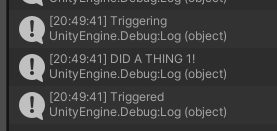
Are you sure you tested that?

Because I just did and I got:
9609476--1363106--upload_2024-1-28_20-50-7.png

2 Likes

I get the impression that you’re trying to do too much at once while still coming to grips with some of these concepts, and how Unity works in general.

I completely understand that you want to reduce coupling, but I wouldn’t worry about that until I could confidently make my code function as desired in the first place. Once you can do that, then start worrying about the more advanced concepts.