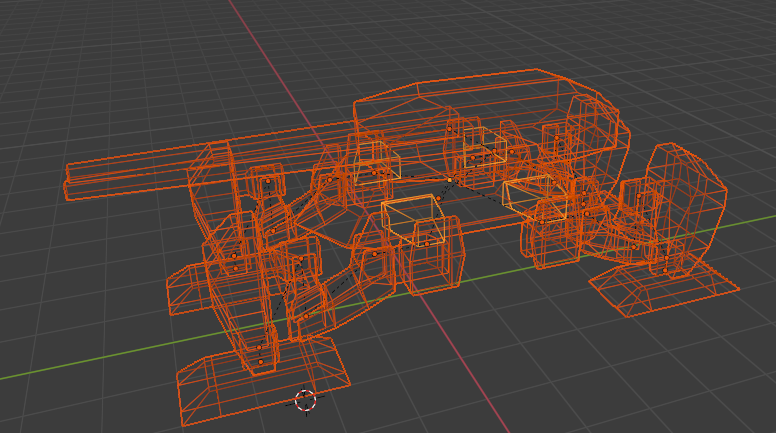
This is a set of meshes with a hierarchy. The meshes also include linked duplicates.
However, when I import it in blender, this happens to the root model.
Rotated around x Axis by -90, and scaled by 100.
It also makes dealing with local transforms very interesting, as they’re not really following unity axis conventions.
I also tired exporting as collada or obj, this results in a loss of hierarchy or loss of some objects (collada can’t apply mirror modifier and does not handle linked duplicates well.
This issue has always existed, as far as I know, but is there a way to fix it?
I mean, I COULD write my own export/import chain for custom file format, but the point of using unity is supposed to be to avoid doing that.
I don’t know for certain if it fixes anything other than the root node, but maybe you could use the provided script as a starting point for writing your own custom export. The whole project is basically just a single python script, from what I can tell.
Child nodes won’t be converted to unity orientation convention.
Oh, this is interesting. I’ll check it out.
If I decide to write my own tool I’d probably work without any boilerplate. I mean I already wrote several exporter tools in the past (for 3dsmax, for maya, and at least one for blender, except it doesn’t work anymore), I’m just sort of tired of doing that.
I know this thread is kind of old,
The blender documentation is full of “TODOs” when it comes to the FBX page,
but I found that the scaling will be normalized setting “Apply Scalings” to “FBX Units Scale”,
for the rotations, checking “Apply Transform” seems to work too.
If you think that’s a bad way to fix this, don’t hesitate to send a reply!
Yeees, a character with Armature exported from blender usually has an extra transform inserted after Root bone. Said transform often rotates scene on x axis, and can also scale it.
This can result in situation where if you export a character with a cloak and hope to make the cloak cloth, the cloak mesh will be 10x, 100x or 1000x larger than needed.
This fixed for me, From Blender 3.6, In fbx export window , select Apply Scaling->FBX All, Forward -Z Forward, Up is Y YO , check box on Apply Unit, User Space Transform, Apply Transform. Hope this help