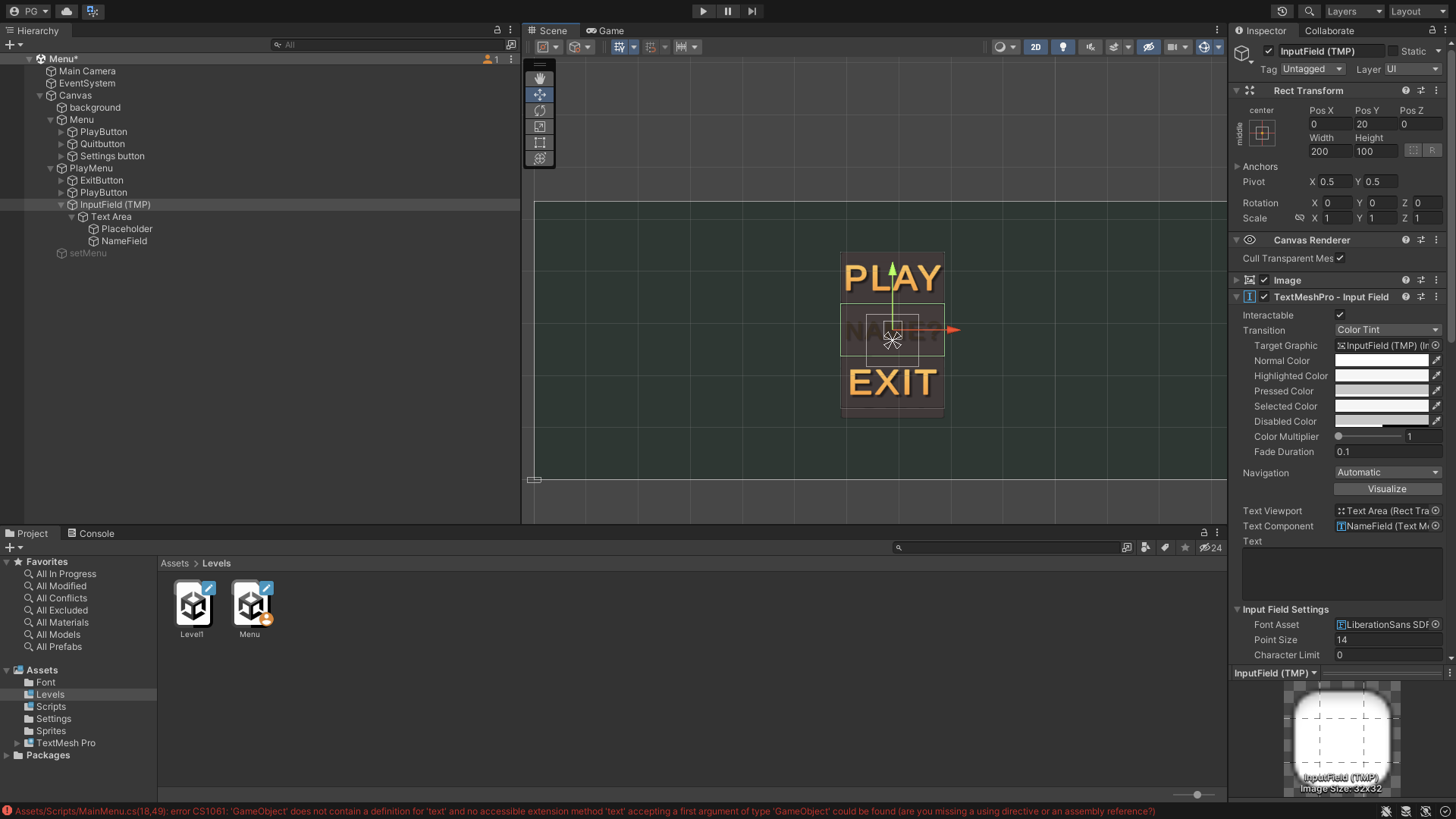
I’m a beginner on this forum and on Unity so I hope it’s the right section.
I’m trying to get the player’s name that the user will be writing in a InputField TMP and to store it into a variable that will be used to create a folder named thanks to username.
I’ve followed some tutorials on how to do It and I face an error that’s quite strange for me.
Here’s my code :
using System.Collections;
using System.Collections.Generic;
using UnityEngine;
using UnityEngine.SceneManagement;
using TMPro;
public class PlayMenu : MonoBehaviour
{
    private TMP_InputField tMP_Input;
    private void Awake()
    {
        tMP_Input = GetComponent<TMP_InputField>();
    }
    private void Update()
    {
        string inputText = tMP_Input.text;

        Debug.Log("Current name : " + inputText);
    }
    public void playGame()
    {
        SceneManager.LoadScene(1);
    }
}
Assets/Scripts/MainMenu.cs(18,49): error CS1061: ‘GameObject’ does not contain a definition for ‘text’ and no accessible extension method ‘text’ accepting a first argument of type ‘GameObject’ could be found (are you missing a using directive or an assembly reference?)
Does anyone knows if I’m on a right way to implement it or is there any easier solutions ? Or maybe I’ve done a stupid mistake that doesn’t allow me to have access to this component ?
Just to say : “PlaceHolder” inside the input field correspond to the text displayed when the user hasn’t started to write his username : “Name ?” and NameField correspond to the input field
Thank you all, hope I’ve been clear enough with my poor English skills
This error is talking about a completely different script called “MainMenu”. You’ve shared a script called “PlayMenu”. The PlayMenu script looks fine to me, at least from a compilation standpoint.
However you’ll need to make sure it’s attached to the same GameObject as the TMP_InputField for it to work properly, which doesn’t appear to be the case currently based on your screenshot.
Yes you’re right I’ve made this mistake, tried to change it and I face a new error. Here’s the code of MainMenu which is the script linked to the entire menu system while PlayMenu is just linked to “PlayMenu” component.
Here’s Main Menu code :
using System.Collections;
using System.Collections.Generic;
using UnityEngine;
using UnityEngine.SceneManagement;
using TMPro;

public class MainMenu : MonoBehaviour
{

    public static TMP_InputField tMP_Input;
    public static string inputText;
    private void Awake()
    {
        tMP_Input = GetComponent<TMP_InputField>();
    }
    private void Update()
    {
        inputText = tMP_Input.text;

        Debug.Log("Current name : " + inputText);
    }
    public void quitGame()
    {
        Debug.Log("Application quit sucessful");

        // Works only for built application
        // Application.Quit();

        // In editor mode, we use :
        UnityEditor.EditorApplication.isPlaying = false;
    }
Here’s the error :
NullReferenceException: Object reference not set to an instance of an object
PlayMenu.Update () (at Assets/Scripts/PlayMenu.cs:15)
doesn’t find the component TMP_InputField and I don’t know another syntax which can tell to the code : tMP_Input = the InputField inside PlayMenu component
I’m trying it your way… Still not working I’m not very common with this idea of NullReferenceException error even if I understand why it occurs I don’t know where it comes from, I’ve done same processes in order scripts and worked fine but idk why this one is giving me headaches