Hi all,
I’m attempting to create an effect for flames blowing in the wind, based off the techniques in this grass tutorial.

Right now, I have flames created by particles, and can deform them locally in the same way as the grass show in the tutorial. My problem now arises that I can’t deform the flames in their local axis, only the world axis - I need to attach the flames to a moving object and skew them in the direction of movement, so the direction of deformation needs to follow the local axis.
I can achieve this effect on a normal object - please see below for a simple graph constructing the effect, and a gif of a cube using this shader to deform along the Y, rotated around to demonstrate the local deformation.
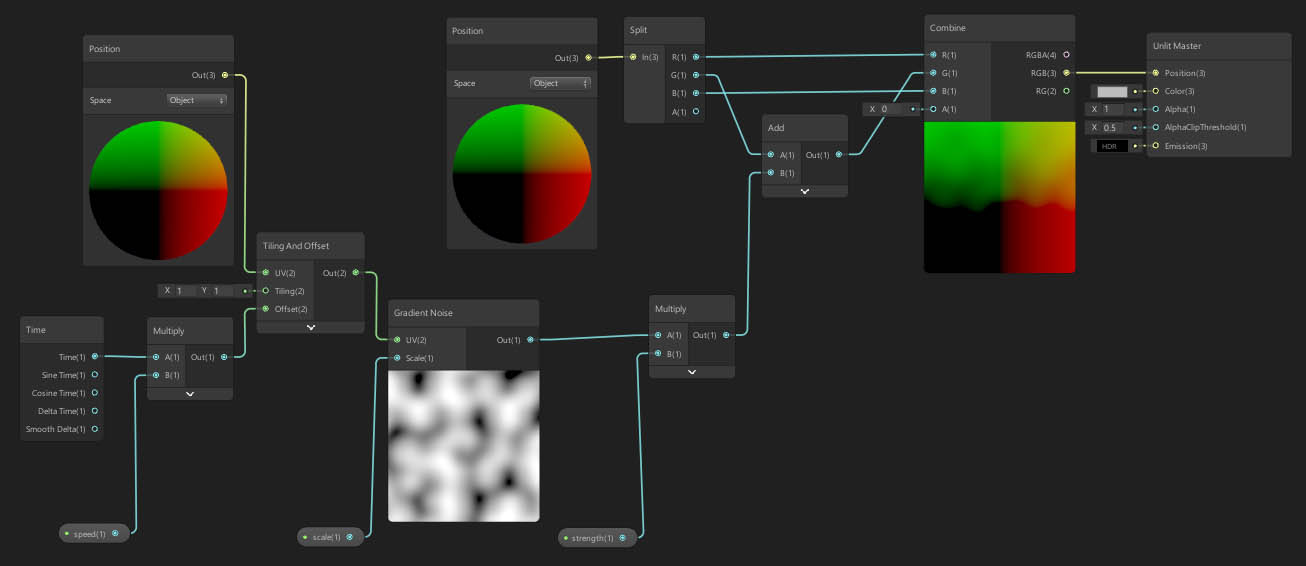

I can’t get the same results with a particle though - when applied the particle always resorts to deforming along the world axis. I suspect Custom Vertex Streams may be an avenue to investigate, but I haven’t been successful in getting positional information to come through to the shader graph - the documentation assumes scripted shaders only, not shader graph.
Any help or advice greatly appreciated!
Using Unity 2019.2.12
HDRP 6.9.2
Shader Graph 6.9.2