Hi,
Until Unity 5, the generated exe files had the product version/file version. Incremental.
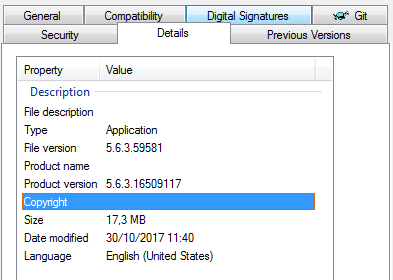
(exe from Unity 5.6.3)
Now, in Unity 2017, this information was moved to the generated DLL (UnityPlayer.dll) and completely removed from the exe (it doesn’t even have the version resource).

(exe from Unity 2017.2)
It completely messed my Installer Project, I can add RemovePreviousVersions, etc, but if the assembly does not have version in it, the installer either does not update or just remove the older version and can’t install the new file. So, basically, an existing app with the same exe file, can’t update it. It creates an immediate problem for me when updating the app from Unity 5.6 to 2017 and probably the problem will happen again from 2017.2 to future versions.
The easy solution is to replicate the version information from the dll to the exe. The perfect solution is to have this on Build Settings so the developer may set it.
I have submitted the issue and hopefully it can be fixed asap as I just can’t release my new version for PC. I’ve tried other solutions, but as the assembly does not even have the version entries, there is not even a way to change it.
If anyone can assist me or notify someone from Unity, that would be great.
Thanks!
Fernando