It has been asked a million times and I have followed some examples but they simply don’t work.
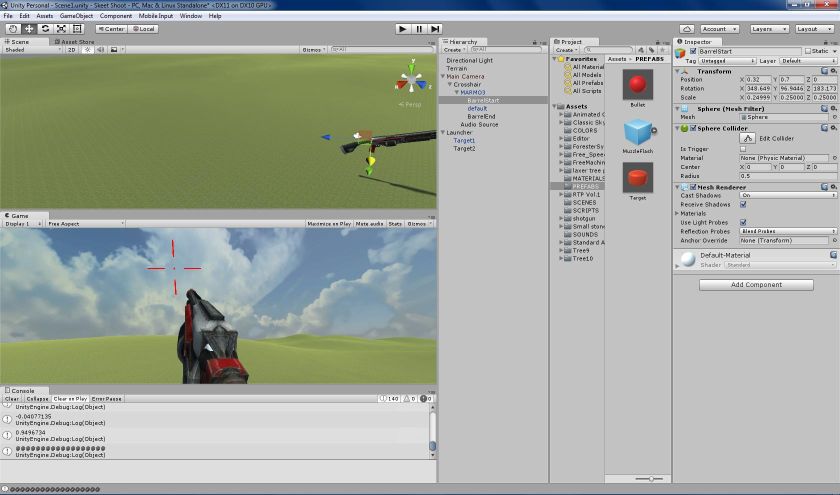
I have a sphere at the start of the gun barrel and a sphere at the end of the barrel.
public GameObject m_gmobjBarrelEnd;
public GameObject m_gmobjBarrelStart; (the white bit in the above image is this sphere)
It should be an easy matter to find the correct direction of the barrel but apparently not.
So can some one please tell me how to do it because it is totally eluding me.
This is the code I have:
using UnityEngine;
using System.Collections;

public class Crosshair: MonoBehaviour
{
    public Camera m_camobjCamera;
    public GameObject m_gmobjBarrelEnd;
    public GameObject m_gmobjBarrelStart;
    public GameObject m_gmobjMARMO3;
    public GameObject m_particlesMuzzleFlash;
    public GameObject m_prefabBullet;

    private float m_fRecoilAngle = 8.0f;

    // Use this for initialization
    void Start()
    {
        m_gmobjBarrelEnd.transform.rotation = m_camobjCamera.transform.rotation;
    }

    bool mouseMoved()
    {
        return (Input.GetAxis("Mouse X") != 0) && (Input.GetAxis("Mouse Y") != 0);
    }

    void doRotate(float fRotAroundX, float fRotAroundY)
    {
        float fGunAngleToHoriz = 0.0f;

        if ((m_camobjCamera.gameObject.transform.eulerAngles.x >= 0) && (m_camobjCamera.gameObject.transform.eulerAngles.x <= 90))
            fGunAngleToHoriz = -m_camobjCamera.gameObject.transform.eulerAngles.x;
        else if ((m_camobjCamera.gameObject.transform.eulerAngles.x >= 270) && (m_camobjCamera.gameObject.transform.eulerAngles.x <= 360))
            fGunAngleToHoriz = 360 - m_camobjCamera.gameObject.transform.eulerAngles.x;

        if (((fGunAngleToHoriz + fRotAroundX) >= -20.0f) && ((fGunAngleToHoriz + fRotAroundX) <= 40.0f))
        {
            m_camobjCamera.gameObject.transform.Rotate (new Vector3 (-fRotAroundX, fRotAroundY, 0));
            m_camobjCamera.gameObject.transform.Rotate(new Vector3 (0.0f, 0.0f, -m_camobjCamera.gameObject.transform.eulerAngles.z));
            m_gmobjBarrelEnd.transform.rotation = m_camobjCamera.transform.rotation;
        }
    }

    void doUnRecoilGun()
    {
        m_camobjCamera.gameObject.transform.Rotate (new Vector3 (m_fRecoilAngle, 0.0f, 0.0f));
    }

    void doFireGun()
    {
        if (Input.GetKeyDown ("space"))
        {
            const float fRecoilAngle = 5.0f;
            m_camobjCamera.gameObject.transform.Rotate (new Vector3 (-m_fRecoilAngle, 0.0f, 0.0f));
            Vector3 vectBarrelEndPos = m_gmobjBarrelEnd.transform.position,
            vectBarrelStartPos = m_gmobjBarrelStart.transform.position;
            Quaternion quartBarrelDirection = Quaternion.LookRotation((vectBarrelEndPos - vectBarrelStartPos).normalized);
            vectBarrelEndPos.y -= 0.6f;
            Object objMuzzleFlash = Instantiate(m_particlesMuzzleFlash, vectBarrelEndPos, m_gmobjBarrelEnd.transform.rotation);
            AudioSource audiosrcBang = GetComponent<AudioSource>();
            audiosrcBang.Play();

            GameObject gmobjBullet = Instantiate(m_prefabBullet, vectBarrelEndPos, quartBarrelDirection) as GameObject;
            gmobjBullet.transform.rotation = quartBarrelDirection;
            Bullet bullet = gmobjBullet.GetComponent<Bullet>();
            bullet.Fire(m_gmobjBarrelEnd);

            Invoke("doUnRecoilGun", 0.05f);
        }
    }

    void doMoveGun()
    {
        const float fSpeed = 8.0f;
        float fRotAroundX = 0.0f,
        fRotAroundY = 0.0f;

        if (Input.GetKey("left"))
            fRotAroundY = -fSpeed;
        else if (Input.GetKey("right"))
            fRotAroundY = fSpeed;

        if (Input.GetKey("up"))
            fRotAroundX = fSpeed;
        else if (Input.GetKey("down"))
            fRotAroundX = -fSpeed;

        if ((fRotAroundX != 0.0f) || (fRotAroundY != 0.0f))
        {
            doRotate(fRotAroundX, fRotAroundY);
        }
    }

    // Update is called once per frame
    void Update()
    {
        doMoveGun();
        doFireGun();
    }
}
You can use just one GameObject:
First make it a child of your gun and position it where you want the projectile to appear, then give it the same rotation of the barrel (so that the Z axis is pointing the direction of shooting).
Now the empty object you created will always point at the direction you want, in your script you can create a reference to it:
public Transform shootPos;
Then when instantiating the projectile you can use its position and rotation:
I have tried that as well and it does not work either.Apart from the fact that I can spin my gun 360 degrees around the y axis to shoot in any direction.
Regardless of what I do with respect to trying to set angles the projectiles are coming out roughly towards the centre of the screen (in the screen capture now above) and then arching over - I have a low muzzle velocity at present so I can see which direction they they are going in.
Is it something to do with the hierarchy of my gun related gameobjects? I.E. Angles related to child objects don’t mean the same thing as global world angles? There is clearly some major gap in my knowledge as to how angles work in unity.
Objects that are child of any other object have a global position AND a local position. The global position is the real world position of the object while the local position is relative to its parent (same for rotation).
So if the parent moves or rotates all child objects will follow its movement so that the local position stays the same, for example:
We have a cube that has a rotation of 90 degrees on the X axis,
a sphere that is child of the cube, also has a rotation of 90 degrees on the X axis,
the GLOBAL position of the sphere will be 180 degrees because its parent has rotated by 90 and the sphere itself is rotated by 90, if we consider the local position of the sphere, it stays 90 no matter what is the rotation of the parent.
This is also important in scripts:
// global
someTransform.position
someTransform.rotation

// local
someTransform.localPosition
someTransform.localRotation
From what I understand you set up the object correctly but got confused with the axes. I assume your projectiles consider the Z axis as forward but I can see on the screenshot that the X axis is lined up with the barrel, you should line up the Z axis with the barrel
It simply does not matter how I align the little sphere sitting in the end of the barrel of my gun - Z axis aligned with the barrel or X axis aligned with the barrel or any other random rotation.
The spawned projectile come out of the barrel aligned with the camera I think.
So what is that I have to do to my script below or my shotgun construct to get those bloody projectiles to go in the direction that I am expecting them to go in!!!
using UnityEngine;
using System.Collections;

public class Crosshair: MonoBehaviour
{
    public Camera m_camobjCamera;
    public GameObject m_gmobjBarrelEnd;
    public GameObject m_gmobjBarrelStart;
    public GameObject m_gmobjMARMO3;
    public GameObject m_particlesMuzzleFlash;
    public GameObject m_prefabBullet;

    private float m_fRecoilAngle = 8.0f;

    // Use this for initialization
    void Start()
    {
        m_gmobjBarrelEnd.transform.rotation = m_camobjCamera.transform.rotation;
    }

    bool mouseMoved()
    {
        return (Input.GetAxis("Mouse X") != 0) && (Input.GetAxis("Mouse Y") != 0);
    }

    void doRotate(float fRotAroundX, float fRotAroundY)
    {
        float fGunAngleToHoriz = 0.0f;

        if ((m_camobjCamera.gameObject.transform.eulerAngles.x >= 0) && (m_camobjCamera.gameObject.transform.eulerAngles.x <= 90))
            fGunAngleToHoriz = -m_camobjCamera.gameObject.transform.eulerAngles.x;
        else if ((m_camobjCamera.gameObject.transform.eulerAngles.x >= 270) && (m_camobjCamera.gameObject.transform.eulerAngles.x <= 360))
            fGunAngleToHoriz = 360 - m_camobjCamera.gameObject.transform.eulerAngles.x;

        if (((fGunAngleToHoriz + fRotAroundX) >= -20.0f) && ((fGunAngleToHoriz + fRotAroundX) <= 40.0f))
        {
            m_camobjCamera.gameObject.transform.Rotate (new Vector3 (-fRotAroundX, fRotAroundY, 0));
            m_camobjCamera.gameObject.transform.Rotate(new Vector3 (0.0f, 0.0f, -m_camobjCamera.gameObject.transform.eulerAngles.z));
            m_gmobjBarrelEnd.transform.rotation = m_camobjCamera.transform.rotation;
        }
    }

    void doUnRecoilGun()
    {
        m_camobjCamera.gameObject.transform.Rotate (new Vector3 (m_fRecoilAngle, 0.0f, 0.0f));
    }

    void doFireGun()
    {
        if (Input.GetKeyDown ("space"))
        {
            m_camobjCamera.gameObject.transform.Rotate (new Vector3 (-m_fRecoilAngle, 0.0f, 0.0f));

            Object objMuzzleFlash = Instantiate(m_particlesMuzzleFlash, m_gmobjBarrelEnd.transform.position, m_gmobjBarrelEnd.transform.rotation);

            AudioSource audiosrcBang = GetComponent<AudioSource>();
            audiosrcBang.Play();

            GameObject gmobjBullet = Instantiate(m_prefabBullet, m_gmobjBarrelEnd.transform.position, m_prefabBullet.transform.rotation) as GameObject;
            Bullet bullet = gmobjBullet.GetComponent<Bullet>();

            bullet.Fire(bullet.transform.forward);

            Invoke("doUnRecoilGun", 0.05f);
        }
    }

    void doMoveGun()
    {
        const float fSpeed = 8.0f;
        float fRotAroundX = 0.0f,
        fRotAroundY = 0.0f;

        if (Input.GetKey("left"))
            fRotAroundY = -fSpeed;
        else if (Input.GetKey("right"))
            fRotAroundY = fSpeed;

        if (Input.GetKey("up"))
            fRotAroundX = fSpeed;
        else if (Input.GetKey("down"))
            fRotAroundX = -fSpeed;

        if ((fRotAroundX != 0.0f) || (fRotAroundY != 0.0f))
        {
            doRotate(fRotAroundX, fRotAroundY);
        }
    }

    // Update is called once per frame
    void Update()
    {
        doMoveGun();
        doFireGun();
    }
}
I figured out something. The angle that my spawned projectile is coming out of the gun barrel is determined by the angles in the bullet prefab I am using - if I change them in the editor then I can change the trajectory of the projectile.
In my script I can change the trajectory by rotating my bullet prefab with transform.Rotate(…).
However that results in the bullet trajectory spinning around in a circle on successive spawned bullets.
How do you set an absolute rotation rather than incrementing the rotation?
There does not seem to be any way to change the rotation of a spawned bullet once it is created - why?
And what is the point of the 3rd parameter in the above function - it seems to have no effect on my spawned bullet.
Only the rotation in m_prefabBullet matters.
I changed the angles of the little sphere in the end of my gun barrel to the same angles as the gun barrel itself - 6, 76, 0.7 (with the hope that transform.forward on the spawned bullet will be pointing in the right direction)
The rotation you see in the editor is the local rotation while eulerAngles is the global rotation and not local so it will be different if your camera is rotated. If you debug localEulerAngles it should be the ones you see in the editor.
Well you set the third parameter to be the rotation of the actual prefab so it wont’t change unless you do it manually.
The simplest way to do this is the way I showed you in the first post but I don’t understand what exactly is not working with that solution… Also you should post the bullet script
You were setting the instantiate rotation to the prefabs rotation! Orientate the instantiated object to the barrel ends rotation.
Oh and make sure you have the blue arrow on the end of the barrel facing in the direction you want the bullet to fire AND make sure you have the blue arrow on the bullet prefab facing the correct way forward too.
And don’t pass your .fire function anything you don’t need to. just move the bullet in its .forward direction.
Then what does localEulerAngles mean then? Relative to what?
eulerAngles must be relative to the world origin (0,0,0)
And it sure does not help my confusion that terrains are not centered on world 0,0,0 like all other game objects are - I had to center my camera on the terrain and no doubt that is fu#$ing the angles up some how.
the terrain and camera will have no effect on the orientation of something you instantiate. What you are trying to do is very trivial and is a one liner to accomplish. Wampir888 Gave the answer in the second post.
localEulerAngles are relative to whatever it is parented to. if it’s not parented then it’s not really local but global and relative to the 3 axis gizmo you see in the top right of every window. Hope this helps.
Can’t believe I’m defending Unity but the terrain anchor makes sense as you usually tile them and it’s easier the way it is because if it was in the center you would then be adding and subtracting half terrain tile when placing them.
As far as I can see the world is infinite in all directions so why on earth would you need to add half a terrain if the first terrain tile is centered on 0,0,0.
It is not like your are tiling a room with fixed immutable walls on four sides.
The terrain that is generated is not centered but that is not a problem and it does not affect angles in any way. But You can center the terrain manually, if you have a terrain that is 300x300 you can set the x and z to be half of the size so -150, -150 (note the minus) and “visually” it will be centered on the world zero.
OK the terrain I created had its top left corner (I think) at 0,0 as you look at the screen.
I then moved my camera + shotgun construct to 250, 250 at the centre of my terrain.
That should make an angle of roughly 45 degrees (or 315) with 0,0,0 on the z and x axes.
So I still have no clue where the global angle 352, 353, 352 is coming from.
What is that angle relative to??? From my point of view it appears to be a bug in the software.
The global angle you get is not relative to anything because its global. It just means that that is the real rotation in that moment.
Have you rotated the camera or gun? If you rotate the camera or gun you will se that the debug angle will change
I aint no maths guru but ALL angles are relative to something - you need 3 points in space to make an angle with any axis.
The world origin 0,0,0 is clearly one, the position of my game object in the world graph system is the 2nd point.
But what is the third point that causes eulerAngles to return the 352, 353, 352 that I am observing in my debug script???
With my understanding of maths I would have assumed this regarding eulerAngles.
If my gameobject position was 1,1,1 then to get eulerAngles.x then the 3 points would be 0,0,0 / 1,1,1 and 0,1,1…with 0,1,1 being determined by ‘drawing’ a perpendicular line from my point in world space to the X axis. This is how it works in regular maths!
So what maths is unity using to generate an angle of 352 degrees???
In this case the world origin has nothing to do with it, If you took world origin into account that would make no sense because if you moved the object the angles would change and mess up your rotation.
The rotation is around the origin of the object itself
Even if the position changes the rotations stays around the center point of the object
I don’t understand how is that global rotation? That looks more like local rotation to me.
If I am setting localEulerAngles (as you have described above) in the unity editor then my original question still stands.
Where have 352,353,352 come from in eulerAngles?
So the angles in the editor are relative to the coordinate of my gameobject in world space.
What are ‘global’ angles relative to?
And some one mentioned the angles a non child gameobject not really being local. What does that mean exactly?
Either angles are global and relative to world 0,0,0 or local and relative to the coordinate of the game object.
We are not talking quantum mechanics here where things can be in two places at once or two things at once.
This whole unity angle thing seems to be very ill-defined.
Or ‘global’ is a very poor description of what eulerAngles actually represent.