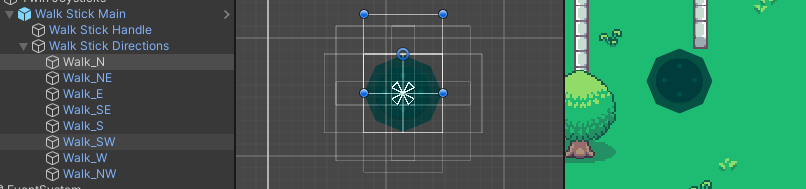
I am in the process of writing the on-screen joystick script for my 2D game. The joystick control itself works just fine - however, I also need to detect which direction out of the 8 main cardinal directions (N, NE, E, SE, etc.) the joystick is pointed towards. To do this, I created 8 empty child objects around the joystick and positioned them at equal distances from the joystick’s anchor reference point:
In the GetClosestDirection() method below, I am attempting to determine which of those 8 objects the joystick’s handle is currently closest to:
using System.Collections;
using System.Collections.Generic;
using UnityEngine;
using UnityEngine.UI;
using UnityEngine.EventSystems;
using System;

public class JoystickController : MonoBehaviour, IDragHandler, IPointerDownHandler, IPointerUpHandler
{
    public float handleRange = 0.1f;

    private Image imgJoystickBg;
    private Image imgJoystick;
    private Vector2 posInput;
    private RectTransform[] directionsList;

    void Start()
    {
        imgJoystickBg = GetComponent<Image>();
        imgJoystick = transform.GetChild(0).GetComponent<Image>();
        directionsList = transform.GetChild(1).GetComponentsInChildren<RectTransform>();
    }

    void FixedUpdate()
    {
        var closestDirection = GetClosestDirection(directionsList);
        Debug.Log(closestDirection);
    }

    public void OnDrag(PointerEventData eventData)
    {

        if (RectTransformUtility.ScreenPointToLocalPointInRectangle(imgJoystickBg.rectTransform, eventData.position, eventData.pressEventCamera, out posInput))
        {
            posInput.x = posInput.x / (imgJoystickBg.rectTransform.sizeDelta.x);
            posInput.y = posInput.y / (imgJoystickBg.rectTransform.sizeDelta.y);

            if (posInput.magnitude > 1.0f)
            {
                posInput = posInput.normalized;
            }

            imgJoystick.rectTransform.anchoredPosition = new Vector2(
                posInput.x * (imgJoystickBg.rectTransform.sizeDelta.x / 2 * handleRange),
                posInput.y * (imgJoystickBg.rectTransform.sizeDelta.y / 2 * handleRange));

        }
    }
    String GetClosestDirection(RectTransform[] directions)
    {
        RectTransform closest = null;
        float smallestDistance = Mathf.Infinity;
        Vector2 currentPos = imgJoystick.rectTransform.anchoredPosition;

        foreach (RectTransform rt in directions)
        {
            if ((Vector2)rt.position != Vector2.zero)
            {
                float distance = Vector2.Distance((Vector2)rt.position, currentPos);
                if (distance < smallestDistance)
                {
                    closest = rt;
                    smallestDistance = distance;
                }
            }
            else if ((Vector2)rt.position == Vector2.zero)
            {
                continue;
            }
        }
        return closest.gameObject.name;
    }
However, when I play the game, I have found Debug.Log() to immediately show only one of these directions - Walk_SW. When dragging the joystick in different directions, the console does not seem to be updating with the new object that the joystick handle is closest to either, it just stays as “Walk_SW”.
using UnityEngine;

public class QuantizeAngles : MonoBehaviour
{
    [Header("How many steps around circle?")]
    public int    NumStepsAroundCircle = 8;

    [Header("Raw - not quantized.")]
    public Transform RawSpinner;
    [Header("Quantized into steps.")]
    public Transform QuantizedSpinner;

    void Update ()
    {
        // get h and v however you like
        float h = Input.GetAxis ("Horizontal");
        float v = Input.GetAxis ("Vertical");

        h = -h;     // invert to match controller orientation

        // only do it if beyond a certain amount
        Vector2 v2 = new Vector2(h, v);
        if (v2.magnitude > 0.1f)
        {
            // get the raw angle, in radians
            float radians = Mathf.Atan2(h, v);

            // up to degrees
            float degrees = radians * Mathf.Rad2Deg;

            // drive the raw spinner
            RawSpinner.rotation = Quaternion.Euler(0, 0, degrees);

            // how big is a pie wedge in degrees?
            float pieWedge = 360.0f / NumStepsAroundCircle;

            // make sure we're positive
            degrees += 360;

            // back up half a pie wedge
            degrees += pieWedge / 2;

            // get a quantized number
            int wedgeNumber = (int)(degrees / pieWedge);

            // expand by original pie to return to degrees
            degrees = wedgeNumber * pieWedge;

            // make sure 0 to 360, just for fun (not necessary really)
            degrees = degrees % 360;

            QuantizedSpinner.rotation = Quaternion.Euler(0, 0, degrees);
        }
    }
}
That produces behaviour very similar to what I’m trying to do but instead of getting the transform to snap to 8 different rotations, I am trying to get the transform to snap to slide along 8 different directional paths
Basically I am trying to get it so that, for example, if I was dragging towards the north-east corner of the joystick, the joystick handle would snap to a diagonal axis, meaning that even if I dragged back closer towards the center of the joystick from this corner, the handle would remain snapped to that axis and could slide back and forward along that diagonal line, until I decided to move the joystick in a different direction, in which case the joystick would then re-snap to a different directional path.
Hm, I think what you describe might be a two-step process:
This would make the input follow the perimeter of an 8-sided stop sign:
normalize the input vector if it is above perhaps 0.1 in size, otherwise zero it out. Perhaps even scale it up again by 2x just to make sure you “get the points” of your octagon border.
now 2D-intersect that vector with all eight (8) of the 45-degree line segments going around the circumference of the octagon border… which ever 2D intersection hits is the one to use for output.

 Thanks