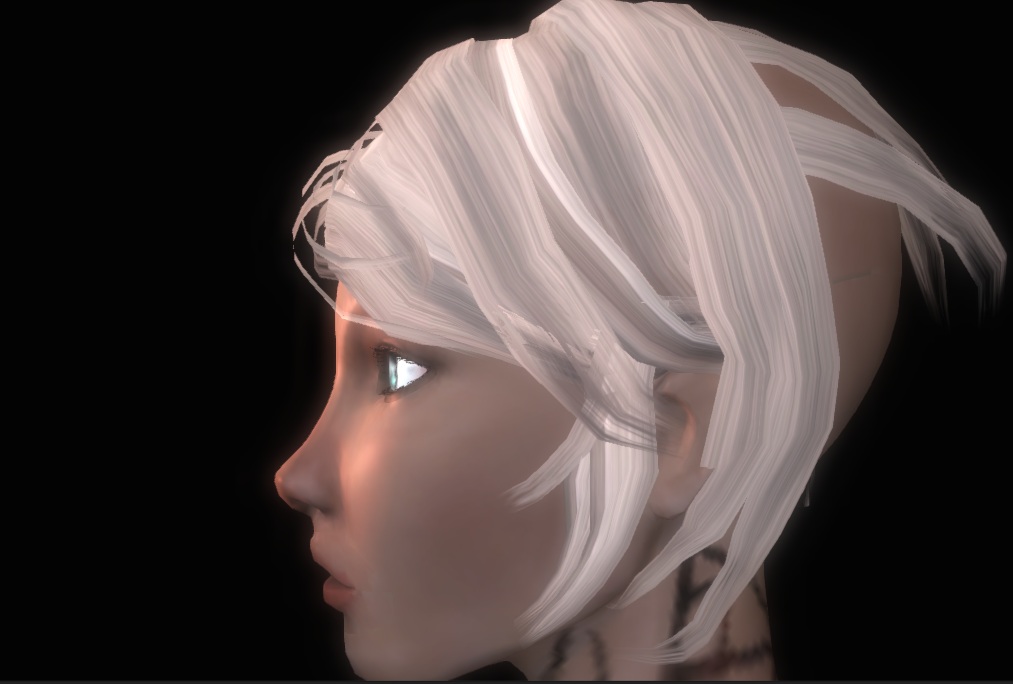
Hey guys. Anyone who’s tried to make alpha blended hair has run into the issues with Zordering, so I’m trying to create a shader for the community that will ease some of the pain.
I’m working on implementing ATI’s Hair Sketch (http://www.shaderwrangler.com/publications/hairsketch/hairsketch.pdf) in Unity’s ShaderLab. I managed to get the sorting correct using just vertex and fragment shaders,
but when I tried to include lighting using Surface Shaders, that’s when I started getting weird problems. I’ve figured out more or less what is happening and here are the observations I have found:
- Lighting is good from certain angles, but once lights are directly pointing at the alpha blended tips, they become completely transparent
- If I use only 1 directional light, this problem does not exist. It’s only with multiple lights.
And here’s some pictures to show what I mean:
Lights are pointed away from the hair, looks pretty good:
Strong spot light pointed directly at alpha blended tips makes them disappear:
Does anyone have any clue why this is happening? I don’t want to just dump my whole shader code in the thread, beacause it seems like most people do that when they are trying to have someone write it for them. I just want insights, but if you’re interested in seeing the code, I’d be happy to post it.
The basic gist of it is this:
4 pass shader,
Pass 1 has these settings:
Name "PrimeZBuffer"
		Tags
		{
			"Queue" = "AlphaTest"
			"IgnoreProjector" = "True"
			"RenderType" = "TransparentCutout"
		}
		Cull Off				// 2 sided hair
		AlphaTest GEqual 1.0	// Only render opaque pixels
		ZWrite On
		ZTest Less
		ColorMask 0				// Disables color buffer writes

		 CGPROGRAM
			#include "CustomLighting.cginc"
			#pragma surface surf KajiyaKayMarschner vertex:vert
			#pragma target 3.0
Pass 2 has these settings:
Name "RenderOpaqueRegions"
        Tags
		{
			"Queue" = "AlphaTest"
			"IgnoreProjector" = "True"
			"RenderType" = "TransparentCutout"
		}
		Cull Off				// 2 sided hair
		AlphaTest GEqual 1.0	// Only render opaque pixels
		ZWrite Off
		ZTest Equal

		CGPROGRAM
			#include "CustomLighting.cginc"
			#pragma surface surf KajiyaKayMarschner alpha vertex:vert
			#pragma target 3.0
Pass 3 has these:
Name "RenderTransparentBackfaces"
        Tags
		{
			"Queue" = "Transparent"
			"IgnoreProjector" = "True"
			"RenderType" = "Transparent"
		}
		Cull Front
		ZWrite Off
		ZTest Less
		Blend SrcAlpha OneMinusSrcAlpha

		CGPROGRAM
			#include "CustomLighting.cginc"
			#pragma surface surf KajiyaKayMarschner alpha vertex:vert
			#pragma target 3.0
And finally Pass 4:
Name "RenderTransparentFrontFaces"
        Tags
		{
			"Queue" = "Transparent+1"
			"IgnoreProjector" = "True"
			"RenderType" = "Transparent"
		}
		Cull Back
		ZWrite On
		ZTest Less
		Blend SrcAlpha OneMinusSrcAlpha

		CGPROGRAM
			#include "CustomLighting.cginc"
			#pragma surface surf KajiyaKayMarschner alpha vertex:vert
			#pragma target 3.0
They all have CGPROGRAMs that run the same surface shader with the lighting model that I’m working on.