Hi, I was wondering if anyone could help me sort out this problem I have trying to render polygon hair. I haven’t got around to creating proper alpha brushing of the hair tips yet so it cuts off sharply at the moment. The hair is modeled with two polygonal layers.
-
I tried using the Transparent-bumpspecular shader first, however as you can see, a lot of alpha artifacting is displaying.
-
With the cutout shader, layering is displaying correctly, except it looks pretty bad due to the alpha aliasing.
-
Finally, the leaf shader looks decent, but it’s got no specular or bump. It’s got an alpha cutoff slider like the cutout shader.
Looking through some of the shader code, I can make out that the leaf shader has a pass which does the cutoff, and a pass that does alpha blending (correct me if I’m wrong).
My question is such: Is it at all possible to add an alpha blend pass to the ‘Transparent/Cutout/Bumped Specular’ so that it looks like the leaf shader (except it has specular and bump)?
I don’t know enough about Unity shader code to pull this off. I’ve fiddled around with trying to add an additional pass to no avail. It’s pretty much just guesswork for me. Would anyone be able to help me out or suggest an alternative solution? Thanks in advance.
The problem you’re seeing with the two transparent shaders is that they do backface culling (like most shaders), which means you get missing geometry. Unfortunately, getting things to look right with a bump map is not as simple as turning off backface culling on one of the transparent shaders. Lighting (especially bump mapping) will look completely wrong with backface culling turned off.
As such, the simplest solution is to double your geometry, making your own backfaces with correct normals, tangents and UV coordinates. Then you can use the Transparent-Bumped shader and the backface culling won’t hurt the image.
Unfortunately, backface culling is not the problem. I already anticipated the need for double sided rendering for hair early on, and like you suggested, doubling the geometry with reversed normals. I posted the earlier screenshots without the secondary reversed faces.
The following screenshot shows double sided geometry, with appropriate normals. Using the backface culling option in Maya viewport renders fine with transparency, but in Unity:
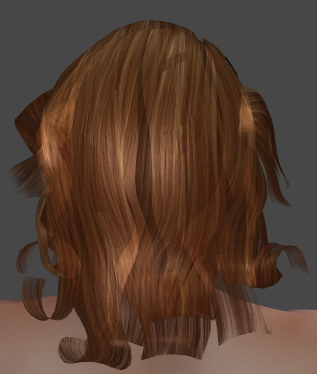
I assumed you were using an OpenGL view in Maya. If you’re raytracing, you’ll get a result with per-pixel sorting. Unfortunately, an OpenGL view will produce sorting problems if you have multiple layers of transparent geometry. If you can separate the outer and inner layers, you might have luck rendering them in the proper order by using a different Material.renderQueue for each layer.
Hmm, thanks a bunch, I’ll have a go at that.
I also tried several ways to generate a decent hair shader, but it didnt come out with any good. Could anyone who have fixed the problem share his experience?
Maybe it’ll work well enough to do what they do on the grass in unity - render a pass first with alpha testing (cutout), then an alpha blended pass on top of that to smooth out the edges against the background.
Edit: I just re-read your original post, and you already suggested this it seems.
