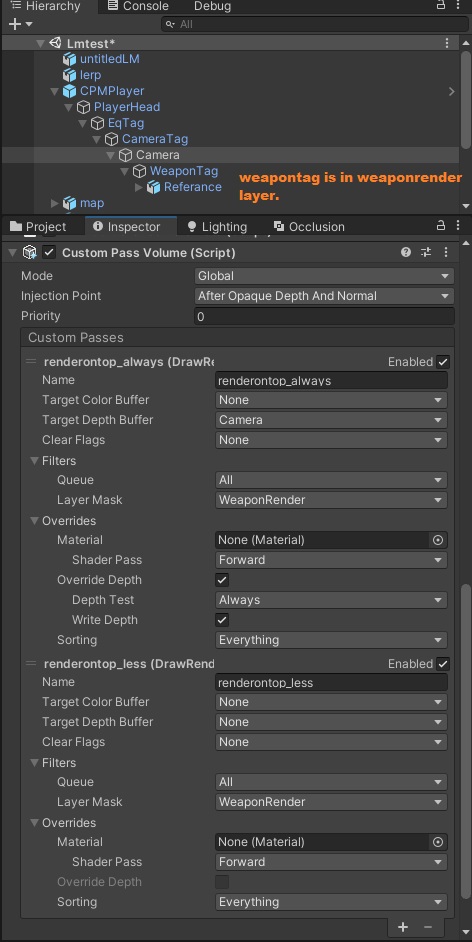
For our game, we are using HDRP version 11. We needed a solution when the objects are in inventory or in examine mode, to be rendered in front of all other objects in the scene to avoid clipping. Since for HDRP using another camera was not a solution, we achieved that with creating Custom Passes. Here is our blog that we wrote for this solution since on the net, there was no any solution for it when HDRP is used: Unity HDRP – Render Object On Top Of Everything – Intetic
Everything worked fine. But now when we enabled Ambient Occlusion, the object that we want still is rendered in front of all other objects, but Ambient Occlusion itself is above this object that is in examine state (that is the point when our Custom Passes are running against that object).
Is it possible somehow to fix this problem? Because it looks like our object is “transparent” since Ambient Occlusion is above it.
I discovered your blog two days ago and with your method I can now use subsurface scattering and custom pass.
I wanted to thank you for this. I also wanted to say that it is problematic for using custom pass in temporalAA.
@CihanGurbuz
well as usual find a way fix one but break others…
gentlepleasingcrocodileskink
Clipping can be avoided, custom FOV, Movecs support.
carefulsarcasticeidolonhelvum
But self shadow projection are broken. . . .
i move away from custom pass at least for now until they add support for motion vector in custompass.
I just use a slight modification of shader from this sample https://discussions.unity.com/t/720014
I modify so it’s also apply scaling on z axis view space. But yeah now it screwed up shadow projection.
This video also a good references but it’s on UE4 though https://www.youtube.com/watch?v=zqfzvHCcvZs
we might need a separate thread to talk about fps viewmodel rendering in HDRP
Ah yes, I’ve seen that before. I have not tried this method neither in unreal nor in unity. Because methods other than the render layer bring their own problems. For example, our weapon will have a muzzleflash and bulletshelleject effect. What will these effects look like when the gun goes into the wall? Problems problems and problems.
I’m on the same boat, can’t find a way to make HDRP work with FPS weapons or items.
Custom Passes = messes the AO/motion vector buffers so it looks terrible
Stacking cameras = with/without the Compositor has terrible performance.
the FPS Sample shader = 3 years old… doesn’t work any longer.
Would be great to have somebody from Unity have some input on this, seems like everybody is having the same issue with FPS weapons in HDRP… since 2018.
I reckon the UFPS asset on the Asset store managed to accomplish the FPS weapon rendering in a performant and bug-free way somehow. Didnt pick it apart to see how it works yet but seemed to work.
I get what you did, but to have SSS shading working correctly in a Draw Renderer Custom Pass, there is another workaround :
Create your skin shader with ShaderGraph, set the Master Node to Transparent BUT set the material that come from this shader as opaque (it is still an option in the material, so np), it’s capital => there are some data that will get some data initialized to make your SSS happend in the custom pass.
for injection point : After opaque and Depth to Before Post Process should work as expected.
Render queue Type : all
Override Depth State box : need to be enable to draw the mesh correctly,
Depth write box : can be checked as and comparison set as less equal for normal sorting, but it can be as you choose it to be
here is a screen shot (I don’t have the exact same GUI as you guys as I have modified my Custom Pass scripts to output into a given RT only using the Samplebuffer material, and I did get rid of the custom Inspector Editor script btw). SSS is working perfectly and Depth too :
cheers, hope it will help some ppl using Lit Subsurface Scattering Shader in a CustomPass
Ah something that may be important, It can be resolved.
Right Click on your Main Color Map property in your ShaderGraph, then set this property to be the Main Texture, It will help the shader to resolve everything accordingly to the baseColor map across each sampler
 I also wanted to say that it is problematic for using custom pass in temporalAA.