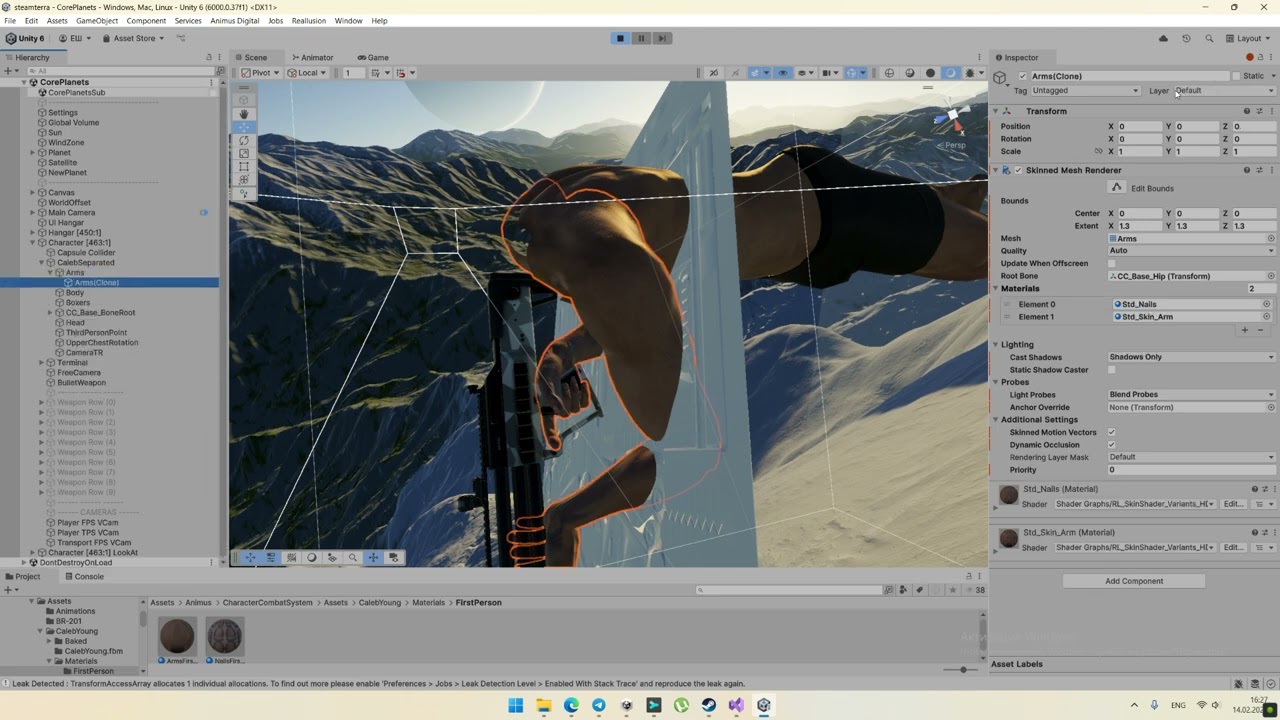
Override camera FOV for arms/gun in first person mode HDRP

Hello everyone!

I found video https://youtu.be/5AmI2yOx0Nc?si=1ydj3UajxiCtb8Xg&t=291 recorded with older version of Unity and HDRP, where arms and gun of first person character are rendered in separate passes with camera FOV override, which allows to have wide field of view for environment and at the same time prevent arms and gun of character from undesired projection distortion.
It Unity 6 (HDRP 17.0.3) there is Custom Pass Volume component with similar settings, but in Overrides foldout there is no ‘Override Camera’ checkbox.

Is it possible to override FOV for character arms and gun in first person mode in Unity 6 without heavy performance impact? (it is possible to use two cameras, but such approach is not very performant)

Hey, the video you linked in an old version of URP, HDRP doesn’t allow to override the camera FOV using the default custom passes.

There are some examples about how to achieve FPS foreground effect in this repository: GitHub - alelievr/HDRP-Custom-Passes: A bunch of custom passes made for HDRP

Thanks for the link, this repository contains useful examples :slightly_smiling_face:
I found FPSForegroundV2 custom pass and wrote similar one, which just renders objects on FirstPerson layer with custom FOV:

using UnityEngine;
using UnityEngine.Rendering.HighDefinition;
using UnityEngine.Rendering;

#if UNITY_EDITOR

using UnityEditor.Rendering.HighDefinition;

[CustomPassDrawer(typeof(FirstPersonPass))]
class FirstPersonPassEditor : CustomPassDrawer
{
    protected override PassUIFlag commonPassUIFlags => PassUIFlag.Name;
}

#endif

class FirstPersonPass : CustomPass
{
    public float        FOV = 45;
    public LayerMask    FirstPersonMask;
    public Camera       FirstPersonCamera;
    protected override bool executeInSceneView => false;

    protected override void AggregateCullingParameters(ref ScriptableCullingParameters cullingParameters, HDCamera hdCamera)
        => cullingParameters.cullingMask |= (uint)FirstPersonMask.value;

    protected override void Execute(CustomPassContext ctx)
    {
        if (FirstPersonCamera == null) return;

        FirstPersonCamera.CopyFrom(ctx.hdCamera.camera);
        FirstPersonCamera.fieldOfView = FOV;
        FirstPersonCamera.cullingMask = FirstPersonMask;

        var overrideDepthState = new RenderStateBlock(RenderStateMask.Depth)
        {
            depthState = new DepthState(true, CompareFunction.LessEqual)
        };

        CoreUtils.SetRenderTarget(ctx.cmd, new RenderTargetIdentifier[] { ctx.cameraColorBuffer, ctx.cameraMotionVectorsBuffer }, ctx.cameraDepthBuffer);
        CustomPassUtils.RenderFromCamera(ctx, FirstPersonCamera, FirstPersonMask, overrideRenderState: overrideDepthState);
    }
}

But I found two issues, the first one is that materials with Subsurface Scattering (like character body and arms) have black color.

The second problem is that objects placed on FirstPerson layer don’t cast shadows. If set Culling Mask to Everything for Main Camera, then shadows will appear, but arms and gun will be rendered twice. If set Cast Shadows to Shadows Only for body SkinnedMeshRenderer and gun MeshRenderer, then shadows will appear, but arms and gun will disappear both for Main Camera and for FirstPersonPass.

Hey, for the shadows and sub-surface scattering these are limitations of the system. What the custom pass is doing is rendering a list of objects at a single point in the pipeline, it’s not being included in all the other passes like regular objects.

If you need sub-surface scattering then the only solution is to use a regular object, you can set the FoV of the object by creating a ShaderGraph that has a custom vertex code that counter the camera matrix and apply a custom one.
This will also work for shadows but it doesn’t prevent wall clipping, if this is also an issue for you then you can make the object smaller and closer to the camera so that it doesn’t clip in the walls but remains the same size on screen. However, this will not work for shadows as well as the object will just be smaller. If you can afford to duplciate the FPS objects and render only the shadows from the main camera with a regular shader and then another one with shadows off and the custom shader it might work (except self-shadowing I think).

Thank you for answer, which confirms my suggestions that there is no approach which will provide custom FOV, Subsurface Scattering support, proper shadow casting and proper arms/gun self-shadowing simultaneously :laughing:

I also tried approach with ShaderGraph with custom function node in vertex stage

#define FIRST_PERSON_FOV 60

void ApplyFirstPersonProjection_float(float3 objectPosition, out float3 projectedObjectPosition) {
    projectedObjectPosition = objectPosition;
    #if SHADERPASS==SHADERPASS_SHADOWS
    return;
	#endif
    float3 viewPosition = TransformWorldToView(TransformObjectToWorld(objectPosition));
    viewPosition.xy *= -rcp(UNITY_MATRIX_P[1][1] * tan(0.5 * FIRST_PERSON_FOV * PI / 180));
    projectedObjectPosition = TransformWorldToObject(mul(UNITY_MATRIX_I_V, float4(viewPosition, 1)).xyz);
}

Then I assigned material with FirstPerson_Projection ShaderGraph to arms and gun of character and in general it preserves individual FOV, casts proper shadows on planet surface, looks properly under water and supports FSR

But arms and gun have incorrect self-shadowing (probably because visible geometry is scaled in vertex stage to preserve first person FOV, but shadow geometry must be unscaled to look propely on environment surfaces)

So if use custom ShaderGraph to preserve first person FOV for arms with gun, then either self-shadowing will be incorrect, or shadow of player character will have incorrect proportions (if scale vertices both for shadow geometry and visible geometry).

Then I tried approach with custom pass, and changed material for character arms so it doesn’t use Subsurface Scattering and in general looks similar to original material

And duplicated body skinned mesh with gun meshes, set Default layer and Shadows Only mode for all copies

So it seems that custom pass is the best possible option, it preserves separate FOV for character arms and gun, it can draw arms and gun on top of environment if needed, it works faster than setup with two cameras, it provides proper shadow casting and arms/gun self-shadowing. The only downside is that it doesn’t support Subsurface scattering, but it is possible to create copy of character’s arms material without Subsurface scattering and switch material when player enters first person mode.

Yes, it seems like a good compromise between all the solutions. I’ll see if I can do something about maybe adding the possibility to render into the SSS buffer from a custom pass. It’ll probably rely on reflection though.

If you can modify the HDRP package in your project, then I can send you a patch to allow this kind of things from custom pass, let me know if you’re interested.

Sure, it will be nice to have Subsurface Scattering support in custom pass, so I will be waiting for a patch :slightly_smiling_face:
Also it will be nice to render shadows from objects on FirstPerson layer without duplication of their Renderers (it will be easier to handle, because in our game character can change equipped gun and can be undressed/dressed in different suits). But as far as I understood, if add CustomPassUtils.DrawRenderers method with overrideMaterialIndex: opaqueMaterial.FindPass(“ShadowCaster”) in FPSForegroundV2 pass, then shadows from objects on FirstPerson layer will not appear.

The changes for shadows are much more involved, it’s using a different call than other passes and doesn’t have any filtering option, not even by layer. I’ll take time before we have a solution for this one.

Here’s the patch for HDRP, it adds a new injection point and internal access to SSS buffers. You can change them to public in your code to simplify the pass.

custom-pass-sss.patch.txt (12.8 KB)

And a small custom pass using the buffers:
RenderWithSubsurfaceScattering.cs (2.5 KB)

Thanks for patch, I will try it later and share with results.
Will this patch appear in the next HDRP update? If it will present in upcoming update, then I think it will be easier to wait until update and use workaround with arms materials without Subsurface Scattering when player enters First Person mode.

I am not sure yet, I’ll tell you when it’s approved and landed

HI,
These days I’m trying to solve the same problem as you. from your videos I see that you use two cameras to have two separate FOVs, which is not a good solution. I recommend using a single camera and applying a shader that modifies the vertices of the weapon.

I personally created the following shader which is perfectly integrated with HDRP/Lit, you just need to change the shaders for each weapon material.

So I modified Character script, which sets FirstPerson layer for respective renderers (arms, gun, etc.) and creates duplicates with Cast Shadows = Shadows Only (also it overrides materials for arms skinned mesh with disabled Subsurface Scattering) when player enters First Person mode. Main Camera has Culling Mask = Everything except FirstPerson, FirstPersonCamera is disabled and needed only for FPSForegroundV2 pass to call CustomPassUtils.RenderFromCamera method.

It works great in Editor

But in Build there are no texture normals on surfaces with HDRP/Lit shader rendered by FPSForegroundV2 pass (but they appear back if switch to Third Person mode and all renderers will be moved to Default layer)

Gun materials use SpecularGraph shader graph, and it displays texture normals as expected both in Editor and Build; if assign HDRP/Lit shader to all first person renderers, then all of them will be rendered without texture normals in build, so it seems that HDRP/Lit shader has some issues in Build when surface is rendered by CustomPassUtils.RenderFromCamera call in custom pass.

It could be a mismatching shader variant, a quick way to check that would be to enable the “Strict shader variant matching” option in the project settings. The gun will appear pink if it isn’t using the correct variant.

If it’s pink, then it’s probably a shader stripping issue which could be solved by forcing both forward and deferred shader to be present in the build (mode “Both” in HDRP asset)

Well, seems like “Strict shader variant matching” and “Lit Shader Mode” settings can resolve texture normals rendering of HDRP/Lit shader, but it is a bit unclear how these settings affect on build.

When I enabled “Strict shader variant matching” and set mode “Both” for all HDRP quality assets,

then in the first build arms with HDRP/Lit were pink and gun was not visible at all (all materials of gun had shader=SpecularGraph and Surface Type=Opaque).

Then I enabled transparency for gun aim lens material, made build again, and normals on arms with HDRP/Lit shader were correct and gun was visible

Then I disabled “Strict shader variant matching” and returned “Lit Shader Mode” back to Deffered Only, made third build, and now everything looks correct

But in fact this build has the same settings as initial build where arms with HDRP/Lit didn’t have visible texutre normals, so it is unevident how it works :smile:

I noticed that if any shader graph with Lit master node doesn’t have Transparent material referenced by scenes in build, then materials with this graph will not be rendered by CustomPassUtils.RenderFromCamera call in custom pass.
So my current workaround for visible texture normals for character’s arms in first person mode is to create separate shader graph (which in fact does the same as HDRP/Lit shader but it renders texture normals properly in build like any other Lit shader graph), create transparent material with this graph and assign reference to this material to serialized array of Character script (which probably provides inclusion of Forward pass of lit shader graph into build).
The solution with setting “Lit Shader Mode” to “Both” looks more elegant, but for some reason it has less reliable behaviour, so I think that I will use current workaround until Unity editor or HDRP update.

Strict variant matching is an option that disables a piece of code in the engine that tries to find the “best” shader variant if it cannot find one that matches exactly the list of keywords currently used, in this case, best means “less broken” and is completely unreliable. Technically strict matching should be enabled everywhere to avoid using shaders that are not intended to be used, but in practice, there are a lot of bugs that this thing fixes :sweat:

If you’re not seeing your model / it’s pink with strict matching enabled, then there is indeed a problem with the keyword setup or shader stripping which can make random things break in the build. Could you share the log of this player? It should contain the errors of which shader it tried to render but failed to find in the build.

The “fix” with option both is that I supposed that you were using deferred only in your project which can cause issues with custom passes that can only render objects in Forward. For example if you build a player using only deferred HDRP assets, then it’ll not compile any forward shader variant, thus breaking the custom passes.

Could you share the log of this player?

Sure, here it is

Player.zip (74.9 KB)

Also I noticed that shadows on character arms and gun are either flickering (with low shadow quality) or have visible stairs/pixels (with high shadow quality).
In this video I use High Fidelity HDRP asset (shadow resolution = 4096, directional shadow filtering quality = High)

Distances for shadow cascades are configured like this (large shadow distance is required to be able to see shadows from planet surface and trees)

I tried to reduce distance of first shadow cascade, but even with distance = 2 units (and high shadow quality) ‘stairs’ and shadow contours jittering are visible on character arms and gun.

Then I found this presentation
Playing with Real-Time Shadows_0.pdf (9.7 MB)

And it seems that proper way for first person arms/weapon self-shadowing is to use per-object shadow maps. Is it possible to configure individual shadow maps for gun and character arms in HDRP?

Okay, so in the log we can see the variants that were missing and I don’t see anything wrong with this keyword configuration so it may be a bug in our system, or the custom keywords in ShaderGraph.

Shader Shader Graphs/PlanetTerrainFabric, subshader 0, pass 3, stage pixel: variant AREA_SHADOW_MEDIUM DECALS_4RT PLANET_LOD_FAR SCREEN_SPACE_SHADOWS_OFF USE_FPTL_LIGHTLIST _DISABLE_SSR _DISABLE_SSR_TRANSPARENT not found.
Shader Shader Graphs/PlanetTerrainFabric, subshader 0, pass 3, stage pixel: variant AREA_SHADOW_MEDIUM DECALS_4RT PLANET_LOD_NEAR SCREEN_SPACE_SHADOWS_OFF USE_FPTL_LIGHTLIST _DISABLE_SSR _DISABLE_SSR_TRANSPARENT not found.
Shader Shader Graphs/PlanetOceanFabric, subshader 0, pass 4, stage pixel: variant AREA_SHADOW_MEDIUM DECALS_4RT PLANET_LOD_FAR SCREEN_SPACE_SHADOWS_OFF USE_FPTL_LIGHTLIST _DISABLE_SSR _DISABLE_SSR_TRANSPARENT _DOUBLESIDED_ON not found.
Shader PlanetScatteringGrassFabric, subshader 0, pass 3, stage pixel: variant AREA_SHADOW_MEDIUM DECALS_4RT PROCEDURAL_INSTANCING_ON SCREEN_SPACE_SHADOWS_OFF USE_FPTL_LIGHTLIST _DISABLE_SSR _DISABLE_SSR_TRANSPARENT _DOUBLESIDED_ON not found.
Shader HDRP/Lit, subshader 0, pass 6, stage vertex: variant _DISABLE_SSR_TRANSPARENT _NORMALMAP not found.
Shader HDRP/Lit, subshader 0, pass 6, stage pixel: variant AREA_SHADOW_MEDIUM DECALS_4RT 
DIRECTIONAL_SHADOW_MEDIUM PUNCTUAL_SHADOW_MEDIUM SCREEN_SPACE_SHADOWS_OFF USE_CLUSTERED_LIGHTLIST _DISABLE_SSR_TRANSPARENT _MASKMAP _NORMALMAP _NORMALMAP_TANGENT_SPACE _THICKNESSMAP not found.

There are also these errors:

Shader 'Shader Graphs/RL_TeethShader_HDRP': fallback shader 'Hidden/Shader Graph/FallbackError' not found
Shader 'Shader Graphs/RL_SkinShader_Variants_HDRP': fallback shader 'Hidden/Shader Graph/FallbackError' not found
Shader 'Shader Graphs/SpecularGraph': fallback shader 'Hidden/Shader Graph/FallbackError' not found
Shader 'Shader Graphs/RL_EyeOcclusionShader_HDRP': fallback shader 'Hidden/Shader Graph/FallbackError' not found

This means that the shader was not supported by the HW and is trying to fall back to the error shader (not included in the build apparently).

If you have time, could you report a bug about this with a repro project?

HDRP doesn’t have a per-object shadow system. For this use case, I’d recommend trying contact shadows as they can add a lot of details for such objects. Additionally, tweaking the PCSS shadow filtering settings (blocker search sample count, ) on the directional light might help.