This screenshot shows a piece of “glass”, which is using the HDRP Lit - Transparent - Iridescence shader. Between the “glass” and the camera, I have some world-space UI elements, and a plain old cube. I have distortion enabled on the glass material, and no matter what I do, it’s causing objects in front of the glass to also be distorted.
you are right that transparent object object in front of distortion are affected by distortion.
Currently distortion is apply at the end of the rendering thus why it apply on everything.
If you want a different behavior you can use refraction, which apply only for current object.
A alternative is to enable distortion on your UI element, that is 0 (i.e don’t do distortion), this will allow to disable the distortion effect for your UI element. We will add an option in future version of HDRP to do that in one click.
Just getting back to this now, and a couple of things:
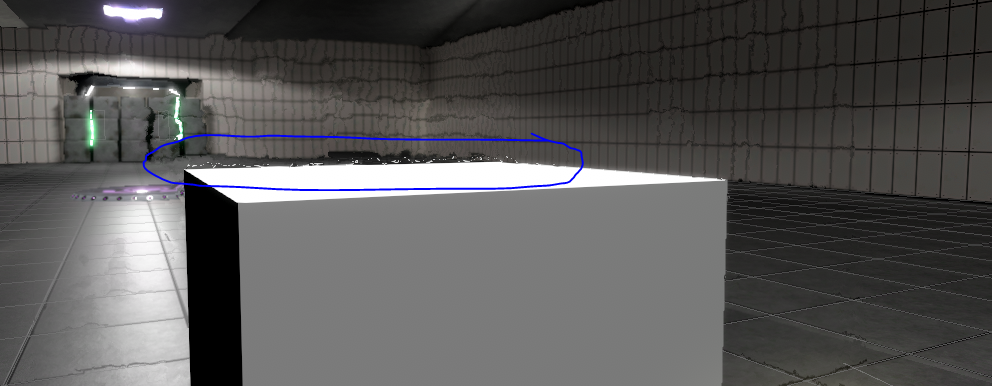
It’s not just transparent objects in front of the distorted object. It’s any object. You can see a cube in this image that is between the camera and the distortion texture. Note that white fuzzy edge along the cube:
That goes away if distortion is reduced. I don’t think that’s correct behavior, as this isn’t a reflective surface, but maybe I just don’t know how this is supposed to work. But it seems like the edges of non-transparent objects in front of distorted objects are getting brought into the distortion.
I tried the second approach, creating a new Unlit HDRP material and setting its distortion to 0, but that doesn’t seem to prevent the image from being distorted. Did you mean something different than the material here:
That’s the limitation of the technique we use. We could improve a bit but at the cost of doing another color pyramid processing (which will cost around 2ms on a PS4 @ 1080p, so don’t worth the cost). We may add this option in the future with a warning about performance.
My suggestion is to use refraction instead of distortion here if you can, which minimize the artifact.
Thanks, Seb. It seems refraction is available only with Subsurface Scatter? (Just want to make sure there wasn’t a different “refraction” I was missing. I’m still on 2018.2 and HDRP 3.)
HDRP 3 is not useful for development, I recommend 4.6 + as HDRP would be having new fixes every release (it’s not more stable using 3 since the whole thing is preview - so sticking with an older version is meaningless until the actual release IMHO)
I’d definitely like to, but unfortunately I’m stuck on 2018.2 until Allegorithmic sorts out their Substance plugin issues, or I lose my patience and give up on Substance in Unity altogether.
I suggest not being bound to a specific version of Unity due to poor 3rd party support. We use substance designer but all the substances are exported to relevant textures ahead of time.
In addition the artefact you mention is common to all renderers I know of, especially with water shaders. It’s because when you distort a render texture you should also compare the fragment depth so that only the relevant pixels are distorted.
It’s a common and easily solved issue with water shaders so you might want to google around that.
Yeah, I’m considering the same approach. I was hoping to avoid that step, but as the weeks pass I get closer to biting the bullet and abandoning procedural textures. sigh
Well, procedural textures are only saving some hard drive space, and how much that is, is debatable as well because of crunch texture compression being really quite good.
Also it’s higher performance to stream in new textures using Unity’s new built in mip streaming technology, that it is to go with procedural changes. I don’t see there being any benefit to procedural textures except for extreme niche cases, in general if you wanted say, a season change, it would still be better to use shader graph and construct something that would blend something (IMHO).
Is the information regarding Refraction in this thread still valid? Specifically, I no longer see a Refraction Model dropdown on any materials. (I’m only just getting back to looking at this while trying to improve the appearance of objects in front of distorted materials). Was Refraction model changed or removed?
Is there any approach yet to achieving a frosted glass look that blurs objects behind it without distorting objects in front of it?
Edit: Nevermind. My problem was that I had “Appear in Refraction” checked, which prevented the material from having Refraction as an option.
Is there any option to use distortion and which won’t affect all objects behind it?
If I use refraction in Lit shader in my canvas (second cam for ui), there are black edges around the screen
It looks like sorting priority doesn’t influence on distortion